
OptimACS Helm Charts
Helm chart repository for OptimACS — an open-source access-point management platform built on the Broadband Forum TR-369 / USP (User Services Platform) standard.
OptimACS provides centralized provisioning, configuration delivery, firmware management, telemetry, and camera management for fleets of OpenWrt-based access points, with a web-based management UI featuring RBAC, multi-tenancy, and real-time GraphQL subscriptions.
Table of Contents
- Architecture
- Components
- Security Architecture
- Add the Helm Repository
- Charts
- Quick Start
- PKI Setup (step-ca)
- Configuration Reference
- Upgrading
- Security Posture
- Chart Source
Architecture
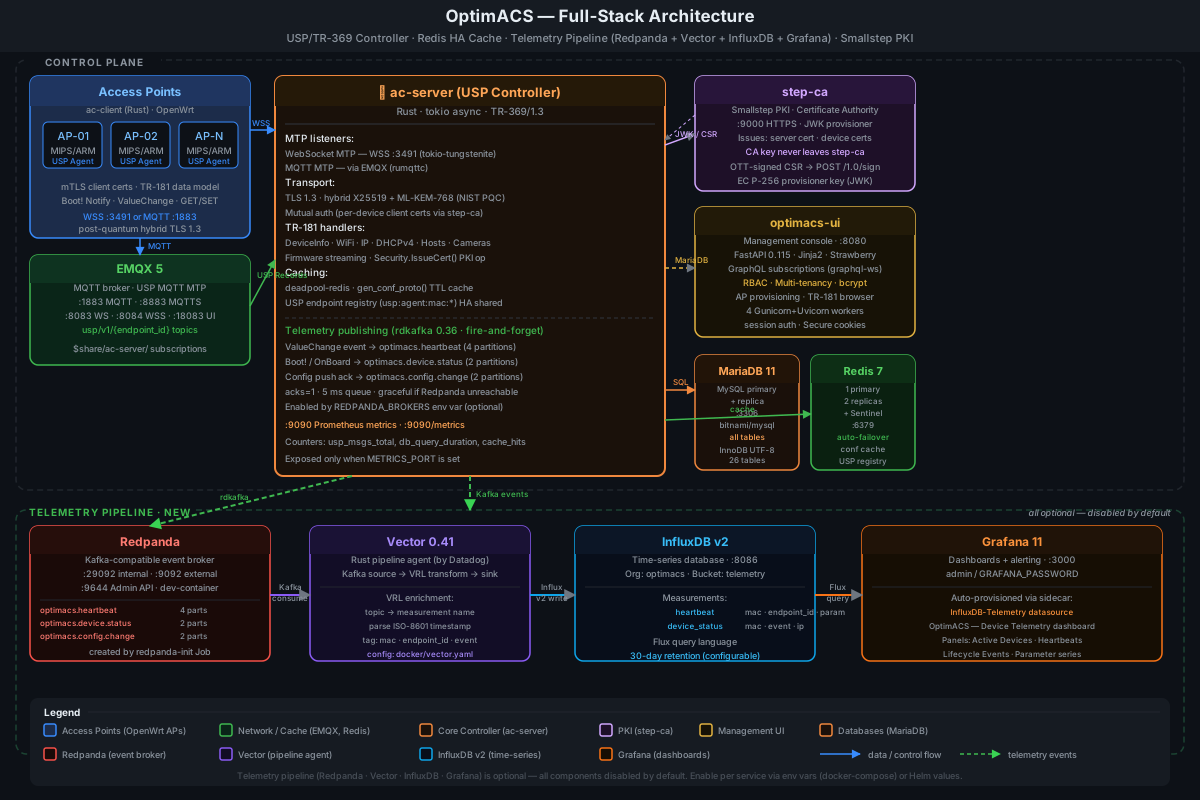
Components
ac-server — Rust async (tokio + rustls) USP Controller. Handles device provisioning, TR-181 GET/SET/OPERATE dispatch, firmware streaming, and telemetry ingestion. Publishes USP events to Redpanda via rdkafka. Delegates all X.509 certificate signing to step-ca via the JWK provisioner REST API. Post-quantum hybrid TLS (X25519 + ML-KEM-768).
step-ca — Smallstep Certificate Authority (PKI). Issues all X.509 certificates in the stack: server TLS cert, per-device client certs, and the init cert. ac-server authenticates CSR signing requests using an EC P-256 JWK provisioner key; the CA private key never leaves the step-ca container.
ac-client — Rust daemon running on each OpenWrt AP. USP Agent: connects via WSS or MQTT, sends Boot! Notify on start, handles incoming GET/SET/OPERATE requests through a UCI-backed TR-181 data model, and sends periodic ValueChange telemetry.
optimacs-ui — FastAPI + Jinja2 management console with Strawberry GraphQL. Real-time dashboard, AP management, USP agent browser, per-device TR-181 editor, RBAC user management, and multi-tenant organization.
EMQX — MQTT 5 broker for the MQTT Message Transport Protocol (MTP). Agents publish USP Records to controller topics; controller subscribes per-agent.
Redpanda (optional) — Kafka-compatible streaming broker (no ZooKeeper). Receives USP events published by ac-server on topics optimacs.heartbeat, optimacs.device.status, and optimacs.config.change.
Vector (optional) — Rust telemetry pipeline agent. Consumes Redpanda topics, enriches events via VRL transforms, and writes measurements to InfluxDB v2.
InfluxDB v2 (optional) — Time-series database for device telemetry. Stores heartbeat, device_status, and telemetry_event measurements.
Grafana (optional) — Dashboards and alerting. Auto-provisioned via ConfigMap sidecar with the InfluxDB-Telemetry datasource and the "OptimACS — Device Telemetry" dashboard.
| Component | Image | Port(s) | Chart key |
|---|---|---|---|
| ac-server | ghcr.io/optim-enterprises-bv/ac-server |
3491 WSS (USP WebSocket MTP) |
(core) |
| optimacs-ui | ghcr.io/optim-enterprises-bv/optimacs-ui |
8080 HTTP |
ui.enabled |
| EMQX | emqx/emqx:5 |
1883 MQTT · 8883 MQTTS · 18083 Dashboard |
emqx.enabled |
| MariaDB/MySQL | bitnami/mysql |
3306 |
mysql.enabled |
| Redis | bitnami/redis |
6379 |
redis.enabled |
| step-ca | smallstep/step-certificates |
9000 HTTPS |
stepca.enabled |
| Redpanda | redpandadata/redpanda |
9092 Kafka · 9644 Admin |
redpanda.enabled |
| Vector | timberio/vector:0.41.1-alpine |
— (internal) | vector.enabled |
| InfluxDB v2 | influxdb:2 |
8086 HTTP |
influxdb2.enabled |
| Grafana | grafana/grafana |
3000 HTTP |
grafana.enabled |
Security Architecture
Transport Security
- TLS 1.3 with mutual authentication on all ac-server connections
- Post-quantum hybrid key exchange: X25519 + ML-KEM-768 (NIST PQC standard, FIPS 203)
- Certificate chain: step-ca root CA → server cert → per-device client certs
- PKI managed by Smallstep step-ca — CA private key stays inside step-ca; ac-server
delegates all certificate signing via the JWK provisioner REST API (
POST /1.0/sign) - ac-server holds only the EC P-256 JWK provisioner key to sign one-time tokens (OTTs)
Certificate Lifecycle
First boot (init cert):
  ap-device uses 00:00:00:00:00:00 cert (init_cn from config)

Provisioning:
  1. Admin approves in UI
  2. Controller sends OPERATE Device.X_OptimACS_Security.IssueCert()
  3. Agent generates CSR, responds with OPERATE_RESP { csr: "..." }
  4. Controller signs OTT with provisioner key → forwards CSR to step-ca
     step-ca issues the certificate → Controller sends SET {CaCert, Cert, Key}
  5. Agent calls apply::save_certs(), reconnects with device cert

Revocation:
  Deleting a device from the UI prevents future connections (cert not in DB)
RBAC Roles
| Role | Level | Capabilities |
|---|---|---|
super_admin |
4 | Full access across all tenants; manage tenants and users |
full_admin |
3 | Full access within own tenant; manage users in own tenant |
ap_admin |
2 | View/configure APs, provision/dismiss devices; no user management |
stats_viewer |
1 | Read-only: dashboard, AP list, logs, USP events |
Add the Helm Repository
helm repo add optimacs https://optim-enterprises-bv.github.io/helm-charts
helm repo update
Charts
| Chart | Version | Description |
|---|---|---|
optimacs/optimacs |
0.6.0 | Full OptimACS stack — ac-server, optimacs-ui, EMQX, MySQL, Redis (cluster), step-ca + optional telemetry pipeline (Redpanda, Vector, InfluxDB v2, Grafana) |
helm search repo optimacs
Quick Start
Production install
# 1. Add repo
helm repo add optimacs https://optim-enterprises-bv.github.io/helm-charts
helm repo update

# 2. Create namespace
kubectl create namespace optimacs

# 3. Create step-ca provisioner key secret (see PKI Setup below)
kubectl create secret generic ac-server-stepca-provisioner \
  --from-file=provisioner.key=/path/to/provisioner.key \
  --namespace optimacs

# 4. Install
helm install optimacs optimacs/optimacs \
  --namespace optimacs \
  --set db.password=<app-db-password> \
  --set mysql.auth.rootPassword=<mysql-root-password> \
  --set ui.secretKey=$(openssl rand -hex 32) \
  --set ui.ingress.enabled=true \
  --set ui.ingress.hostname=optimacs.example.com \
  --set stepca.fingerprint=<root-ca-sha256> \
  --set stepca.kid=<provisioner-kid>
Create the first admin user
kubectl exec -n optimacs \
  $(kubectl get pod -n optimacs -l 'app.kubernetes.io/name=optimacs-ui' -o name | head -1) \
  -- python create_admin.py --username admin --password secret --role super_admin
Standalone / dev install
helm install optimacs optimacs/optimacs \
  --namespace optimacs --create-namespace \
  --set mysql.architecture=standalone \
  --set db.password=dev \
  --set mysql.auth.rootPassword=devroot \
  --set ui.secretKey=devsecret
With telemetry pipeline
Enable the full Redpanda → Vector → InfluxDB v2 → Grafana pipeline:
helm install optimacs optimacs/optimacs \
  --namespace optimacs --create-namespace \
  --set db.password=<pass> \
  --set mysql.auth.rootPassword=<root-pass> \
  --set ui.secretKey=<key> \
  --set redpanda.enabled=true \
  --set influxdb2.enabled=true \
  --set influxdb2.adminUser.token=<influx-token> \
  --set influxdb2.adminUser.password=<influx-password> \
  --set vector.enabled=true \
  --set grafana.enabled=true \
  --set grafana.adminPassword=<grafana-password>
PKI Setup (step-ca)
OptimACS uses Smallstep step-ca as the root of trust for all X.509 certificates. The CA private key never touches ac-server.
Option A — In-cluster step-ca (sub-chart)
Deploy step-ca as part of the Helm release:
helm install optimacs optimacs/optimacs \
  --namespace optimacs --create-namespace \
  --set stepca.enabled=true \
  --set stepca.kid=<provisioner-kid> \
  --set stepca.provisionerPassword=<password> \
  --set db.password=<pass> \
  --set mysql.auth.rootPassword=<root-pass> \
  --set ui.secretKey=<key>
Option B — External step-ca with K8s Secret (recommended for production)
Export the provisioner key from an existing step-ca instance and store it as a K8s Secret:
# Export provisioner key (on the step-ca host)
step ca provisioner list
step crypto jwk format --public-key=false <kid> > provisioner.key

# Create the K8s secret
kubectl create secret generic ac-server-stepca-provisioner \
  --from-file=provisioner.key=./provisioner.key \
  --namespace optimacs

# Install, pointing at your external step-ca
helm install optimacs optimacs/optimacs \
  --namespace optimacs --create-namespace \
  --set stepca.url=https://my-step-ca.example.com:9000 \
  --set stepca.fingerprint=$(step certificate fingerprint root_ca.crt) \
  --set stepca.kid=<provisioner-kid> \
  --set db.password=<pass> \
  --set mysql.auth.rootPassword=<root-pass> \
  --set ui.secretKey=<key>
Optional — pre-provisioned server TLS cert
kubectl create secret generic ac-server-tls \
  --from-file=server.crt=/path/to/server.crt \
  --from-file=server.key=/path/to/server.key \
  --from-file=rootCA.crt=/path/to/rootCA.crt \
  --namespace optimacs
Configuration Reference
ac-server
| Value | Default | Description |
|---|---|---|
image.repository |
ghcr.io/optim-enterprises-bv/ac-server |
Container image |
image.tag |
latest |
Image tag |
replicaCount |
1 |
Replicas (RWX PVCs required for >1) |
config.serverPort |
3490 |
ACP listen port |
config.initCn |
00:00:00:00:00:00 |
Default cert CN for unregistered devices |
config.dbSchema |
generic |
generic or meshconnect |
db.password |
"" |
DB password — required |
tlsSecret.name |
ac-server-tls |
Existing TLS Secret name |
service.type |
LoadBalancer |
LoadBalancer or NodePort |
service.port |
3490 |
USP WebSocket service port |
usp.ws.port |
3491 |
USP WebSocket MTP listen port |
usp.endpointId |
oui:00005A:OptimACS-Controller-1 |
USP Controller endpoint ID |
Management UI
| Value | Default | Description |
|---|---|---|
ui.enabled |
true |
Deploy the web UI |
ui.image.repository |
ghcr.io/optim-enterprises-bv/optimacs-ui |
UI image |
ui.image.tag |
latest |
UI image tag |
ui.secretKey |
"" |
Session signing key — required |
ui.replicaCount |
1 |
UI replicas |
ui.service.type |
ClusterIP |
Service type |
ui.service.port |
8080 |
HTTP port |
ui.ingress.enabled |
false |
Create an Ingress resource |
ui.ingress.className |
"" |
Ingress class (e.g. nginx) |
ui.ingress.hostname |
optimacs.example.com |
Ingress host rule |
step-ca PKI
| Value | Default | Description |
|---|---|---|
stepca.enabled |
false |
Deploy in-cluster step-ca sub-chart |
stepca.url |
"" |
External step-ca API URL |
stepca.fingerprint |
"" |
SHA-256 root CA fingerprint (hex, no colons) |
stepca.kid |
"" |
JWK provisioner key ID |
stepca.keyPem |
"" |
Inline EC P-256 provisioner key PEM (Option C) |
stepca.provisioner.secretName |
ac-server-stepca-provisioner |
K8s Secret with provisioner.key (Option B) |
stepca.provisionerPassword |
"" |
Provisioner JWK password (sub-chart only) |
stepca.skipVerify |
false |
Skip step-ca TLS verification (dev only) |
EMQX MQTT Broker
| Value | Default | Description |
|---|---|---|
emqx.enabled |
true |
Deploy EMQX MQTT broker |
emqx.replicaCount |
1 |
EMQX replicas (≥3 for clustering) |
emqx.service.mqtt |
1883 |
MQTT port |
emqx.service.mqtts |
8883 |
MQTT over TLS port |
emqx.persistence.enabled |
true |
Persist EMQX data |
emqx.persistence.size |
1Gi |
EMQX data volume size |
usp.mqtt.url |
"" |
External MQTT broker URL (overrides auto-set) |
MySQL Cluster
| Value | Default | Description |
|---|---|---|
mysql.enabled |
true |
Deploy the embedded MySQL cluster |
mysql.architecture |
replication |
replication or standalone |
mysql.auth.rootPassword |
"" |
MySQL root password — required |
mysql.auth.database |
laravel |
Application database name |
mysql.auth.username |
acserver |
Application user |
mysql.primary.persistence.size |
20Gi |
Primary data volume |
mysql.secondary.replicaCount |
1 |
Number of read replicas |
Redis Cache
ac-server caches serialised config-proto payloads in Redis with a configurable TTL. A Redis outage degrades gracefully — the server falls back to direct DB queries.
helm install optimacs optimacs/optimacs \
  --set redis.enabled=true \
  --set redis.cacheTtl=300 \
  --set db.password=<pass> \
  --set mysql.auth.rootPassword=<root-pass> \
  --set ui.secretKey=<key>
| Value | Default | Description |
|---|---|---|
redis.enabled |
false |
Deploy Bitnami Redis sub-chart |
redis.url |
"" |
External Redis URL (when redis.enabled=false) |
redis.cacheTtl |
300 |
Cache entry TTL in seconds |
Note
: Redis is required for horizontal scaling (
replicaCount > 1). It acts as a shared endpoint registry so agent MAC addresses are visible across all ac-server replicas.
Telemetry Pipeline
The telemetry pipeline is fully opt-in. All four components can be enabled independently:
helm upgrade optimacs optimacs/optimacs \
  --set redpanda.enabled=true \
  --set influxdb2.enabled=true \
  --set influxdb2.adminUser.token=<token> \
  --set influxdb2.adminUser.password=<password> \
  --set vector.enabled=true \
  --set grafana.enabled=true \
  --set grafana.adminPassword=<password> \
  --set db.password=<pass> \
  --set mysql.auth.rootPassword=<root-pass> \
  --set ui.secretKey=<key>
Redpanda
| Value | Default | Description |
|---|---|---|
redpanda.enabled |
false |
Deploy in-cluster Redpanda sub-chart |
redpanda.externalBrokers |
"" |
External broker address (e.g. broker.example.com:9092) — overrides sub-chart |
When redpanda.enabled=true the chart automatically sets redpanda_brokers in the ac-server config Secret and opens Redpanda egress (9092/9093) in the NetworkPolicy.
InfluxDB v2
| Value | Default | Description |
|---|---|---|
influxdb2.enabled |
false |
Deploy InfluxDB v2 sub-chart |
influxdb2.externalUrl |
"" |
External InfluxDB URL (e.g. https://influx.example.com) |
influxdb2.adminUser.token |
"" |
API token — required |
influxdb2.adminUser.password |
"" |
Admin password — required |
influxdb2.adminUser.organization |
optimacs |
Organisation name |
influxdb2.adminUser.bucket |
telemetry |
Target bucket |
influxdb2.adminUser.retentionPolicy |
30d |
Data retention period |
influxdb2.persistence.enabled |
true |
Persist InfluxDB data |
influxdb2.persistence.size |
10Gi |
PVC size |
Vector
| Value | Default | Description |
|---|---|---|
vector.enabled |
false |
Deploy Vector pipeline (requires Redpanda + InfluxDB both reachable) |
vector.image.repository |
timberio/vector |
Vector image |
vector.image.tag |
0.41.1-alpine |
Vector image tag |
Vector is deployed as a single-replica Deployment. Its vector.yaml ConfigMap is rendered by the Helm chart using optimacs.telemetry.redpanda.brokers and optimacs.telemetry.influxdb.url helpers — no manual URL configuration required.
Grafana
| Value | Default | Description |
|---|---|---|
grafana.enabled |
false |
Deploy Grafana sub-chart with pre-provisioned dashboard |
grafana.adminPassword |
"" |
Grafana admin password — required |
The datasource and dashboard are auto-loaded by the Grafana sidecar container from ConfigMaps labelled grafana_datasource: "1" and grafana_dashboard: "1".
Using an external Redpanda or InfluxDB
# External Redpanda cluster
helm upgrade optimacs optimacs/optimacs \
  --set redpanda.externalBrokers=broker1.example.com:9092 \
  --set influxdb2.enabled=true \
  --set vector.enabled=true \
  ...

# External InfluxDB Cloud
helm upgrade optimacs optimacs/optimacs \
  --set influxdb2.externalUrl=https://us-east-1-1.aws.cloud2.influxdata.com \
  --set influxdb2.adminUser.token=<cloud-token> \
  --set redpanda.enabled=true \
  --set vector.enabled=true \
  ...
Autoscaling (HPA)
helm upgrade optimacs optimacs/optimacs \
  --set autoscaling.enabled=true \
  --set replicaCount=2 \
  --set ui.replicaCount=2 \
  --set redis.enabled=true \
  --set db.password=<pass> \
  --set mysql.auth.rootPassword=<root-pass> \
  --set ui.secretKey=<key>
| Value | Default | Description |
|---|---|---|
autoscaling.enabled |
false |
Enable HPA for ac-server |
autoscaling.minReplicas |
2 |
ac-server minimum replicas |
autoscaling.maxReplicas |
10 |
ac-server maximum replicas |
autoscaling.targetCPUUtilizationPercentage |
70 |
Scale-up CPU threshold |
autoscaling.ui.minReplicas |
2 |
UI minimum replicas |
autoscaling.ui.maxReplicas |
5 |
UI maximum replicas |
Network Policy
When networkPolicy.enabled=true:
- Ingress — only on the declared service ports (3491 WSS for ac-server, 8080 for UI) and the optional metrics port.
- Egress — only to MySQL (3306), Redis (6379), EMQX (1883/8883), step-ca (9000), Redpanda (9092/9093, when
redpanda.enabled=trueorredpanda.externalBrokersis set), and DNS (53). All other egress is blocked.
helm upgrade optimacs optimacs/optimacs \
  --set networkPolicy.enabled=true \
  --set db.password=<pass> \
  --set mysql.auth.rootPassword=<root-pass> \
  --set ui.secretKey=<key>
Prometheus Metrics
When metrics.enabled=true, ac-server exposes a Prometheus scrape endpoint on metrics_port (default 9090).
helm upgrade optimacs optimacs/optimacs \
  --set metrics.enabled=true \
  --set metrics.serviceMonitor.enabled=true \
  --set metrics.serviceMonitor.interval=15s \
  --set db.password=<pass> \
  --set mysql.auth.rootPassword=<root-pass> \
  --set ui.secretKey=<key>
| Value | Default | Description |
|---|---|---|
metrics.enabled |
false |
Expose Prometheus /metrics endpoint |
metrics.port |
9090 |
Metrics listener port |
metrics.serviceMonitor.enabled |
false |
Create ServiceMonitor CRD (Prometheus Operator) |
metrics.serviceMonitor.interval |
30s |
Scrape interval |
Persistent Storage
| Volume | Value key | Mount path | Default size | Purpose |
|---|---|---|---|---|
| client-dir | persistence.clientDir |
/var/ac-server/peers |
1 Gi | Issued client certs |
| fw-dir | persistence.fwDir |
/var/ac-server/firmware |
10 Gi | Firmware images served to APs |
| img-dir | persistence.imgDir |
/var/ac-server/images |
50 Gi | Camera images uploaded by APs |
Note
: Volumes require
ReadWriteManyaccess mode forreplicaCount > 1. Use an RWX-capable storage class (NFS, AWS EFS, Azure Files, GCP Filestore). For single-replica deploymentsReadWriteOncealso works:--set persistence.clientDir.accessMode=ReadWriteOnce
Upgrading
helm repo update
helm upgrade optimacs optimacs/optimacs \
  --set db.password=<pass> \
  --set mysql.auth.rootPassword=<root-pass> \
  --set ui.secretKey=<key> \
  --set image.tag=v1.2.0
Security Posture
| Property | Value |
|---|---|
| TLS version | 1.3 only |
| Key exchange | Hybrid X25519 + ML-KEM-768 (NIST FIPS 203) |
| Mutual auth | Client certificate required (signed by CA) |
| Certificate keys | Ed25519 (server and per-device client certs); CA managed by step-ca |
| PKI authority | Smallstep step-ca — CA private key never touches ac-server pods |
| Container user | UID 1000 (non-root) |
| ac-server root filesystem | Read-only |
| Linux capabilities | All dropped |
| DB password storage | Kubernetes Secret (not ConfigMap) |
| UI session signing key | Kubernetes Secret |
Chart Source
| Branch | Contents | Purpose |
|---|---|---|
main |
charts/optimacs/ source, README |
Development and chart authoring |
gh-pages |
index.yaml, optimacs-*.tgz, .nojekyll |
GitHub Pages — live Helm repo endpoint |
Chart source lives in charts/optimacs/.
Packaged releases and index.yaml are served from the gh-pages branch via GitHub Pages.
Releasing a new chart version
# 1. Bump version in charts/optimacs/Chart.yaml, commit to main
# 2. Package and regenerate index
helm package charts/optimacs --destination /tmp/release
helm repo index /tmp/release \
  --url https://optim-enterprises-bv.github.io/helm-charts \
  --merge gh-pages/index.yaml   # merge with existing index

# 3. Copy artifacts to gh-pages branch and push
git checkout gh-pages
cp /tmp/release/optimacs-<version>.tgz .
cp /tmp/release/index.yaml .
git add optimacs-<version>.tgz index.yaml
git commit -m "release: optimacs <version>"
git push origin gh-pages
git checkout main
Full application documentation, Docker Compose setup, and PKI bootstrap guide: github.com/optim-enterprises-bv/APConfig