Compare commits
77 Commits
docker_upd
...
redis_exte
| Author | SHA1 | Date | |
|---|---|---|---|

|
932720a81a | ||
|
|
49d8ed4a6f | ||
|
|
c7b537e6c7 | ||
|
|
f1cdd2fa46 | ||
|
|
3d5ad02274 | ||
|
|
1cb9f4becf | ||
|
|
0d0dafbe49 | ||
|
|
048d1df2d1 | ||
|
|
4fb4154e30 | ||
|
|
0be69bbccd | ||
|
|
7015a40256 | ||
|
|
03cca642e9 | ||
|
|
579fd3780b | ||
|
|
a85d91c10e | ||
|
|
af31c496a1 | ||
|
|
f9efbaa954 | ||
|
|
d541ec7f20 | ||
|
|
1d847e2c6f | ||
|
|
2fedf4f075 | ||
|
|
e9a02c4c80 | ||
|
|
8beaccdded | ||
|
|
af6003da6d | ||
|
|
76ac2cd013 | ||
|
|
859876e3f8 | ||
|
|
7d49e7fb34 | ||
|
|
6c42ae9077 | ||
|
|
15dcc60407 | ||
|
|
5b811b7003 | ||
|
|
55d670fe3c | ||
|
|
ac3a5e52c7 | ||
|
|
2abe00e251 | ||
|
|
1bd3c29e39 | ||
|
|
1a8087bda7 | ||
|
|
72b4c2b1ec | ||
|
|
38e6820d7b | ||
|
|
765b3a57fe | ||
|
|
1c4a32f8fa | ||
|
|
3f258fcebf | ||
|
|
140f2cbfa8 | ||
|
|
6aacd77492 | ||
|
|
ef3f46f8b7 | ||
|
|
0cdd25d2cf | ||
|
|
5d02ce0636 | ||
|
|
0cd1228ba7 | ||
|
|
0595401d14 | ||
|
|
d724f8cc8e | ||
|
|
a3f5d458d7 | ||
|
|
76bfb130b0 | ||
|
|
184bb78e3b | ||
|
|
6a41af2cb2 | ||
|
|
faa149cc87 | ||
|
|
24592fe480 | ||
|
|
4be53082e0 | ||
|
|
ae8c9c668c | ||
|
|
b0c15af04f | ||
|
|
c05b710aff | ||
|
|
4299c48aef | ||
|
|
ae0523dec0 | ||
|
|
e18a6bda7b | ||
|
|
e64be95f1c | ||
|
|
a1aa0150f8 | ||
|
|
32f9cb5996 | ||
|
|
3b7e692b01 | ||
|
|
6491eba1da | ||
|
|
bb7ea7e809 | ||
|
|
169930e3b8 | ||
|
|
8e14047f36 | ||
|
|
fd29a96f7b | ||
|
|
820c12f230 | ||
|
|
ff3550e7b3 | ||
|
|
b65e43351d | ||
|
|
3fb74b632b | ||
|
|
253e54344d | ||
|
|
f1ee7d24a6 | ||
|
|
475673b3e7 | ||
|
|
dd49afef01 | ||
|
|
d0c842fe87 |
104
README.md
@@ -4,71 +4,101 @@
|
||||
</p>
|
||||
|
||||
<p align="center">
|
||||
<a href="https://flashcat.cloud/docs/">
|
||||
<img alt="GitHub latest release" src="https://img.shields.io/github/v/release/ccfos/nightingale"/>
|
||||
<a href="https://n9e.github.io">
|
||||
<img alt="Docs" src="https://img.shields.io/badge/docs-get%20started-brightgreen"/></a>
|
||||
<a href="https://hub.docker.com/u/flashcatcloud">
|
||||
<img alt="Docker pulls" src="https://img.shields.io/docker/pulls/flashcatcloud/nightingale"/></a>
|
||||
<a href="https://github.com/ccfos/nightingale/graphs/contributors">
|
||||
<img alt="GitHub contributors" src="https://img.shields.io/github/contributors-anon/ccfos/nightingale"/></a>
|
||||
<img alt="GitHub Repo stars" src="https://img.shields.io/github/stars/ccfos/nightingale">
|
||||
<br/><img alt="GitHub Repo issues" src="https://img.shields.io/github/issues/ccfos/nightingale">
|
||||
<img alt="GitHub Repo issues" src="https://img.shields.io/github/issues/ccfos/nightingale">
|
||||
<img alt="GitHub Repo issues closed" src="https://img.shields.io/github/issues-closed/ccfos/nightingale">
|
||||
<img alt="GitHub forks" src="https://img.shields.io/github/forks/ccfos/nightingale">
|
||||
<img alt="GitHub latest release" src="https://img.shields.io/github/v/release/ccfos/nightingale"/>
|
||||
<img alt="License" src="https://img.shields.io/badge/license-Apache--2.0-blue"/>
|
||||
<a href="https://github.com/ccfos/nightingale/graphs/contributors">
|
||||
<img alt="GitHub contributors" src="https://img.shields.io/github/contributors-anon/ccfos/nightingale"/></a>
|
||||
<a href="https://n9e-talk.slack.com/">
|
||||
<img alt="GitHub contributors" src="https://img.shields.io/badge/join%20slack-%23n9e-brightgreen.svg"/></a>
|
||||
<img alt="License" src="https://img.shields.io/badge/license-Apache--2.0-blue"/>
|
||||
</p>
|
||||
|
||||
<p align="center">
|
||||
告警管理专家,一体化的开源可观测平台
|
||||
An open-source cloud-native monitoring system that is <b>all-in-one</b> <br/>
|
||||
<b>Out-of-the-box</b>, it integrates data collection, visualization, and monitoring alert <br/>
|
||||
We recommend upgrading your <b>Prometheus + AlertManager + Grafana</b> combination to Nightingale!
|
||||
</p>
|
||||
|
||||
[English](./README_en.md) | [中文](./README.md)
|
||||
|
||||
夜莺Nightingale是中国计算机学会托管的开源云原生可观测工具,最早由滴滴于 2020 年孵化并开源,并于 2022 年正式捐赠予中国计算机学会。夜莺采用 All-in-One 的设计理念,集数据采集、可视化、监控告警、数据分析于一体,与云原生生态紧密集成,融入了顶级互联网公司可观测性最佳实践,沉淀了众多社区专家经验,开箱即用。
|
||||
|
||||
## 资料
|
||||
|
||||
- 文档:[flashcat.cloud/docs](https://flashcat.cloud/docs/)
|
||||
- 提问:[answer.flashcat.cloud](https://answer.flashcat.cloud/)
|
||||
- 报Bug:[github.com/ccfos/nightingale/issues](https://github.com/ccfos/nightingale/issues/new?assignees=&labels=kind%2Fbug&projects=&template=bug_report.yml)
|
||||
[English](./README.md) | [中文](./README_zh.md)
|
||||
|
||||
|
||||
## 功能和特点
|
||||
## Highlighted Features
|
||||
|
||||
- 统一接入各种时序库:支持对接 Prometheus、VictoriaMetrics、Thanos、Mimir、M3DB 等多种时序库,实现统一告警管理
|
||||
- 专业告警能力:内置支持多种告警规则,可以扩展支持所有通知媒介,支持告警屏蔽、告警抑制、告警自愈、告警事件管理
|
||||
- 高性能可视化引擎:支持多种图表样式,内置众多Dashboard模版,也可导入Grafana模版,开箱即用,开源协议商业友好
|
||||
- 无缝搭配 [Flashduty](https://flashcat.cloud/product/flashcat-duty/):实现告警聚合收敛、认领、升级、排班、IM集成,确保告警处理不遗漏,减少打扰,更好协同
|
||||
- 支持所有常见采集器:支持 [Categraf](https://flashcat.cloud/product/categraf)、telegraf、grafana-agent、datadog-agent、各种 exporter 作为采集器,没有什么数据是不能监控的
|
||||
- 一体化观测平台:从 v6 版本开始,支持接入 ElasticSearch、Jaeger 数据源,实现日志、链路、指标多维度的统一可观测
|
||||
- **Out-of-the-box**
|
||||
- Supports multiple deployment methods such as **Docker, Helm Chart, and cloud services**, integrates data collection, monitoring, and alerting into one system, and comes with various monitoring dashboards, quick views, and alert rule templates. **It greatly reduces the construction cost, learning cost, and usage cost of cloud-native monitoring systems**.
|
||||
- **Professional Alerting**
|
||||
- Provides visual alert configuration and management, supports various alert rules, offers the ability to configure silence and subscription rules, supports multiple alert delivery channels, and has features such as alert self-healing and event management.
|
||||
- **Cloud-Native**
|
||||
- Quickly builds an enterprise-level cloud-native monitoring system through a turnkey approach, supports multiple collectors such as [Categraf](https://github.com/flashcatcloud/categraf), Telegraf, and Grafana-agent, supports multiple data sources such as Prometheus, VictoriaMetrics, M3DB, ElasticSearch, and Jaeger, and is compatible with importing Grafana dashboards. **It seamlessly integrates with the cloud-native ecosystem**.
|
||||
- **High Performance and High Availability**
|
||||
- Due to the multi-data-source management engine of Nightingale and its excellent architecture design, and utilizing a high-performance time-series database, it can handle data collection, storage, and alert analysis scenarios with billions of time-series data, saving a lot of costs.
|
||||
- Nightingale components can be horizontally scaled with no single point of failure. It has been deployed in thousands of enterprises and tested in harsh production practices. Many leading Internet companies have used Nightingale for cluster machines with hundreds of nodes, processing billions of time-series data.
|
||||
- **Flexible Extension and Centralized Management**
|
||||
- Nightingale can be deployed on a 1-core 1G cloud host, deployed in a cluster of hundreds of machines, or run in Kubernetes. Time-series databases, alert engines, and other components can also be decentralized to various data centers and regions, balancing edge deployment with centralized management. **It solves the problem of data fragmentation and lack of unified views**.
|
||||
|
||||
|
||||
## 产品演示
|
||||
#### If you are using Prometheus and have one or more of the following requirement scenarios, it is recommended that you upgrade to Nightingale:
|
||||
|
||||

|
||||
- Multiple systems such as Prometheus, Alertmanager, Grafana, etc. are fragmented and lack a unified view and cannot be used out of the box;
|
||||
- The way to manage Prometheus and Alertmanager by modifying configuration files has a big learning curve and is difficult to collaborate;
|
||||
- Too much data to scale-up your Prometheus cluster;
|
||||
- Multiple Prometheus clusters running in production environments, which faced high management and usage costs;
|
||||
|
||||
## 部署架构
|
||||
#### If you are using Zabbix and have the following scenarios, it is recommended that you upgrade to Nightingale:
|
||||
|
||||

|
||||
- Monitoring too much data and wanting a better scalable solution;
|
||||
- A high learning curve and a desire for better efficiency of collaborative use in a multi-person, multi-team model;
|
||||
- Microservice and cloud-native architectures with variable monitoring data lifecycles and high monitoring data dimension bases, which are not easily adaptable to the Zabbix data model;
|
||||
|
||||
## 加入交流群
|
||||
|
||||
欢迎加入 QQ 交流群,群号:479290895,QQ 群适合群友互助,夜莺研发人员通常不在群里。如果要报 bug 请到[这里](https://github.com/ccfos/nightingale/issues/new?assignees=&labels=kind%2Fbug&projects=&template=bug_report.yml),提问到[这里](https://answer.flashcat.cloud/)。
|
||||
#### If you are using [open-falcon](https://github.com/open-falcon/falcon-plus), we recommend you to upgrade to Nightingale:
|
||||
- For more information about open-falcon and Nightingale, please refer to read [Ten features and trends of cloud-native monitoring](https://mp.weixin.qq.com/s?__biz=MzkzNjI5OTM5Nw==&mid=2247483738&idx=1&sn=e8bdbb974a2cd003c1abcc2b5405dd18&chksm=c2a19fb0f5d616a63185cd79277a79a6b80118ef2185890d0683d2bb20451bd9303c78d083c5#rd)。
|
||||
|
||||
## Getting Started
|
||||
|
||||
[https://n9e.github.io/](https://n9e.github.io/)
|
||||
|
||||
## Screenshots
|
||||
|
||||
https://user-images.githubusercontent.com/792850/216888712-2565fcea-9df5-47bd-a49e-d60af9bd76e8.mp4
|
||||
|
||||
## Architecture
|
||||
|
||||
<img src="doc/img/arch-product.png" width="600">
|
||||
|
||||
Nightingale monitoring can receive monitoring data reported by various collectors (such as [Categraf](https://github.com/flashcatcloud/categraf) , telegraf, grafana-agent, Prometheus, etc.) and write them to various popular time-series databases (such as Prometheus, M3DB, VictoriaMetrics, Thanos, TDEngine, etc.). It provides configuration capabilities for alert rules, silence rules, and subscription rules, as well as the ability to view monitoring data. It also provides automatic alarm self-healing mechanisms (such as automatically calling back to a webhook address or executing a script after an alarm is triggered), and the ability to store and manage historical alarm events and view them in groups.
|
||||
|
||||
If the performance of a standalone time-series database (such as Prometheus) has bottlenecks or poor disaster recovery, we recommend using [VictoriaMetrics](https://github.com/VictoriaMetrics/VictoriaMetrics). The VictoriaMetrics architecture is relatively simple, has excellent performance, and is easy to deploy and maintain. The architecture diagram is as shown above. For more detailed documentation on VictoriaMetrics, please refer to its [official website](https://victoriametrics.com/).
|
||||
|
||||
**We welcome you to participate in the Nightingale open-source project and community in various ways, including but not limited to**:
|
||||
- Adding and improving documentation => [n9e.github.io](https://n9e.github.io/)
|
||||
- Sharing your best practices and experience in using Nightingale monitoring => [Article sharing]((https://n9e.github.io/docs/prologue/share/))
|
||||
- Submitting product suggestions => [github issue](https://github.com/ccfos/nightingale/issues/new?assignees=&labels=kind%2Ffeature&template=enhancement.md)
|
||||
- Submitting code to make Nightingale monitoring faster, more stable, and easier to use => [github pull request](https://github.com/didi/nightingale/pulls)
|
||||
|
||||
|
||||
**Respecting, recognizing, and recording the work of every contributor** is the first guiding principle of the Nightingale open-source community. We advocate effective questioning, which not only respects the developer's time but also contributes to the accumulation of knowledge in the entire community
|
||||
- Before asking a question, please first refer to the [FAQ](https://www.gitlink.org.cn/ccfos/nightingale/wiki/faq)
|
||||
- We use [GitHub Discussions](https://github.com/ccfos/nightingale/discussions) as the communication forum. You can search and ask questions here.
|
||||
- We also recommend that you join ours [Slack channel](https://n9e-talk.slack.com/) to exchange experiences with other Nightingale users.
|
||||
|
||||
|
||||
## Who is using Nightingale
|
||||
You can register your usage and share your experience by posting on **[Who is Using Nightingale](https://github.com/ccfos/nightingale/issues/897)**.
|
||||
|
||||
## Stargazers over time
|
||||
|
||||
[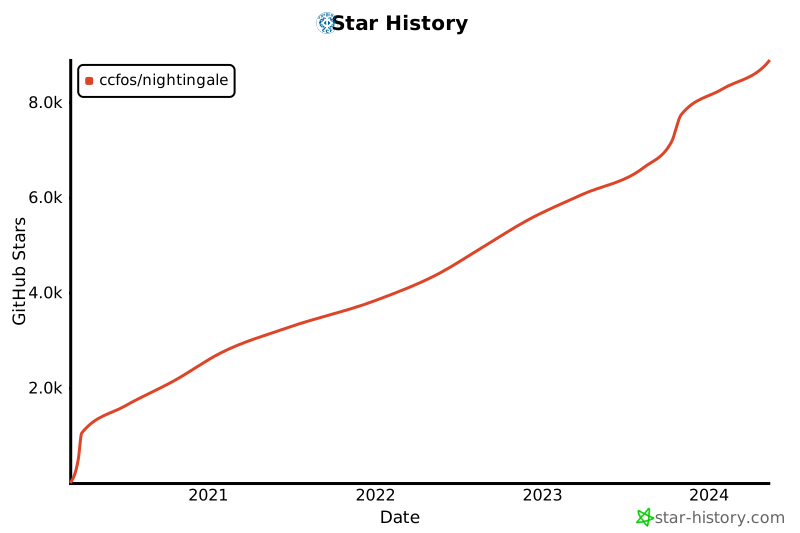](https://star-history.com/#ccfos/nightingale&Date)
|
||||
|
||||
[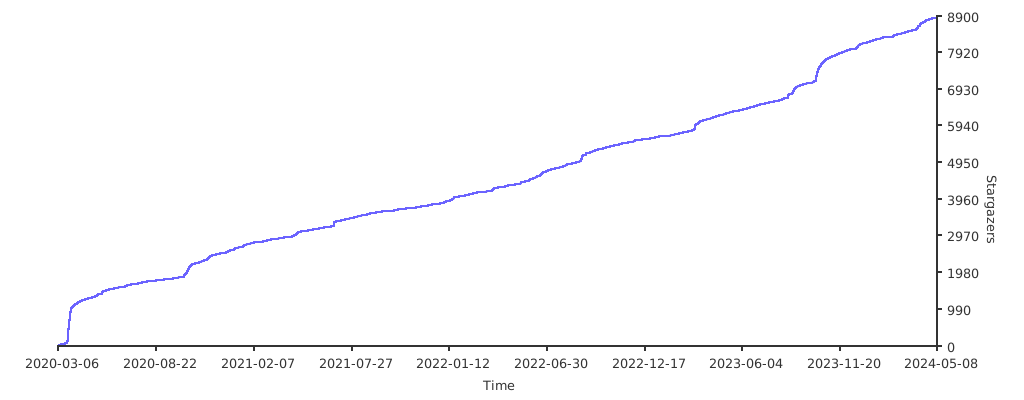](https://starchart.cc/ccfos/nightingale)
|
||||
|
||||
## Contributors
|
||||
<a href="https://github.com/ccfos/nightingale/graphs/contributors">
|
||||
<img src="https://contrib.rocks/image?repo=ccfos/nightingale" />
|
||||
</a>
|
||||
|
||||
## 社区治理
|
||||
[夜莺开源项目和社区治理架构(草案)](./doc/community-governance.md)
|
||||
|
||||
## License
|
||||
[Apache License V2.0](https://github.com/didi/nightingale/blob/main/LICENSE)
|
||||
[Apache License V2.0](https://github.com/didi/nightingale/blob/main/LICENSE)
|
||||
104
README_en.md
@@ -1,104 +0,0 @@
|
||||
<p align="center">
|
||||
<a href="https://github.com/ccfos/nightingale">
|
||||
<img src="doc/img/nightingale_logo_h.png" alt="nightingale - cloud native monitoring" width="240" /></a>
|
||||
</p>
|
||||
|
||||
<p align="center">
|
||||
<img alt="GitHub latest release" src="https://img.shields.io/github/v/release/ccfos/nightingale"/>
|
||||
<a href="https://n9e.github.io">
|
||||
<img alt="Docs" src="https://img.shields.io/badge/docs-get%20started-brightgreen"/></a>
|
||||
<a href="https://hub.docker.com/u/flashcatcloud">
|
||||
<img alt="Docker pulls" src="https://img.shields.io/docker/pulls/flashcatcloud/nightingale"/></a>
|
||||
<img alt="GitHub Repo stars" src="https://img.shields.io/github/stars/ccfos/nightingale">
|
||||
<img alt="GitHub Repo issues" src="https://img.shields.io/github/issues/ccfos/nightingale">
|
||||
<img alt="GitHub Repo issues closed" src="https://img.shields.io/github/issues-closed/ccfos/nightingale">
|
||||
<img alt="GitHub forks" src="https://img.shields.io/github/forks/ccfos/nightingale">
|
||||
<a href="https://github.com/ccfos/nightingale/graphs/contributors">
|
||||
<img alt="GitHub contributors" src="https://img.shields.io/github/contributors-anon/ccfos/nightingale"/></a>
|
||||
<a href="https://n9e-talk.slack.com/">
|
||||
<img alt="GitHub contributors" src="https://img.shields.io/badge/join%20slack-%23n9e-brightgreen.svg"/></a>
|
||||
<img alt="License" src="https://img.shields.io/badge/license-Apache--2.0-blue"/>
|
||||
</p>
|
||||
<p align="center">
|
||||
An open-source cloud-native monitoring system that is <b>all-in-one</b> <br/>
|
||||
<b>Out-of-the-box</b>, it integrates data collection, visualization, and monitoring alert <br/>
|
||||
We recommend upgrading your <b>Prometheus + AlertManager + Grafana</b> combination to Nightingale!
|
||||
</p>
|
||||
|
||||
[English](./README.md) | [中文](./README_ZH.md)
|
||||
|
||||
|
||||
## Highlighted Features
|
||||
|
||||
- **Out-of-the-box**
|
||||
- Supports multiple deployment methods such as **Docker, Helm Chart, and cloud services**, integrates data collection, monitoring, and alerting into one system, and comes with various monitoring dashboards, quick views, and alert rule templates. **It greatly reduces the construction cost, learning cost, and usage cost of cloud-native monitoring systems**.
|
||||
- **Professional Alerting**
|
||||
- Provides visual alert configuration and management, supports various alert rules, offers the ability to configure silence and subscription rules, supports multiple alert delivery channels, and has features such as alert self-healing and event management.
|
||||
- **Cloud-Native**
|
||||
- Quickly builds an enterprise-level cloud-native monitoring system through a turnkey approach, supports multiple collectors such as [Categraf](https://github.com/flashcatcloud/categraf), Telegraf, and Grafana-agent, supports multiple data sources such as Prometheus, VictoriaMetrics, M3DB, ElasticSearch, and Jaeger, and is compatible with importing Grafana dashboards. **It seamlessly integrates with the cloud-native ecosystem**.
|
||||
- **High Performance and High Availability**
|
||||
- Due to the multi-data-source management engine of Nightingale and its excellent architecture design, and utilizing a high-performance time-series database, it can handle data collection, storage, and alert analysis scenarios with billions of time-series data, saving a lot of costs.
|
||||
- Nightingale components can be horizontally scaled with no single point of failure. It has been deployed in thousands of enterprises and tested in harsh production practices. Many leading Internet companies have used Nightingale for cluster machines with hundreds of nodes, processing billions of time-series data.
|
||||
- **Flexible Extension and Centralized Management**
|
||||
- Nightingale can be deployed on a 1-core 1G cloud host, deployed in a cluster of hundreds of machines, or run in Kubernetes. Time-series databases, alert engines, and other components can also be decentralized to various data centers and regions, balancing edge deployment with centralized management. **It solves the problem of data fragmentation and lack of unified views**.
|
||||
|
||||
|
||||
#### If you are using Prometheus and have one or more of the following requirement scenarios, it is recommended that you upgrade to Nightingale:
|
||||
|
||||
- Multiple systems such as Prometheus, Alertmanager, Grafana, etc. are fragmented and lack a unified view and cannot be used out of the box;
|
||||
- The way to manage Prometheus and Alertmanager by modifying configuration files has a big learning curve and is difficult to collaborate;
|
||||
- Too much data to scale-up your Prometheus cluster;
|
||||
- Multiple Prometheus clusters running in production environments, which faced high management and usage costs;
|
||||
|
||||
#### If you are using Zabbix and have the following scenarios, it is recommended that you upgrade to Nightingale:
|
||||
|
||||
- Monitoring too much data and wanting a better scalable solution;
|
||||
- A high learning curve and a desire for better efficiency of collaborative use in a multi-person, multi-team model;
|
||||
- Microservice and cloud-native architectures with variable monitoring data lifecycles and high monitoring data dimension bases, which are not easily adaptable to the Zabbix data model;
|
||||
|
||||
|
||||
#### If you are using [open-falcon](https://github.com/open-falcon/falcon-plus), we recommend you to upgrade to Nightingale:
|
||||
- For more information about open-falcon and Nightingale, please refer to read [Ten features and trends of cloud-native monitoring](https://mp.weixin.qq.com/s?__biz=MzkzNjI5OTM5Nw==&mid=2247483738&idx=1&sn=e8bdbb974a2cd003c1abcc2b5405dd18&chksm=c2a19fb0f5d616a63185cd79277a79a6b80118ef2185890d0683d2bb20451bd9303c78d083c5#rd)。
|
||||
|
||||
## Getting Started
|
||||
|
||||
[English Doc](https://n9e.github.io/) | [中文文档](http://n9e.flashcat.cloud/)
|
||||
|
||||
## Screenshots
|
||||
|
||||
https://user-images.githubusercontent.com/792850/216888712-2565fcea-9df5-47bd-a49e-d60af9bd76e8.mp4
|
||||
|
||||
## Architecture
|
||||
|
||||
<img src="doc/img/arch-product.png" width="600">
|
||||
|
||||
Nightingale monitoring can receive monitoring data reported by various collectors (such as [Categraf](https://github.com/flashcatcloud/categraf) , telegraf, grafana-agent, Prometheus, etc.) and write them to various popular time-series databases (such as Prometheus, M3DB, VictoriaMetrics, Thanos, TDEngine, etc.). It provides configuration capabilities for alert rules, silence rules, and subscription rules, as well as the ability to view monitoring data. It also provides automatic alarm self-healing mechanisms (such as automatically calling back to a webhook address or executing a script after an alarm is triggered), and the ability to store and manage historical alarm events and view them in groups.
|
||||
|
||||
If the performance of a standalone time-series database (such as Prometheus) has bottlenecks or poor disaster recovery, we recommend using [VictoriaMetrics](https://github.com/VictoriaMetrics/VictoriaMetrics). The VictoriaMetrics architecture is relatively simple, has excellent performance, and is easy to deploy and maintain. The architecture diagram is as shown above. For more detailed documentation on VictoriaMetrics, please refer to its [official website](https://victoriametrics.com/).
|
||||
|
||||
**We welcome you to participate in the Nightingale open-source project and community in various ways, including but not limited to**:
|
||||
- Adding and improving documentation => [n9e.github.io](https://n9e.github.io/)
|
||||
- Sharing your best practices and experience in using Nightingale monitoring => [Article sharing]((https://n9e.github.io/docs/prologue/share/))
|
||||
- Submitting product suggestions => [github issue](https://github.com/ccfos/nightingale/issues/new?assignees=&labels=kind%2Ffeature&template=enhancement.md)
|
||||
- Submitting code to make Nightingale monitoring faster, more stable, and easier to use => [github pull request](https://github.com/didi/nightingale/pulls)
|
||||
|
||||
|
||||
**Respecting, recognizing, and recording the work of every contributor** is the first guiding principle of the Nightingale open-source community. We advocate effective questioning, which not only respects the developer's time but also contributes to the accumulation of knowledge in the entire community
|
||||
- Before asking a question, please first refer to the [FAQ](https://www.gitlink.org.cn/ccfos/nightingale/wiki/faq)
|
||||
- We use [GitHub Discussions](https://github.com/ccfos/nightingale/discussions) as the communication forum. You can search and ask questions here.
|
||||
- We also recommend that you join ours [Slack channel](https://n9e-talk.slack.com/) to exchange experiences with other Nightingale users.
|
||||
|
||||
|
||||
## Who is using Nightingale
|
||||
You can register your usage and share your experience by posting on **[Who is Using Nightingale](https://github.com/ccfos/nightingale/issues/897)**.
|
||||
|
||||
## Stargazers over time
|
||||
[](https://starchart.cc/ccfos/nightingale)
|
||||
|
||||
## Contributors
|
||||
<a href="https://github.com/ccfos/nightingale/graphs/contributors">
|
||||
<img src="https://contrib.rocks/image?repo=ccfos/nightingale" />
|
||||
</a>
|
||||
|
||||
## License
|
||||
[Apache License V2.0](https://github.com/didi/nightingale/blob/main/LICENSE)
|
||||
74
README_zh.md
Normal file
@@ -0,0 +1,74 @@
|
||||
<p align="center">
|
||||
<a href="https://github.com/ccfos/nightingale">
|
||||
<img src="doc/img/nightingale_logo_h.png" alt="nightingale - cloud native monitoring" width="240" /></a>
|
||||
</p>
|
||||
|
||||
<p align="center">
|
||||
<a href="https://flashcat.cloud/docs/">
|
||||
<img alt="Docs" src="https://img.shields.io/badge/docs-get%20started-brightgreen"/></a>
|
||||
<a href="https://hub.docker.com/u/flashcatcloud">
|
||||
<img alt="Docker pulls" src="https://img.shields.io/docker/pulls/flashcatcloud/nightingale"/></a>
|
||||
<a href="https://github.com/ccfos/nightingale/graphs/contributors">
|
||||
<img alt="GitHub contributors" src="https://img.shields.io/github/contributors-anon/ccfos/nightingale"/></a>
|
||||
<img alt="GitHub Repo stars" src="https://img.shields.io/github/stars/ccfos/nightingale">
|
||||
<br/><img alt="GitHub Repo issues" src="https://img.shields.io/github/issues/ccfos/nightingale">
|
||||
<img alt="GitHub Repo issues closed" src="https://img.shields.io/github/issues-closed/ccfos/nightingale">
|
||||
<img alt="GitHub forks" src="https://img.shields.io/github/forks/ccfos/nightingale">
|
||||
<img alt="GitHub latest release" src="https://img.shields.io/github/v/release/ccfos/nightingale"/>
|
||||
<img alt="License" src="https://img.shields.io/badge/license-Apache--2.0-blue"/>
|
||||
<a href="https://n9e-talk.slack.com/">
|
||||
<img alt="GitHub contributors" src="https://img.shields.io/badge/join%20slack-%23n9e-brightgreen.svg"/></a>
|
||||
</p>
|
||||
|
||||
<p align="center">
|
||||
告警管理专家,一体化的开源可观测平台
|
||||
</p>
|
||||
|
||||
[English](./README.md) | [中文](./README_zh.md)
|
||||
|
||||
夜莺Nightingale是中国计算机学会托管的开源云原生可观测工具,最早由滴滴于 2020 年孵化并开源,并于 2022 年正式捐赠予中国计算机学会。夜莺采用 All-in-One 的设计理念,集数据采集、可视化、监控告警、数据分析于一体,与云原生生态紧密集成,融入了顶级互联网公司可观测性最佳实践,沉淀了众多社区专家经验,开箱即用。
|
||||
|
||||
## 资料
|
||||
|
||||
- 文档:[flashcat.cloud/docs](https://flashcat.cloud/docs/)
|
||||
- 提问:[answer.flashcat.cloud](https://answer.flashcat.cloud/)
|
||||
- 报Bug:[github.com/ccfos/nightingale/issues](https://github.com/ccfos/nightingale/issues/new?assignees=&labels=kind%2Fbug&projects=&template=bug_report.yml)
|
||||
|
||||
|
||||
## 功能和特点
|
||||
|
||||
- 统一接入各种时序库:支持对接 Prometheus、VictoriaMetrics、Thanos、Mimir、M3DB 等多种时序库,实现统一告警管理
|
||||
- 专业告警能力:内置支持多种告警规则,可以扩展支持所有通知媒介,支持告警屏蔽、告警抑制、告警自愈、告警事件管理
|
||||
- 高性能可视化引擎:支持多种图表样式,内置众多Dashboard模版,也可导入Grafana模版,开箱即用,开源协议商业友好
|
||||
- 无缝搭配 [Flashduty](https://flashcat.cloud/product/flashcat-duty/):实现告警聚合收敛、认领、升级、排班、IM集成,确保告警处理不遗漏,减少打扰,更好协同
|
||||
- 支持所有常见采集器:支持 [Categraf](https://flashcat.cloud/product/categraf)、telegraf、grafana-agent、datadog-agent、各种 exporter 作为采集器,没有什么数据是不能监控的
|
||||
- 一体化观测平台:从 v6 版本开始,支持接入 ElasticSearch、Jaeger 数据源,实现日志、链路、指标多维度的统一可观测
|
||||
|
||||
|
||||
## 产品演示
|
||||
|
||||

|
||||
|
||||
## 部署架构
|
||||
|
||||

|
||||
|
||||
## 加入交流群
|
||||
|
||||
欢迎加入 QQ 交流群,群号:479290895,QQ 群适合群友互助,夜莺研发人员通常不在群里。如果要报 bug 请到[这里](https://github.com/ccfos/nightingale/issues/new?assignees=&labels=kind%2Fbug&projects=&template=bug_report.yml),提问到[这里](https://answer.flashcat.cloud/)。
|
||||
|
||||
## Stargazers over time
|
||||
|
||||
[](https://star-history.com/#ccfos/nightingale&Date)
|
||||
|
||||
|
||||
## Contributors
|
||||
<a href="https://github.com/ccfos/nightingale/graphs/contributors">
|
||||
<img src="https://contrib.rocks/image?repo=ccfos/nightingale" />
|
||||
</a>
|
||||
|
||||
## 社区治理
|
||||
[夜莺开源项目和社区治理架构(草案)](./doc/community-governance.md)
|
||||
|
||||
## License
|
||||
[Apache License V2.0](https://github.com/didi/nightingale/blob/main/LICENSE)
|
||||
@@ -2,8 +2,6 @@ package aconf
|
||||
|
||||
import (
|
||||
"path"
|
||||
|
||||
"github.com/toolkits/pkg/runner"
|
||||
)
|
||||
|
||||
type Alert struct {
|
||||
@@ -55,9 +53,9 @@ type Ibex struct {
|
||||
Timeout int64
|
||||
}
|
||||
|
||||
func (a *Alert) PreCheck() {
|
||||
func (a *Alert) PreCheck(configDir string) {
|
||||
if a.Alerting.TemplatesDir == "" {
|
||||
a.Alerting.TemplatesDir = path.Join(runner.Cwd, "etc", "template")
|
||||
a.Alerting.TemplatesDir = path.Join(configDir, "template")
|
||||
}
|
||||
|
||||
if a.Alerting.NotifyConcurrency == 0 {
|
||||
|
||||
@@ -22,6 +22,14 @@ func MatchTags(eventTagsMap map[string]string, itags []models.TagFilter) bool {
|
||||
}
|
||||
return true
|
||||
}
|
||||
func MatchGroupsName(groupName string, groupFilter []models.TagFilter) bool {
|
||||
for _, filter := range groupFilter {
|
||||
if !matchTag(groupName, filter) {
|
||||
return false
|
||||
}
|
||||
}
|
||||
return true
|
||||
}
|
||||
|
||||
func matchTag(value string, filter models.TagFilter) bool {
|
||||
switch filter.Func {
|
||||
|
||||
@@ -95,8 +95,8 @@ func (e *Dispatch) relaodTpls() error {
|
||||
}
|
||||
|
||||
e.RwLock.RLock()
|
||||
for channel, sender := range e.ExtraSenders {
|
||||
senders[channel] = sender
|
||||
for channelName, extraSender := range e.ExtraSenders {
|
||||
senders[channelName] = extraSender
|
||||
}
|
||||
e.RwLock.RUnlock()
|
||||
|
||||
@@ -170,12 +170,25 @@ func (e *Dispatch) handleSubs(event *models.AlertCurEvent) {
|
||||
|
||||
// handleSub 处理订阅规则的event,注意这里event要使用值传递,因为后面会修改event的状态
|
||||
func (e *Dispatch) handleSub(sub *models.AlertSubscribe, event models.AlertCurEvent) {
|
||||
if sub.IsDisabled() || !sub.MatchCluster(event.DatasourceId) {
|
||||
if sub.IsDisabled() {
|
||||
return
|
||||
}
|
||||
|
||||
if !sub.MatchCluster(event.DatasourceId) {
|
||||
return
|
||||
}
|
||||
|
||||
if !sub.MatchProd(event.RuleProd) {
|
||||
return
|
||||
}
|
||||
|
||||
if !common.MatchTags(event.TagsMap, sub.ITags) {
|
||||
return
|
||||
}
|
||||
// event BusiGroups filter
|
||||
if !common.MatchGroupsName(event.GroupName, sub.IBusiGroups) {
|
||||
return
|
||||
}
|
||||
if sub.ForDuration > (event.TriggerTime - event.FirstTriggerTime) {
|
||||
return
|
||||
}
|
||||
@@ -204,7 +217,7 @@ func (e *Dispatch) Send(rule *models.AlertRule, event *models.AlertCurEvent, not
|
||||
needSend := e.BeforeSenderHook(event)
|
||||
if needSend {
|
||||
for channel, uids := range notifyTarget.ToChannelUserMap() {
|
||||
ctx := sender.BuildMessageContext(rule, []*models.AlertCurEvent{event}, uids, e.userCache)
|
||||
msgCtx := sender.BuildMessageContext(rule, []*models.AlertCurEvent{event}, uids, e.userCache)
|
||||
e.RwLock.RLock()
|
||||
s := e.Senders[channel]
|
||||
e.RwLock.RUnlock()
|
||||
@@ -212,7 +225,7 @@ func (e *Dispatch) Send(rule *models.AlertRule, event *models.AlertCurEvent, not
|
||||
logger.Debugf("no sender for channel: %s", channel)
|
||||
continue
|
||||
}
|
||||
s.Send(ctx)
|
||||
s.Send(msgCtx)
|
||||
}
|
||||
}
|
||||
|
||||
|
||||
@@ -85,6 +85,10 @@ func (s *Scheduler) syncAlertRules() {
|
||||
if rule == nil {
|
||||
continue
|
||||
}
|
||||
// 同步rule到Scheduler时,未生效的rule应该直接drop,减少对时序数据库查询次数
|
||||
if rule.TimeSpanMuteStrategy() {
|
||||
continue
|
||||
}
|
||||
if rule.IsPrometheusRule() {
|
||||
datasourceIds := s.promClients.Hit(rule.DatasourceIdsJson)
|
||||
for _, dsId := range datasourceIds {
|
||||
|
||||
@@ -17,9 +17,10 @@ func IsMuted(rule *models.AlertRule, event *models.AlertCurEvent, targetCache *m
|
||||
return true
|
||||
}
|
||||
|
||||
if TimeSpanMuteStrategy(rule, event) {
|
||||
return true
|
||||
}
|
||||
// 移到Sync Rule之前就判断
|
||||
// if TimeSpanMuteStrategy(rule, event) {
|
||||
// return true
|
||||
// }
|
||||
|
||||
if IdentNotExistsMuteStrategy(rule, event, targetCache) {
|
||||
return true
|
||||
@@ -36,53 +37,6 @@ func IsMuted(rule *models.AlertRule, event *models.AlertCurEvent, targetCache *m
|
||||
return false
|
||||
}
|
||||
|
||||
// TimeSpanMuteStrategy 根据规则配置的告警生效时间段过滤,如果产生的告警不在规则配置的告警生效时间段内,则不告警,即被mute
|
||||
// 时间范围,左闭右开,默认范围:00:00-24:00
|
||||
func TimeSpanMuteStrategy(rule *models.AlertRule, event *models.AlertCurEvent) bool {
|
||||
tm := time.Unix(event.TriggerTime, 0)
|
||||
triggerTime := tm.Format("15:04")
|
||||
triggerWeek := strconv.Itoa(int(tm.Weekday()))
|
||||
|
||||
enableStime := strings.Fields(rule.EnableStime)
|
||||
enableEtime := strings.Fields(rule.EnableEtime)
|
||||
enableDaysOfWeek := strings.Split(rule.EnableDaysOfWeek, ";")
|
||||
length := len(enableDaysOfWeek)
|
||||
// enableStime,enableEtime,enableDaysOfWeek三者长度肯定相同,这里循环一个即可
|
||||
for i := 0; i < length; i++ {
|
||||
enableDaysOfWeek[i] = strings.Replace(enableDaysOfWeek[i], "7", "0", 1)
|
||||
if !strings.Contains(enableDaysOfWeek[i], triggerWeek) {
|
||||
continue
|
||||
}
|
||||
|
||||
if enableStime[i] < enableEtime[i] {
|
||||
if enableEtime[i] == "23:59" {
|
||||
// 02:00-23:59,这种情况做个特殊处理,相当于左闭右闭区间了
|
||||
if triggerTime < enableStime[i] {
|
||||
// mute, 即没生效
|
||||
continue
|
||||
}
|
||||
} else {
|
||||
// 02:00-04:00 或者 02:00-24:00
|
||||
if triggerTime < enableStime[i] || triggerTime >= enableEtime[i] {
|
||||
// mute, 即没生效
|
||||
continue
|
||||
}
|
||||
}
|
||||
} else if enableStime[i] > enableEtime[i] {
|
||||
// 21:00-09:00
|
||||
if triggerTime < enableStime[i] && triggerTime >= enableEtime[i] {
|
||||
// mute, 即没生效
|
||||
continue
|
||||
}
|
||||
}
|
||||
|
||||
// 到这里说明当前时刻在告警规则的某组生效时间范围内,即没有 mute,直接返回 false
|
||||
return false
|
||||
}
|
||||
|
||||
return true
|
||||
}
|
||||
|
||||
// IdentNotExistsMuteStrategy 根据ident是否存在过滤,如果ident不存在,则target_up的告警直接过滤掉
|
||||
func IdentNotExistsMuteStrategy(rule *models.AlertRule, event *models.AlertCurEvent, targetCache *memsto.TargetCacheType) bool {
|
||||
ident, has := event.TagsMap["ident"]
|
||||
|
||||
@@ -92,7 +92,7 @@ func handleIbex(ctx *ctx.Context, url string, event *models.AlertCurEvent, targe
|
||||
return
|
||||
}
|
||||
|
||||
tpl, err := models.TaskTplGet(ctx, "id = ?", id)
|
||||
tpl, err := models.TaskTplGetById(ctx, id)
|
||||
if err != nil {
|
||||
logger.Errorf("event_callback_ibex: failed to get tpl: %v", err)
|
||||
return
|
||||
|
||||
@@ -81,7 +81,7 @@ func (ds *DingtalkSender) extract(users []*models.User) ([]string, []string) {
|
||||
}
|
||||
if token, has := user.ExtractToken(models.Dingtalk); has {
|
||||
url := token
|
||||
if !strings.HasPrefix(token, "https://") {
|
||||
if !strings.HasPrefix(token, "https://") && !strings.HasPrefix(token, "http://") {
|
||||
url = "https://oapi.dingtalk.com/robot/send?access_token=" + token
|
||||
}
|
||||
urls = append(urls, url)
|
||||
|
||||
@@ -63,7 +63,7 @@ func (fs *FeishuSender) extract(users []*models.User) ([]string, []string) {
|
||||
}
|
||||
if token, has := user.ExtractToken(models.Feishu); has {
|
||||
url := token
|
||||
if !strings.HasPrefix(token, "https://") {
|
||||
if !strings.HasPrefix(token, "https://") && !strings.HasPrefix(token, "http://") {
|
||||
url = "https://open.feishu.cn/open-apis/bot/v2/hook/" + token
|
||||
}
|
||||
urls = append(urls, url)
|
||||
|
||||
@@ -125,7 +125,7 @@ func (fs *FeishuCardSender) extract(users []*models.User) ([]string, []string) {
|
||||
for i := range users {
|
||||
if token, has := users[i].ExtractToken(models.FeishuCard); has {
|
||||
url := token
|
||||
if !strings.HasPrefix(token, "https://") {
|
||||
if !strings.HasPrefix(token, "https://") && !strings.HasPrefix(token, "http://") {
|
||||
url = "https://open.feishu.cn/open-apis/bot/v2/hook/" + strings.TrimSpace(token)
|
||||
}
|
||||
urls = append(urls, url)
|
||||
|
||||
@@ -55,7 +55,7 @@ func SendTelegram(message TelegramMessage) {
|
||||
continue
|
||||
}
|
||||
var url string
|
||||
if strings.HasPrefix(message.Tokens[i], "https://") {
|
||||
if strings.HasPrefix(message.Tokens[i], "https://") || strings.HasPrefix(message.Tokens[i], "http://") {
|
||||
url = message.Tokens[i]
|
||||
} else {
|
||||
array := strings.Split(message.Tokens[i], "/")
|
||||
|
||||
@@ -46,7 +46,7 @@ func (ws *WecomSender) extract(users []*models.User) []string {
|
||||
for _, user := range users {
|
||||
if token, has := user.ExtractToken(models.Wecom); has {
|
||||
url := token
|
||||
if !strings.HasPrefix(token, "https://") {
|
||||
if !strings.HasPrefix(token, "https://") && !strings.HasPrefix(token, "http://") {
|
||||
url = "https://qyapi.weixin.qq.com/cgi-bin/webhook/send?key=" + token
|
||||
}
|
||||
urls = append(urls, url)
|
||||
|
||||
@@ -13,10 +13,4 @@ var Plugins = []Plugin{
|
||||
Type: "elasticsearch",
|
||||
TypeName: "Elasticsearch",
|
||||
},
|
||||
{
|
||||
Id: 3,
|
||||
Category: "logging",
|
||||
Type: "jaeger",
|
||||
TypeName: "Jaeger",
|
||||
},
|
||||
}
|
||||
|
||||
@@ -8,6 +8,7 @@ import (
|
||||
"github.com/ccfos/nightingale/v6/alert/astats"
|
||||
"github.com/ccfos/nightingale/v6/alert/process"
|
||||
"github.com/ccfos/nightingale/v6/center/cconf"
|
||||
"github.com/ccfos/nightingale/v6/center/cstats"
|
||||
"github.com/ccfos/nightingale/v6/center/metas"
|
||||
"github.com/ccfos/nightingale/v6/center/sso"
|
||||
"github.com/ccfos/nightingale/v6/conf"
|
||||
@@ -19,6 +20,7 @@ import (
|
||||
"github.com/ccfos/nightingale/v6/pkg/httpx"
|
||||
"github.com/ccfos/nightingale/v6/pkg/i18nx"
|
||||
"github.com/ccfos/nightingale/v6/pkg/logx"
|
||||
"github.com/ccfos/nightingale/v6/pkg/version"
|
||||
"github.com/ccfos/nightingale/v6/prom"
|
||||
"github.com/ccfos/nightingale/v6/pushgw/idents"
|
||||
"github.com/ccfos/nightingale/v6/pushgw/writer"
|
||||
@@ -43,7 +45,8 @@ func Initialize(configDir string, cryptoKey string) (func(), error) {
|
||||
return nil, err
|
||||
}
|
||||
|
||||
i18nx.Init()
|
||||
i18nx.Init(configDir)
|
||||
cstats.Init()
|
||||
|
||||
db, err := storage.New(config.DB)
|
||||
if err != nil {
|
||||
@@ -83,6 +86,7 @@ func Initialize(configDir string, cryptoKey string) (func(), error) {
|
||||
writers := writer.NewWriters(config.Pushgw)
|
||||
|
||||
httpx.InitRSAConfig(&config.HTTP.RSA)
|
||||
go version.GetGithubVersion()
|
||||
|
||||
alertrtRouter := alertrt.New(config.HTTP, config.Alert, alertMuteCache, targetCache, busiGroupCache, alertStats, ctx, externalProcessors)
|
||||
centerRouter := centerrt.New(config.HTTP, config.Center, cconf.Operations, dsCache, notifyConfigCache, promClients, redis, sso, ctx, metas, idents, targetCache, userCache, userGroupCache)
|
||||
|
||||
@@ -17,12 +17,14 @@ import (
|
||||
"github.com/ccfos/nightingale/v6/pkg/aop"
|
||||
"github.com/ccfos/nightingale/v6/pkg/ctx"
|
||||
"github.com/ccfos/nightingale/v6/pkg/httpx"
|
||||
"github.com/ccfos/nightingale/v6/pkg/version"
|
||||
"github.com/ccfos/nightingale/v6/prom"
|
||||
"github.com/ccfos/nightingale/v6/pushgw/idents"
|
||||
"github.com/ccfos/nightingale/v6/storage"
|
||||
|
||||
"github.com/gin-gonic/gin"
|
||||
"github.com/rakyll/statik/fs"
|
||||
"github.com/toolkits/pkg/ginx"
|
||||
"github.com/toolkits/pkg/logger"
|
||||
"github.com/toolkits/pkg/runner"
|
||||
)
|
||||
@@ -42,6 +44,8 @@ type Router struct {
|
||||
UserCache *memsto.UserCacheType
|
||||
UserGroupCache *memsto.UserGroupCacheType
|
||||
Ctx *ctx.Context
|
||||
|
||||
DatasourceCheckHook func(*gin.Context) bool
|
||||
}
|
||||
|
||||
func New(httpConfig httpx.Config, center cconf.Center, operations cconf.Operation, ds *memsto.DatasourceCacheType, ncc *memsto.NotifyConfigCacheType,
|
||||
@@ -62,6 +66,8 @@ func New(httpConfig httpx.Config, center cconf.Center, operations cconf.Operatio
|
||||
UserCache: uc,
|
||||
UserGroupCache: ugc,
|
||||
Ctx: ctx,
|
||||
|
||||
DatasourceCheckHook: func(ctx *gin.Context) bool { return false },
|
||||
}
|
||||
}
|
||||
|
||||
@@ -243,6 +249,7 @@ func (rt *Router) Config(r *gin.Engine) {
|
||||
pages.GET("/builtin-boards-cates", rt.auth(), rt.user(), rt.builtinBoardCateGets)
|
||||
pages.POST("/builtin-boards-detail", rt.auth(), rt.user(), rt.builtinBoardDetailGets)
|
||||
pages.GET("/integrations/icon/:cate/:name", rt.builtinIcon)
|
||||
pages.GET("/integrations/makedown/:cate", rt.builtinMarkdown)
|
||||
|
||||
pages.GET("/busi-group/:id/boards", rt.auth(), rt.user(), rt.perm("/dashboards"), rt.bgro(), rt.boardGets)
|
||||
pages.POST("/busi-group/:id/boards", rt.auth(), rt.user(), rt.perm("/dashboards/add"), rt.bgrw(), rt.boardAdd)
|
||||
@@ -373,6 +380,16 @@ func (rt *Router) Config(r *gin.Engine) {
|
||||
pages.DELETE("/es-index-pattern", rt.auth(), rt.admin(), rt.esIndexPatternDel)
|
||||
}
|
||||
|
||||
r.GET("/api/n9e/versions", func(c *gin.Context) {
|
||||
v := version.Version
|
||||
lastIndex := strings.LastIndex(version.Version, "-")
|
||||
if lastIndex != -1 {
|
||||
v = version.Version[:lastIndex]
|
||||
}
|
||||
|
||||
ginx.NewRender(c).Data(gin.H{"version": v, "github_verison": version.GithubVersion.Load().(string)}, nil)
|
||||
})
|
||||
|
||||
if rt.HTTP.APIForService.Enable {
|
||||
service := r.Group("/v1/n9e")
|
||||
if len(rt.HTTP.APIForService.BasicAuth) > 0 {
|
||||
@@ -418,6 +435,8 @@ func (rt *Router) Config(r *gin.Engine) {
|
||||
service.GET("/alert-his-events", rt.alertHisEventsList)
|
||||
service.GET("/alert-his-event/:eid", rt.alertHisEventGet)
|
||||
|
||||
service.GET("/task-tpl/:tid", rt.taskTplGetByService)
|
||||
|
||||
service.GET("/config/:id", rt.configGet)
|
||||
service.GET("/configs", rt.configsGet)
|
||||
service.GET("/config", rt.configGetByKey)
|
||||
|
||||
@@ -273,7 +273,7 @@ func (rt *Router) alertRuleGet(c *gin.Context) {
|
||||
ginx.NewRender(c).Data(ar, err)
|
||||
}
|
||||
|
||||
//pre validation before save rule
|
||||
// pre validation before save rule
|
||||
func (rt *Router) alertRuleValidation(c *gin.Context) {
|
||||
var f models.AlertRule //new
|
||||
ginx.BindJSON(c, &f)
|
||||
|
||||
@@ -101,6 +101,7 @@ func (rt *Router) alertSubscribePut(c *gin.Context) {
|
||||
"redefine_webhooks",
|
||||
"severities",
|
||||
"extra_config",
|
||||
"busi_groups",
|
||||
))
|
||||
}
|
||||
|
||||
|
||||
@@ -315,3 +315,26 @@ func (rt *Router) builtinIcon(c *gin.Context) {
|
||||
iconPath := fp + "/" + cate + "/icon/" + ginx.UrlParamStr(c, "name")
|
||||
c.File(path.Join(iconPath))
|
||||
}
|
||||
|
||||
func (rt *Router) builtinMarkdown(c *gin.Context) {
|
||||
fp := rt.Center.BuiltinIntegrationsDir
|
||||
if fp == "" {
|
||||
fp = path.Join(runner.Cwd, "integrations")
|
||||
}
|
||||
cate := ginx.UrlParamStr(c, "cate")
|
||||
|
||||
var markdown []byte
|
||||
markdownDir := fp + "/" + cate + "/markdown"
|
||||
markdownFiles, err := file.FilesUnder(markdownDir)
|
||||
if err != nil {
|
||||
logger.Warningf("get markdown fail: %v", err)
|
||||
} else if len(markdownFiles) > 0 {
|
||||
f := markdownFiles[0]
|
||||
fn := markdownDir + "/" + f
|
||||
markdown, err = file.ReadBytes(fn)
|
||||
if err != nil {
|
||||
logger.Warningf("get collect fail: %v", err)
|
||||
}
|
||||
}
|
||||
ginx.NewRender(c).Data(string(markdown), nil)
|
||||
}
|
||||
|
||||
@@ -25,6 +25,11 @@ type listReq struct {
|
||||
}
|
||||
|
||||
func (rt *Router) datasourceList(c *gin.Context) {
|
||||
if rt.DatasourceCheckHook(c) {
|
||||
Render(c, []int{}, nil)
|
||||
return
|
||||
}
|
||||
|
||||
var req listReq
|
||||
ginx.BindJSON(c, &req)
|
||||
|
||||
@@ -65,6 +70,11 @@ func (rt *Router) datasourceBriefs(c *gin.Context) {
|
||||
}
|
||||
|
||||
func (rt *Router) datasourceUpsert(c *gin.Context) {
|
||||
if rt.DatasourceCheckHook(c) {
|
||||
Render(c, []int{}, nil)
|
||||
return
|
||||
}
|
||||
|
||||
var req models.Datasource
|
||||
ginx.BindJSON(c, &req)
|
||||
username := Username(c)
|
||||
@@ -127,14 +137,14 @@ func DatasourceCheck(ds models.Datasource) error {
|
||||
if ds.PluginType == models.PROMETHEUS {
|
||||
subPath := "/api/v1/query"
|
||||
query := url.Values{}
|
||||
if strings.Contains(fullURL, "loki") {
|
||||
if ds.HTTPJson.IsLoki() {
|
||||
subPath = "/api/v1/labels"
|
||||
} else {
|
||||
query.Add("query", "1+1")
|
||||
}
|
||||
fullURL = fmt.Sprintf("%s%s?%s", ds.HTTPJson.Url, subPath, query.Encode())
|
||||
|
||||
req, err = http.NewRequest("POST", fullURL, nil)
|
||||
req, err = http.NewRequest("GET", fullURL, nil)
|
||||
if err != nil {
|
||||
logger.Errorf("Error creating request: %v", err)
|
||||
return fmt.Errorf("request url:%s failed", fullURL)
|
||||
@@ -165,6 +175,11 @@ func DatasourceCheck(ds models.Datasource) error {
|
||||
}
|
||||
|
||||
func (rt *Router) datasourceGet(c *gin.Context) {
|
||||
if rt.DatasourceCheckHook(c) {
|
||||
Render(c, []int{}, nil)
|
||||
return
|
||||
}
|
||||
|
||||
var req models.Datasource
|
||||
ginx.BindJSON(c, &req)
|
||||
err := req.Get(rt.Ctx)
|
||||
@@ -172,6 +187,11 @@ func (rt *Router) datasourceGet(c *gin.Context) {
|
||||
}
|
||||
|
||||
func (rt *Router) datasourceUpdataStatus(c *gin.Context) {
|
||||
if rt.DatasourceCheckHook(c) {
|
||||
Render(c, []int{}, nil)
|
||||
return
|
||||
}
|
||||
|
||||
var req models.Datasource
|
||||
ginx.BindJSON(c, &req)
|
||||
username := Username(c)
|
||||
@@ -181,6 +201,11 @@ func (rt *Router) datasourceUpdataStatus(c *gin.Context) {
|
||||
}
|
||||
|
||||
func (rt *Router) datasourceDel(c *gin.Context) {
|
||||
if rt.DatasourceCheckHook(c) {
|
||||
Render(c, []int{}, nil)
|
||||
return
|
||||
}
|
||||
|
||||
var ids []int64
|
||||
ginx.BindJSON(c, &ids)
|
||||
err := models.DatasourceDel(rt.Ctx, ids)
|
||||
|
||||
@@ -67,7 +67,7 @@ func (rt *Router) esIndexPatternGetList(c *gin.Context) {
|
||||
} else {
|
||||
lst, err = models.EsIndexPatternGets(rt.Ctx, "")
|
||||
}
|
||||
|
||||
|
||||
ginx.NewRender(c).Data(lst, err)
|
||||
}
|
||||
|
||||
|
||||
@@ -3,6 +3,7 @@ package router
|
||||
import (
|
||||
"context"
|
||||
"crypto/tls"
|
||||
"fmt"
|
||||
"net"
|
||||
"net/http"
|
||||
"net/http/httputil"
|
||||
@@ -164,10 +165,18 @@ func (rt *Router) dsProxy(c *gin.Context) {
|
||||
transportPut(dsId, ds.UpdatedAt, transport)
|
||||
}
|
||||
|
||||
modifyResponse := func(r *http.Response) error {
|
||||
if r.StatusCode == http.StatusUnauthorized {
|
||||
return fmt.Errorf("unauthorized access")
|
||||
}
|
||||
return nil
|
||||
}
|
||||
|
||||
proxy := &httputil.ReverseProxy{
|
||||
Director: director,
|
||||
Transport: transport,
|
||||
ErrorHandler: errFunc,
|
||||
Director: director,
|
||||
Transport: transport,
|
||||
ErrorHandler: errFunc,
|
||||
ModifyResponse: modifyResponse,
|
||||
}
|
||||
|
||||
proxy.ServeHTTP(c.Writer, c.Request)
|
||||
|
||||
@@ -45,29 +45,32 @@ func (rt *Router) targetGets(c *gin.Context) {
|
||||
bgid := ginx.QueryInt64(c, "bgid", -1)
|
||||
query := ginx.QueryStr(c, "query", "")
|
||||
limit := ginx.QueryInt(c, "limit", 30)
|
||||
downtime := ginx.QueryInt64(c, "downtime", 0)
|
||||
dsIds := queryDatasourceIds(c)
|
||||
|
||||
var bgids []int64
|
||||
var err error
|
||||
if bgid == -1 {
|
||||
// 全部对象的情况,找到用户有权限的业务组
|
||||
user := c.MustGet("user").(*models.User)
|
||||
userGroupIds, err := models.MyGroupIds(rt.Ctx, user.Id)
|
||||
ginx.Dangerous(err)
|
||||
if !user.IsAdmin() {
|
||||
// 如果是非 admin 用户,全部对象的情况,找到用户有权限的业务组
|
||||
userGroupIds, err := models.MyGroupIds(rt.Ctx, user.Id)
|
||||
ginx.Dangerous(err)
|
||||
|
||||
bgids, err = models.BusiGroupIds(rt.Ctx, userGroupIds)
|
||||
ginx.Dangerous(err)
|
||||
bgids, err = models.BusiGroupIds(rt.Ctx, userGroupIds)
|
||||
ginx.Dangerous(err)
|
||||
|
||||
// 将未分配业务组的对象也加入到列表中
|
||||
bgids = append(bgids, 0)
|
||||
// 将未分配业务组的对象也加入到列表中
|
||||
bgids = append(bgids, 0)
|
||||
}
|
||||
} else {
|
||||
bgids = append(bgids, bgid)
|
||||
}
|
||||
|
||||
total, err := models.TargetTotal(rt.Ctx, bgids, dsIds, query)
|
||||
total, err := models.TargetTotal(rt.Ctx, bgids, dsIds, query, downtime)
|
||||
ginx.Dangerous(err)
|
||||
|
||||
list, err := models.TargetGets(rt.Ctx, bgids, dsIds, query, limit, ginx.Offset(c, limit))
|
||||
list, err := models.TargetGets(rt.Ctx, bgids, dsIds, query, downtime, limit, ginx.Offset(c, limit))
|
||||
ginx.Dangerous(err)
|
||||
|
||||
if err == nil {
|
||||
@@ -78,6 +81,12 @@ func (rt *Router) targetGets(c *gin.Context) {
|
||||
for i := 0; i < len(list); i++ {
|
||||
ginx.Dangerous(list[i].FillGroup(rt.Ctx, cache))
|
||||
keys = append(keys, models.WrapIdent(list[i].Ident))
|
||||
|
||||
if now.Unix()-list[i].UpdateAt < 60 {
|
||||
list[i].TargetUp = 2
|
||||
} else if now.Unix()-list[i].UpdateAt < 180 {
|
||||
list[i].TargetUp = 1
|
||||
}
|
||||
}
|
||||
|
||||
if len(keys) > 0 {
|
||||
@@ -103,12 +112,6 @@ func (rt *Router) targetGets(c *gin.Context) {
|
||||
// 未上报过元数据的主机,cpuNum默认为-1, 用于前端展示 unknown
|
||||
list[i].CpuNum = -1
|
||||
}
|
||||
|
||||
if now.Unix()-list[i].UnixTime/1000 < 60 {
|
||||
list[i].TargetUp = 2
|
||||
} else if now.Unix()-list[i].UnixTime/1000 < 180 {
|
||||
list[i].TargetUp = 1
|
||||
}
|
||||
}
|
||||
}
|
||||
|
||||
|
||||
@@ -48,6 +48,19 @@ func (rt *Router) taskTplGet(c *gin.Context) {
|
||||
}, err)
|
||||
}
|
||||
|
||||
func (rt *Router) taskTplGetByService(c *gin.Context) {
|
||||
tid := ginx.UrlParamInt64(c, "tid")
|
||||
|
||||
tpl, err := models.TaskTplGetById(rt.Ctx, tid)
|
||||
ginx.Dangerous(err)
|
||||
|
||||
if tpl == nil {
|
||||
ginx.Bomb(404, "no such task template")
|
||||
}
|
||||
|
||||
ginx.NewRender(c).Data(tpl, err)
|
||||
}
|
||||
|
||||
type taskTplForm struct {
|
||||
Title string `json:"title" binding:"required"`
|
||||
Batch int `json:"batch"`
|
||||
|
||||
@@ -29,6 +29,8 @@ Port = 389
|
||||
BaseDn = 'dc=example,dc=org'
|
||||
BindUser = 'cn=manager,dc=example,dc=org'
|
||||
BindPass = '*******'
|
||||
# openldap format e.g. (&(uid=%s))
|
||||
# AD format e.g. (&(sAMAccountName=%s))
|
||||
AuthFilter = '(&(uid=%s))'
|
||||
CoverAttributes = true
|
||||
TLS = false
|
||||
|
||||
@@ -48,7 +48,7 @@ func InitConfig(configDir, cryptoKey string) (*ConfigType, error) {
|
||||
}
|
||||
|
||||
config.Pushgw.PreCheck()
|
||||
config.Alert.PreCheck()
|
||||
config.Alert.PreCheck(configDir)
|
||||
config.Center.PreCheck()
|
||||
|
||||
err := decryptConfig(config, cryptoKey)
|
||||
|
||||
@@ -77,4 +77,3 @@ Committer 记录并公示于 **[COMMITTERS](https://github.com/ccfos/nightingale
|
||||
2. 提问之前请先搜索 [Github Issues](https://github.com/ccfos/nightingale/issues "Github Issue");
|
||||
3. 我们优先推荐通过提交 [Github Issue](https://github.com/ccfos/nightingale/issues "Github Issue") 来提问,如果[有问题点击这里](https://github.com/ccfos/nightingale/issues/new?assignees=&labels=kind%2Fbug&template=bug_report.yml "有问题点击这里") | [有需求建议点击这里](https://github.com/ccfos/nightingale/issues/new?assignees=&labels=kind%2Ffeature&template=enhancement.md "有需求建议点击这里");
|
||||
|
||||
最后,我们推荐你加入微信群,针对相关开放式问题,相互交流咨询 (请先加好友:[UlricGO](https://www.gitlink.org.cn/UlricQin/gist/tree/master/self.jpeg "UlricGO") 备注:夜莺加群+姓名+公司,交流群里会有开发者团队和专业、热心的群友回答问题)。
|
||||
|
||||
@@ -53,7 +53,7 @@ insert into user_group_member(group_id, user_id) values(1, 1);
|
||||
CREATE TABLE configs (
|
||||
id bigserial,
|
||||
ckey varchar(191) not null,
|
||||
cval varchar(4096) not null default '',
|
||||
cval text not null default '',
|
||||
PRIMARY KEY (id),
|
||||
UNIQUE (ckey)
|
||||
) ;
|
||||
@@ -94,10 +94,18 @@ insert into role_operation(role_name, operation) values('Standard', '/log/explor
|
||||
insert into role_operation(role_name, operation) values('Standard', '/trace/explorer');
|
||||
insert into role_operation(role_name, operation) values('Standard', '/help/version');
|
||||
insert into role_operation(role_name, operation) values('Standard', '/help/contact');
|
||||
insert into role_operation(role_name, operation) values('Standard', '/help/servers');
|
||||
insert into role_operation(role_name, operation) values('Standard', '/help/migrate');
|
||||
|
||||
insert into role_operation(role_name, operation) values('Standard', '/alert-rules-built-in');
|
||||
insert into role_operation(role_name, operation) values('Standard', '/dashboards-built-in');
|
||||
insert into role_operation(role_name, operation) values('Standard', '/trace/dependencies');
|
||||
|
||||
insert into role_operation(role_name, operation) values('Admin', '/help/source');
|
||||
insert into role_operation(role_name, operation) values('Admin', '/help/sso');
|
||||
insert into role_operation(role_name, operation) values('Admin', '/help/notification-tpls');
|
||||
insert into role_operation(role_name, operation) values('Admin', '/help/notification-settings');
|
||||
|
||||
insert into role_operation(role_name, operation) values('Standard', '/users');
|
||||
insert into role_operation(role_name, operation) values('Standard', '/user-groups');
|
||||
insert into role_operation(role_name, operation) values('Standard', '/user-groups/add');
|
||||
@@ -292,6 +300,7 @@ CREATE TABLE alert_rule (
|
||||
runbook_url varchar(255),
|
||||
append_tags varchar(255) not null default '' ,
|
||||
annotations text not null ,
|
||||
extra_config text not null ,
|
||||
create_at bigint not null default 0,
|
||||
create_by varchar(64) not null default '',
|
||||
update_at bigint not null default 0,
|
||||
@@ -320,7 +329,7 @@ COMMENT ON COLUMN alert_rule.recover_duration IS 'unit: s';
|
||||
COMMENT ON COLUMN alert_rule.callbacks IS 'split by space: http://a.com/api/x http://a.com/api/y';
|
||||
COMMENT ON COLUMN alert_rule.append_tags IS 'split by space: service=n9e mod=api';
|
||||
COMMENT ON COLUMN alert_rule.annotations IS 'annotations';
|
||||
|
||||
COMMENT ON COLUMN alert_rule.extra_config IS 'extra_config';
|
||||
|
||||
CREATE TABLE alert_mute (
|
||||
id bigserial,
|
||||
@@ -337,6 +346,7 @@ CREATE TABLE alert_mute (
|
||||
disabled smallint not null default 0 ,
|
||||
mute_time_type smallint not null default 0,
|
||||
periodic_mutes varchar(4096) not null default '',
|
||||
severities varchar(32) not null default '',
|
||||
create_at bigint not null default 0,
|
||||
create_by varchar(64) not null default '',
|
||||
update_at bigint not null default 0,
|
||||
@@ -363,6 +373,7 @@ CREATE TABLE alert_subscribe (
|
||||
datasource_ids varchar(255) not null default '' ,
|
||||
cluster varchar(128) not null,
|
||||
rule_id bigint not null default 0,
|
||||
severities varchar(32) not null default '',
|
||||
tags varchar(4096) not null default '' ,
|
||||
redefine_severity smallint default 0 ,
|
||||
new_severity smallint not null ,
|
||||
@@ -370,6 +381,7 @@ CREATE TABLE alert_subscribe (
|
||||
new_channels varchar(255) not null default '' ,
|
||||
user_group_ids varchar(250) not null ,
|
||||
webhooks text not null,
|
||||
extra_config text not null,
|
||||
redefine_webhooks smallint default 0,
|
||||
for_duration bigint not null default 0,
|
||||
create_at bigint not null default 0,
|
||||
@@ -389,8 +401,9 @@ COMMENT ON COLUMN alert_subscribe.new_severity IS '0:Emergency 1:Warning 2:Notic
|
||||
COMMENT ON COLUMN alert_subscribe.redefine_channels IS 'is redefine channels?';
|
||||
COMMENT ON COLUMN alert_subscribe.new_channels IS 'split by space: sms voice email dingtalk wecom';
|
||||
COMMENT ON COLUMN alert_subscribe.user_group_ids IS 'split by space 1 34 5, notify cc to user_group_ids';
|
||||
COMMENT ON COLUMN alert_subscribe.extra_config IS 'extra_config';
|
||||
|
||||
|
||||
|
||||
CREATE TABLE target (
|
||||
id bigserial,
|
||||
group_id bigint not null default 0 ,
|
||||
@@ -456,6 +469,7 @@ CREATE TABLE recording_rule (
|
||||
prom_ql varchar(8192) not null ,
|
||||
prom_eval_interval int not null ,
|
||||
append_tags varchar(255) default '' ,
|
||||
query_configs text not null ,
|
||||
create_at bigint default '0',
|
||||
create_by varchar(64) default '',
|
||||
update_at bigint default '0',
|
||||
@@ -472,6 +486,7 @@ COMMENT ON COLUMN recording_rule.disabled IS '0:enabled 1:disabled';
|
||||
COMMENT ON COLUMN recording_rule.prom_ql IS 'promql';
|
||||
COMMENT ON COLUMN recording_rule.prom_eval_interval IS 'evaluate interval';
|
||||
COMMENT ON COLUMN recording_rule.append_tags IS 'split by space: service=n9e mod=api';
|
||||
COMMENT ON COLUMN recording_rule.query_configs IS 'query configs';
|
||||
|
||||
|
||||
CREATE TABLE alert_aggr_view (
|
||||
@@ -732,4 +747,21 @@ CREATE TABLE sso_config (
|
||||
content text not null,
|
||||
PRIMARY KEY (id),
|
||||
UNIQUE (name)
|
||||
) ;
|
||||
) ;
|
||||
|
||||
|
||||
CREATE TABLE es_index_pattern (
|
||||
id bigserial,
|
||||
datasource_id bigint not null default 0,
|
||||
name varchar(191) not null,
|
||||
time_field varchar(128) not null default '@timestamp',
|
||||
allow_hide_system_indices smallint not null default 0,
|
||||
fields_format varchar(4096) not null default '',
|
||||
create_at bigint default '0',
|
||||
create_by varchar(64) default '',
|
||||
update_at bigint default '0',
|
||||
update_by varchar(64) default '',
|
||||
PRIMARY KEY (id),
|
||||
UNIQUE (datasource_id, name)
|
||||
) ;
|
||||
COMMENT ON COLUMN es_index_pattern.datasource_id IS 'datasource id';
|
||||
|
||||
@@ -9,7 +9,7 @@ Level = "DEBUG"
|
||||
# stdout, stderr, file
|
||||
Output = "stdout"
|
||||
# # rotate by time
|
||||
# KeepHours: 4
|
||||
# KeepHours = 4
|
||||
# # rotate by size
|
||||
# RotateNum = 3
|
||||
# # unit: MB
|
||||
@@ -41,24 +41,17 @@ WriteTimeout = 40
|
||||
# http server idle timeout, unit: s
|
||||
IdleTimeout = 120
|
||||
|
||||
[HTTP.Pushgw]
|
||||
[HTTP.ShowCaptcha]
|
||||
Enable = false
|
||||
|
||||
[HTTP.APIForAgent]
|
||||
Enable = true
|
||||
# [HTTP.Pushgw.BasicAuth]
|
||||
# [HTTP.APIForAgent.BasicAuth]
|
||||
# user001 = "ccc26da7b9aba533cbb263a36c07dcc5"
|
||||
|
||||
[HTTP.Alert]
|
||||
[HTTP.APIForService]
|
||||
Enable = true
|
||||
[HTTP.Alert.BasicAuth]
|
||||
user001 = "ccc26da7b9aba533cbb263a36c07dcc5"
|
||||
|
||||
[HTTP.Heartbeat]
|
||||
Enable = true
|
||||
# [HTTP.Heartbeat.BasicAuth]
|
||||
# user001 = "ccc26da7b9aba533cbb263a36c07dcc5"
|
||||
|
||||
[HTTP.Service]
|
||||
Enable = true
|
||||
[HTTP.Service.BasicAuth]
|
||||
[HTTP.APIForService.BasicAuth]
|
||||
user001 = "ccc26da7b9aba533cbb263a36c07dcc5"
|
||||
|
||||
[HTTP.JWTAuth]
|
||||
@@ -77,6 +70,16 @@ Enable = false
|
||||
HeaderUserNameKey = "X-User-Name"
|
||||
DefaultRoles = ["Standard"]
|
||||
|
||||
[HTTP.RSA]
|
||||
# open RSA
|
||||
OpenRSA = false
|
||||
# RSA public key
|
||||
RSAPublicKeyPath = "/etc/n9e/public.pem"
|
||||
# RSA private key
|
||||
RSAPrivateKeyPath = "/etc/n9e/private.pem"
|
||||
# RSA private key password
|
||||
RSAPassWord = ""
|
||||
|
||||
[DB]
|
||||
DSN="host=postgres port=5432 user=root dbname=n9e_v6 password=1234 sslmode=disable"
|
||||
# enable debug mode or not
|
||||
@@ -115,7 +118,7 @@ RedisType = "standalone"
|
||||
IP = ""
|
||||
# unit ms
|
||||
Interval = 1000
|
||||
ClusterName = "default"
|
||||
EngineName = "default"
|
||||
|
||||
# [Alert.Alerting]
|
||||
# NotifyConcurrency = 10
|
||||
@@ -128,16 +131,49 @@ I18NHeaderKey = "X-Language"
|
||||
PromQuerier = true
|
||||
AlertDetail = true
|
||||
|
||||
[Center.Ibex]
|
||||
Address = "http://ibex:10090"
|
||||
# basic auth
|
||||
BasicAuthUser = "ibex"
|
||||
BasicAuthPass = "ibex"
|
||||
# unit: ms
|
||||
Timeout = 3000
|
||||
|
||||
[Pushgw]
|
||||
# use target labels in database instead of in series
|
||||
LabelRewrite = true
|
||||
# # default busigroup key name
|
||||
# BusiGroupLabelKey = "busigroup"
|
||||
# ForceUseServerTS = false
|
||||
|
||||
[[Pushgw.Writers]]
|
||||
Url = "http://victoriametrics:8428/api/v1/write"
|
||||
# [Pushgw.DebugSample]
|
||||
# ident = "xx"
|
||||
# __name__ = "xx"
|
||||
|
||||
# [Pushgw.WriterOpt]
|
||||
# QueueMaxSize = 1000000
|
||||
# QueuePopSize = 1000
|
||||
|
||||
[[Pushgw.Writers]]
|
||||
# Url = "http://127.0.0.1:8480/insert/0/prometheus/api/v1/write"
|
||||
Url = "http://victoriametrics:8428/api/v1/write"
|
||||
# Basic auth username
|
||||
BasicAuthUser = ""
|
||||
# Basic auth password
|
||||
BasicAuthPass = ""
|
||||
# timeout settings, unit: ms
|
||||
Headers = ["X-From", "n9e"]
|
||||
Timeout = 10000
|
||||
DialTimeout = 3000
|
||||
TLSHandshakeTimeout = 30000
|
||||
ExpectContinueTimeout = 1000
|
||||
IdleConnTimeout = 90000
|
||||
# time duration, unit: ms
|
||||
KeepAlive = 30000
|
||||
MaxConnsPerHost = 0
|
||||
MaxIdleConns = 100
|
||||
MaxIdleConnsPerHost = 100
|
||||
## Optional TLS Config
|
||||
# UseTLS = false
|
||||
# TLSCA = "/etc/n9e/ca.pem"
|
||||
# TLSCert = "/etc/n9e/cert.pem"
|
||||
# TLSKey = "/etc/n9e/key.pem"
|
||||
# InsecureSkipVerify = false
|
||||
# [[Writers.WriteRelabels]]
|
||||
# Action = "replace"
|
||||
# SourceLabels = ["__address__"]
|
||||
# Regex = "([^:]+)(?::\\d+)?"
|
||||
# Replacement = "$1:80"
|
||||
# TargetLabel = "__address__"
|
||||
|
||||
@@ -214,7 +214,7 @@
|
||||
|
||||
<footer>
|
||||
<div class="copyright" style="font-style: italic">
|
||||
我们希望与您一起,将监控这个事情,做到极致!
|
||||
报警太多?使用 <a href="https://flashcat.cloud/product/flashduty/" target="_blank">FlashDuty</a> 做告警聚合降噪、排班OnCall!
|
||||
</div>
|
||||
</footer>
|
||||
</div>
|
||||
|
||||
@@ -1,34 +1,43 @@
|
||||
## AliYun Dashboard & Configurable
|
||||
# aliyun plugin
|
||||
|
||||
使用[categraf](https://github.com/flashcatcloud/categraf)中[input.aliyun](https://github.com/flashcatcloud/categraf/blob/main/conf/input.aliyun/cloud.toml)插件采集Vmware指标数据:
|
||||
## 简介
|
||||
|
||||
1. 在阿里云控制创建AK/SK,在IAM中赋予阿里云监控的权限;
|
||||
2. 把创建好的AK/SK配置到Categraf的阿里云插件配置文件中。
|
||||
使用[categraf](https://github.com/flashcatcloud/categraf)中[aliyun](https://github.com/flashcatcloud/categraf/tree/main/inputs/aliyun)插件拉取阿里云云监控的数据(通过 OpenAPI)。
|
||||
|
||||
### Categraf中conf/input.aliyun/cloud.toml配置文件:
|
||||
## 授权
|
||||
|
||||
获取凭证 [https://usercenter.console.aliyun.com/#/manage/ak](https://usercenter.console.aliyun.com/#/manage/ak)
|
||||
RAM 用户授权。RAM 用户调用云监控 API 前,需要所属的阿里云账号将权限策略授予对应的 RAM 用户,参见 [RAM 用户权限](https://help.aliyun.com/document_detail/43170.html?spm=a2c4g.11186623.0.0.30c841feqsoAAn)。
|
||||
可以在 [授权页面](https://ram.console.aliyun.com/permissions) 新增授权,选择对应的用户,授予云监控只读权限 `AliyunCloudMonitorReadOnlyAccess`, 并为授予权限的用户创建accessKey 即可。
|
||||
|
||||
## Categraf中conf/input.aliyun/cloud.toml配置文件:
|
||||
|
||||
```toml
|
||||
# # categraf采集周期,阿里云指标的粒度一般是60秒,建议设置不要少于60秒
|
||||
interval = 60
|
||||
interval = 120
|
||||
[[instances]]
|
||||
## 阿里云资源所处的region
|
||||
## endpoint region 参考 https://help.aliyun.com/document_detail/28616.html#section-72p-xhs-6qt
|
||||
region="cn-beijing"
|
||||
#endpoint="metrics.cn-hangzhou.aliyuncs.com"
|
||||
endpoint="metrics.aliyuncs.com"
|
||||
## 填入你的acces_key_id
|
||||
access_key_id="admin"
|
||||
endpoint="metrics.cn-hangzhou.aliyuncs.com"
|
||||
## 填入你的access_key_id
|
||||
access_key_id=""
|
||||
## 填入你的access_key_secret
|
||||
access_key_secret="admin"
|
||||
access_key_secret=""
|
||||
|
||||
## 可能无法获取当前最新指标,这个指标是指监控指标的截止时间距离现在多久
|
||||
delay="2m"
|
||||
delay="50m"
|
||||
## 阿里云指标的最小粒度,60s 是推荐值,再小了部分指标不支持
|
||||
period="60s"
|
||||
## 指标所属的namespace ,为空,则表示所有空间指标都要采集
|
||||
## namespace 参考 https://help.aliyun.com/document_detail/163515.htm?spm=a2c4g.11186623.0.0.44d65c58mhgNw3
|
||||
#namespaces=["waf"]
|
||||
namespaces=["waf","acs_ecs_dashboard","acs_rds_dashboard","acs_slb_dashboard","acs_kvstore"]
|
||||
namespaces=["acs_ecs_dashboard"]
|
||||
## 过滤某个namespace下的一个或多个指标
|
||||
## metric name 参考 https://help.aliyun.com/document_detail/163515.htm?spm=a2c4g.11186623.0.0.401d15c73Z0dZh
|
||||
## 参考页面中的Metric Id 填入下面的metricName ,页面中包含中文的Metric Name对应接口中的Description
|
||||
[[instances.metric_filters]]
|
||||
namespace=""
|
||||
metric_names=["cpu_cores","vm.TcpCount", "cpu_idle"]
|
||||
|
||||
# 阿里云查询指标接口的QPS是50, 这里默认设置为一半
|
||||
ratelimit=25
|
||||
@@ -36,23 +45,26 @@ ratelimit=25
|
||||
catch_ttl="1h"
|
||||
# 每次请求阿里云endpoint的超时时间
|
||||
timeout="5s"
|
||||
|
||||
## 过滤某个namespace下的一个或多个指标
|
||||
## metric name 参考 https://help.aliyun.com/document_detail/163515.htm?spm=a2c4g.11186623.0.0.401d15c73Z0dZh
|
||||
## 参考页面中的Metric Id 填入下面的metricName ,页面中包含中文的Metric Name对应接口中的Description
|
||||
#[[instances.metric_filters]]
|
||||
#namespace=""
|
||||
#metric_names=["cpu_cores","vm.TcpCount", "cpu_idle"]
|
||||
```
|
||||
|
||||
### 效果图
|
||||
## 效果图
|
||||
|
||||

|
||||
### aliyun ecs
|
||||
|
||||

|
||||

|
||||
|
||||

|
||||
### aliyun rds
|
||||
|
||||

|
||||

|
||||
|
||||

|
||||
### aliyun redis
|
||||
|
||||

|
||||
|
||||
### aliyun slb
|
||||
|
||||

|
||||
|
||||
### aliyun waf
|
||||
|
||||

|
||||
|
||||
@@ -1,31 +1,34 @@
|
||||
### Ceph Dashboard & Alerts
|
||||
开启ceph 默认Prometheus支持
|
||||
# ceph plugin
|
||||
|
||||
开启 ceph prometheus 支持
|
||||
|
||||
```bash
|
||||
ceph mgr module enable prometheus
|
||||
```
|
||||
|
||||
### 采集配置
|
||||
在categraf中的prometheus插件中加入采集配置
|
||||
## 采集配置
|
||||
|
||||
既然 ceph 可以暴露 prometheus 协议的 metrics 数据,则直接使用 prometheus 插件抓取即可。
|
||||
|
||||
categraf 配置文件:`conf/input.prometheus/prometheus.toml`
|
||||
|
||||
```yaml
|
||||
cat /opt/categraf/conf/input.prometheus/prometheus.toml
|
||||
[[instances]]
|
||||
urls = [
|
||||
[[instances]]
|
||||
urls = [
|
||||
"http://192.168.11.181:9283/metrics"
|
||||
]
|
||||
url_label_key = "instance"
|
||||
url_label_value = "{{.Host}}"
|
||||
labels = {service="ceph",cluster="ceph"}
|
||||
labels = {service="ceph",cluster="ceph-cluster-001"}
|
||||
```
|
||||
|
||||
|
||||
Dashboard:
|
||||
## 仪表盘效果
|
||||
|
||||
[dashboard](../dashboards/ceph_by_categraf.json)
|
||||
夜莺内置仪表盘中已经内置了 ceph 的仪表盘,导入即可使用。
|
||||
|
||||

|
||||

|
||||
|
||||
Alerts:
|
||||
## 告警规则
|
||||
|
||||
[alerts](../alerts/ceph_by_categraf.json)
|
||||
夜莺内置告警规则中已经内置了 ceph 的告警规则,导入即可使用。
|
||||
|
||||

|
||||

|
||||

|
Before Width: | Height: | Size: 194 KiB After Width: | Height: | Size: 194 KiB |

|
Before Width: | Height: | Size: 187 KiB After Width: | Height: | Size: 187 KiB |
@@ -1,6 +1,6 @@
|
||||
{
|
||||
"name": "ElasticSearch",
|
||||
"tags": "ElasticSearch Prometheus",
|
||||
"name": "ElasticSearch, group by service",
|
||||
"tags": "ElasticSearch Prometheus Categraf",
|
||||
"ident": "",
|
||||
"configs": {
|
||||
"var": [
|
||||
@@ -1,26 +1,33 @@
|
||||
### 采集方式
|
||||
# elasticsearch plugin
|
||||
|
||||
使用Categraf插件[elasticsearch](https://github.com/flashcatcloud/categraf/blob/main/conf/input.elasticsearch/elasticsearch.toml)采集ES指标;
|
||||
ElasticSearch 通过 HTTP JSON 的方式暴露了自身的监控指标,通过 categraf 的 [elasticsearch](https://github.com/flashcatcloud/categraf/tree/main/inputs/elasticsearch) 插件抓取。
|
||||
|
||||
### 配置示例
|
||||
如果是小规模集群,设置 `local=false`,从集群中某一个节点抓取数据,即可拿到整个集群所有节点的监控数据。如果是大规模集群,建议设置 `local=true`,在集群的每个节点上都部署抓取器,抓取本地 elasticsearch 进程的监控数据。
|
||||
|
||||
ElasticSearch 详细的监控讲解,请参考这篇 [文章](https://time.geekbang.org/column/article/628847)。
|
||||
|
||||
## 配置示例
|
||||
|
||||
categraf 配置文件:`conf/input.elasticsearch/elasticsearch.toml`
|
||||
|
||||
```yaml
|
||||
cat conf/input.elasticsearch/elasticsearch.toml | egrep -v "^#|^$"
|
||||
[[instances]]
|
||||
servers = ["http://192.168.11.177:9200"]
|
||||
http_timeout = "5s"
|
||||
local = true
|
||||
http_timeout = "10s"
|
||||
local = false
|
||||
cluster_health = true
|
||||
cluster_health_level = "cluster"
|
||||
cluster_stats = true
|
||||
indices_level = ""
|
||||
node_stats = ["jvm", "breaker", "process", "os", "fs", "indices"]
|
||||
node_stats = ["jvm", "breaker", "process", "os", "fs", "indices", "thread_pool", "transport"]
|
||||
username = "elastic"
|
||||
password = "xxxxxxxx"
|
||||
num_most_recent_indices = 1
|
||||
labels = { instance="default-es" , service="es" }
|
||||
labels = { service="es" }
|
||||
```
|
||||
|
||||
### 效果图:
|
||||
## 仪表盘效果
|
||||
|
||||

|
||||
夜莺内置仪表盘中已经内置了 Elasticsearch 的仪表盘,导入即可使用。
|
||||
|
||||

|
||||

|
Before Width: | Height: | Size: 263 KiB |

|
Before Width: | Height: | Size: 203 KiB |

|
Before Width: | Height: | Size: 141 KiB |

|
Before Width: | Height: | Size: 264 KiB |
@@ -1,127 +1,74 @@
|
||||
### Gitlab Dashboard & Alerts
|
||||
使用[categraf](https://github.com/flashcatcloud/categraf)中[inputs.prometheus](https://github.com/flashcatcloud/categraf/tree/main/inputs/prometheus)插件采集[Gitlab](https://docs.gitlab.com/)服务组件暴露的指标数据:
|
||||
# Gitlab
|
||||
|
||||
开启Gitlab默认Prometheus支持:
|
||||
Gitlab 默认提供 Prometheus 协议的监控数据,参考:[Monitoring GitLab with Prometheus](https://docs.gitlab.com/ee/administration/monitoring/prometheus/)。所以,使用 categraf 的 prometheus 插件即可采集。
|
||||
|
||||
[Monitoring GitLab with Prometheus](https://docs.gitlab.com/ee/administration/monitoring/prometheus/)
|
||||
## 采集配置
|
||||
|
||||
### 采集配置
|
||||
在categraf中的prometheus插件中加入采集配置
|
||||
```yaml
|
||||
cat /opt/categraf/conf/input.prometheus/prometheus.toml
|
||||
# # collect interval
|
||||
# interval = 15
|
||||
配置文件:categraf 的 `conf/input.prometheus/prometheus.toml`
|
||||
|
||||
```toml
|
||||
[[instances]]
|
||||
urls = [
|
||||
"http://192.168.11.77:9236/metrics"
|
||||
]
|
||||
labels = {service="gitlab", job="gitaly"}
|
||||
|
||||
[[instances]]
|
||||
urls = [
|
||||
"http://192.168.11.77:9236/metrics"
|
||||
"http://192.168.11.77:9168/sidekiq"
|
||||
]
|
||||
url_label_key = "instance"
|
||||
url_label_value = "{{.Host}}"
|
||||
labels = {service="gitlab",job="gitaly"}
|
||||
labels = {service="gitlab", job="gitlab-exporter-sidekiq"}
|
||||
|
||||
[[instances]]
|
||||
urls = [
|
||||
"http://192.168.11.77:9168/sidekiq"
|
||||
"http://192.168.11.77:9168/database"
|
||||
]
|
||||
url_label_key = "instance"
|
||||
url_label_value = "{{.Host}}"
|
||||
labels = {service="gitlab",job="gitlab_exporter_sidekiq"}
|
||||
|
||||
labels = {service="gitlab",job="gitlab-exporter-database"}
|
||||
|
||||
[[instances]]
|
||||
urls = [
|
||||
"http://192.168.11.77:9168/database"
|
||||
"http://192.168.11.77:8082/metrics"
|
||||
]
|
||||
url_label_key = "instance"
|
||||
url_label_value = "{{.Host}}"
|
||||
labels = {service="gitlab",job="gitlab_exporter_database"}
|
||||
labels = {service="gitlab", job="gitlab-sidekiq"}
|
||||
|
||||
[[instances]]
|
||||
urls = [
|
||||
"http://192.168.11.77:8082/metrics"
|
||||
"http://192.168.11.77:8082/metrics"
|
||||
]
|
||||
url_label_key = "instance"
|
||||
url_label_value = "{{.Host}}"
|
||||
labels = {service="gitlab",job="gitlab-sidekiq"}
|
||||
labels = {service="gitlab", job="gitlab-sidekiq"}
|
||||
|
||||
[[instances]]
|
||||
urls = [
|
||||
"http://192.168.11.77:8082/metrics"
|
||||
"http://192.168.11.77:9229/metrics"
|
||||
]
|
||||
url_label_key = "instance"
|
||||
url_label_value = "{{.Host}}"
|
||||
labels = {service="gitlab",job="gitlab-sidekiq"}
|
||||
|
||||
[[instances]]
|
||||
urls = [
|
||||
"http://192.168.11.77:9229/metrics"
|
||||
]
|
||||
url_label_key = "instance"
|
||||
url_label_value = "{{.Host}}"
|
||||
labels = {service="gitlab",job="gitlab-workhorse"}
|
||||
|
||||
[[instances]]
|
||||
urls = [
|
||||
"http://192.168.11.77:9100/metrics"
|
||||
"http://192.168.11.77:9100/metrics"
|
||||
]
|
||||
url_label_key = "instance"
|
||||
url_label_value = "{{.Host}}"
|
||||
labels = {service="gitlab",job="node"}
|
||||
|
||||
labels = {service="gitlab", job="node"}
|
||||
|
||||
[[instances]]
|
||||
urls = [
|
||||
"http://192.168.11.77:9187/metrics"
|
||||
"http://192.168.11.77:9187/metrics"
|
||||
]
|
||||
url_label_key = "instance"
|
||||
url_label_value = "{{.Host}}"
|
||||
labels = {service="gitlab",job="postgres"}
|
||||
|
||||
labels = {service="gitlab", job="postgres"}
|
||||
|
||||
[[instances]]
|
||||
urls = [
|
||||
"http://192.168.11.77:9121/metrics"
|
||||
"http://192.168.11.77:9121/metrics"
|
||||
]
|
||||
url_label_key = "instance"
|
||||
url_label_value = "{{.Host}}"
|
||||
labels = {service="gitlab",job="redis"}
|
||||
labels = {service="gitlab", job="redis"}
|
||||
|
||||
[[instances]]
|
||||
urls = [
|
||||
"http://192.168.11.77:9999/metrics"
|
||||
"http://192.168.11.77:9999/metrics"
|
||||
]
|
||||
url_label_key = "instance"
|
||||
url_label_value = "{{.Host}}"
|
||||
labels = {service="gitlab",job="nginx"}
|
||||
labels = {service="gitlab", job="nginx"}
|
||||
```
|
||||
|
||||
## 仪表盘和告警规则
|
||||
|
||||
Dashboards:
|
||||
夜莺内置提供了 gitlab 各个组件相关的仪表盘和告警规则,导入自己的业务组即可使用。
|
||||
|
||||
[MachinePerformance](../dashboards/MachinePerformance.json)
|
||||
|
||||

|
||||
|
||||
[NGINXVTS](../dashboards/NGINXVTS.json)
|
||||
|
||||

|
||||
|
||||
[Overview](../dashboards/Overview.json)
|
||||
|
||||

|
||||
|
||||
[PostgreSQL](../dashboards/PostgreSQL.json)
|
||||
|
||||

|
||||
|
||||
[Redis](../dashboards/Redis.json)
|
||||
|
||||

|
||||
|
||||
|
||||
Alerts:
|
||||
|
||||
[alerts](../alerts/gitlab_by_categraf.json)
|
||||
|
||||

|
||||

|
Before Width: | Height: | Size: 312 KiB |

|
Before Width: | Height: | Size: 144 KiB |
105
integrations/HTTP/markdown/http.md
Normal file
@@ -0,0 +1,105 @@
|
||||
# http_response plugin
|
||||
|
||||
HTTP 探测插件,用于检测 HTTP 地址的连通性、延迟、HTTPS 证书过期时间。因为 Prometheus 生态的时序库只能存储 float64 类型的值,所以 HTTP 地址探测的结果也是 float64 类型的值,但是这个值的含义是不同的,具体含义如下:
|
||||
|
||||
```
|
||||
Success = 0
|
||||
ConnectionFailed = 1
|
||||
Timeout = 2
|
||||
DNSError = 3
|
||||
AddressError = 4
|
||||
BodyMismatch = 5
|
||||
CodeMismatch = 6
|
||||
```
|
||||
|
||||
如果一切正常,这个值是 0,如果有异常,这个值是 1-6 之间的值,具体含义如上。这个值对应的指标名字是 `http_response_result_code`。
|
||||
|
||||
## Configuration
|
||||
|
||||
categraf 的 `conf/input.http_response/http_response.toml`。最核心的配置就是 targets 配置,配置目标地址,比如想要监控两个地址:
|
||||
|
||||
```toml
|
||||
[[instances]]
|
||||
targets = [
|
||||
"http://localhost:8080",
|
||||
"https://www.baidu.com"
|
||||
]
|
||||
```
|
||||
|
||||
instances 下面的所有 targets 共享同一个 `[[instances]]` 下面的配置,比如超时时间,HTTP方法等,如果有些配置不同,可以拆成多个不同的 `[[instances]]`,比如:
|
||||
|
||||
```toml
|
||||
[[instances]]
|
||||
targets = [
|
||||
"http://localhost:8080",
|
||||
"https://www.baidu.com"
|
||||
]
|
||||
method = "GET"
|
||||
|
||||
[[instances]]
|
||||
targets = [
|
||||
"http://localhost:9090"
|
||||
]
|
||||
method = "POST"
|
||||
```
|
||||
|
||||
完整的带有注释的配置如下:
|
||||
|
||||
```toml
|
||||
[[instances]]
|
||||
targets = [
|
||||
# "http://localhost",
|
||||
# "https://www.baidu.com"
|
||||
]
|
||||
|
||||
# # append some labels for series
|
||||
# labels = { region="cloud", product="n9e" }
|
||||
|
||||
# # interval = global.interval * interval_times
|
||||
# interval_times = 1
|
||||
|
||||
## Set http_proxy (categraf uses the system wide proxy settings if it's is not set)
|
||||
# http_proxy = "http://localhost:8888"
|
||||
|
||||
## Interface to use when dialing an address
|
||||
# interface = "eth0"
|
||||
|
||||
## HTTP Request Method
|
||||
# method = "GET"
|
||||
|
||||
## Set response_timeout (default 5 seconds)
|
||||
# response_timeout = "5s"
|
||||
|
||||
## Whether to follow redirects from the server (defaults to false)
|
||||
# follow_redirects = false
|
||||
|
||||
## Optional HTTP Basic Auth Credentials
|
||||
# username = "username"
|
||||
# password = "pa$$word"
|
||||
|
||||
## Optional headers
|
||||
# headers = ["Header-Key-1", "Header-Value-1", "Header-Key-2", "Header-Value-2"]
|
||||
|
||||
## Optional HTTP Request Body
|
||||
# body = '''
|
||||
# {'fake':'data'}
|
||||
# '''
|
||||
|
||||
## Optional substring match in body of the response (case sensitive)
|
||||
# expect_response_substring = "ok"
|
||||
|
||||
## Optional expected response status code.
|
||||
# expect_response_status_code = 0
|
||||
|
||||
## Optional TLS Config
|
||||
# use_tls = false
|
||||
# tls_ca = "/etc/categraf/ca.pem"
|
||||
# tls_cert = "/etc/categraf/cert.pem"
|
||||
# tls_key = "/etc/categraf/key.pem"
|
||||
## Use TLS but skip chain & host verification
|
||||
# insecure_skip_verify = false
|
||||
```
|
||||
|
||||
## dashboard and monitors
|
||||
|
||||
夜莺提供了内置大盘和内置告警规则,克隆到自己的业务组下即可使用。
|
||||
@@ -1,10 +1,8 @@
|
||||
### 使用Categraf基于IPMI工具监控硬件温度、功率、电压
|
||||
# IPMI plugin
|
||||
|
||||
实现原理:
|
||||
利用 `ipmitool sdr` 命令, 采集硬件的温度、功率、电压等信息,并转化为指标。 依赖工具 `ipmitool`,所以需要安装`ipmitool`。
|
||||
|
||||
利用ipmitool sdr命令, 采集硬件的温度、功率、电压等信息,并转化为指标。 依赖工具ipmitool ,所以需要安装ipmitool。
|
||||
|
||||
IPMI配置:
|
||||
## IPMI 配置
|
||||
|
||||
```bash
|
||||
# 此处的主机必须支持ipmi bmc,不然openipmi启动不了
|
||||
@@ -100,53 +98,56 @@ MAC Address : xx:xx:52:xx:xx:81
|
||||
SNMP Community String : public
|
||||
```
|
||||
|
||||
### 采集配置
|
||||
使用[categraf](https://github.com/flashcatcloud/categraf)中[inputs.ipmi](https://github.com/flashcatcloud/categraf/tree/main/inputs/ipmi)插件采集服务器指标:
|
||||
```yaml
|
||||
cat /opt/categraf/conf/input.ipmi/conf.toml
|
||||
[[instances]]
|
||||
## optionally specify the path to the ipmitool executable
|
||||
# path = "/usr/bin/ipmitool"
|
||||
##
|
||||
## Setting 'use_sudo' to true will make use of sudo to run ipmitool.
|
||||
## Sudo must be configured to allow the telegraf user to run ipmitool
|
||||
## without a password.
|
||||
# use_sudo = false
|
||||
##
|
||||
## optionally force session privilege level. Can be CALLBACK, USER, OPERATOR, ADMINISTRATOR
|
||||
# privilege = "ADMINISTRATOR"
|
||||
##
|
||||
## optionally specify one or more servers via a url matching
|
||||
## [username[:password]@][protocol[(address)]]
|
||||
## e.g.
|
||||
## root:passwd@lan(127.0.0.1)
|
||||
##
|
||||
## if no servers are specified, local machine sensor stats will be queried
|
||||
##
|
||||
servers = ["ADMIN:1234567@lan(192.168.1.123)"]
|
||||
## 采集配置
|
||||
|
||||
## Recommended: use metric 'interval' that is a multiple of 'timeout' to avoid
|
||||
## gaps or overlap in pulled data
|
||||
interval = "30s"
|
||||
categraf 的 `conf/input.ipmi/conf.toml`
|
||||
|
||||
## Timeout for the ipmitool command to complete. Default is 20 seconds.
|
||||
timeout = "20s"
|
||||
```toml
|
||||
[[instances]]
|
||||
## optionally specify the path to the ipmitool executable
|
||||
# path = "/usr/bin/ipmitool"
|
||||
##
|
||||
## Setting 'use_sudo' to true will make use of sudo to run ipmitool.
|
||||
## Sudo must be configured to allow the telegraf user to run ipmitool
|
||||
## without a password.
|
||||
# use_sudo = false
|
||||
##
|
||||
## optionally force session privilege level. Can be CALLBACK, USER, OPERATOR, ADMINISTRATOR
|
||||
# privilege = "ADMINISTRATOR"
|
||||
##
|
||||
## optionally specify one or more servers via a url matching
|
||||
## [username[:password]@][protocol[(address)]]
|
||||
## e.g.
|
||||
## root:passwd@lan(127.0.0.1)
|
||||
##
|
||||
## if no servers are specified, local machine sensor stats will be queried
|
||||
##
|
||||
servers = ["ADMIN:1234567@lan(192.168.1.123)"]
|
||||
|
||||
## Schema Version: (Optional, defaults to version 1)
|
||||
metric_version = 2
|
||||
## Recommended: use metric 'interval' that is a multiple of 'timeout' to avoid
|
||||
## gaps or overlap in pulled data
|
||||
interval = "30s"
|
||||
|
||||
## Optionally provide the hex key for the IMPI connection.
|
||||
# hex_key = ""
|
||||
## Timeout for the ipmitool command to complete. Default is 20 seconds.
|
||||
timeout = "20s"
|
||||
|
||||
## If ipmitool should use a cache
|
||||
## for me ipmitool runs about 2 to 10 times faster with cache enabled on HP G10 servers (when using ubuntu20.04)
|
||||
## the cache file may not work well for you if some sensors come up late
|
||||
# use_cache = false
|
||||
## Schema Version: (Optional, defaults to version 1)
|
||||
metric_version = 2
|
||||
|
||||
## Path to the ipmitools cache file (defaults to OS temp dir)
|
||||
## The provided path must exist and must be writable
|
||||
## Optionally provide the hex key for the IMPI connection.
|
||||
# hex_key = ""
|
||||
|
||||
## If ipmitool should use a cache
|
||||
## for me ipmitool runs about 2 to 10 times faster with cache enabled on HP G10 servers (when using ubuntu20.04)
|
||||
## the cache file may not work well for you if some sensors come up late
|
||||
# use_cache = false
|
||||
|
||||
## Path to the ipmitools cache file (defaults to OS temp dir)
|
||||
## The provided path must exist and must be writable
|
||||
```
|
||||
|
||||
[告警规则](../alerts/alerts.json)
|
||||
## 仪表盘效果
|
||||
|
||||
效果图:
|
||||
夜莺内置了 IPMI 的仪表盘和告警规则,克隆到自己的业务组下即可使用。
|
||||
|
||||

|
||||
@@ -1,26 +1,155 @@
|
||||
## VictoriaMetrics Dashboard & Alerts
|
||||
# kafka plugin
|
||||
|
||||
使用[categraf](https://github.com/flashcatcloud/categraf)中[inputs.kafka](https://github.com/flashcatcloud/categraf/tree/main/inputs/kafka)插件采集[kafka](https://kafka.apache.org/)服务监控指标数据:
|
||||
Kafka 的核心指标,其实都是通过 JMX 的方式暴露的,可以参考这篇 [文章](https://time.geekbang.org/column/article/628498)。对于 JMX 暴露的指标,使用 jolokia 或者使用 jmx_exporter 那个 jar 包来采集即可,不需要本插件。
|
||||
|
||||
### 配置文件示例:
|
||||
本插件主要是采集的消费者延迟数据,这个数据无法通过 Kafka 服务端的 JMX 拿到。
|
||||
|
||||
下面为配置示例,如果是多个kafka就可以写多个[[instances]];
|
||||
本插件 fork 自 [https://github.com/davidmparrott/kafka_exporter](https://github.com/davidmparrott/kafka_exporter)(以下简称 davidmparrott 版本),davidmparrott 版本 fork 自 [https://github.com/danielqsj/kafka_exporter](https://github.com/danielqsj/kafka_exporter)(以下简称 danielqsj 版本)。
|
||||
|
||||
danielqsj 版本作为原始版本, github 版本也相对活跃, prometheus 生态使用较多。davidmparrott 版本与 danielqsj 版本相比, 有以下 metric 名字不同:
|
||||
|
||||
| davidmparrott 版本 | danielqsj 版本 |
|
||||
| ---- | ---- |
|
||||
| kafka_consumergroup_uncommit_offsets | kafka_consumergroup_lag |
|
||||
| kafka_consumergroup_uncommit_offsets_sum | kafka_consumergroup_lag_sum |
|
||||
| kafka_consumergroup_uncommitted_offsets_zookeeper | kafka_consumergroup_lag_zookeeper |
|
||||
|
||||
如果想使用 danielqsj 版本的 metric, 在 `[[instances]]` 中进行如下配置:
|
||||
|
||||
```toml
|
||||
rename_uncommit_offset_to_lag = true
|
||||
```
|
||||
|
||||
davidmparrott 版本比 danielqsj 版本多了以下 metric,这些指标是对延迟速率做了预估计算:
|
||||
|
||||
- kafka_consumer_lag_millis
|
||||
- kafka_consumer_lag_interpolation
|
||||
- kafka_consumer_lag_extrapolation
|
||||
|
||||
为什么要计算速率?因为 lag 很大,但是消费很快,是不会积压的,而 lag 很小,消费很慢,仍然会积压,所以,通过 lag 大小是没法判断积压风险的。通过计算历史消费速率,来判断积压风险会更为合理。要计算这个速率,需要占用较多内存,可以通过如下配置关闭这个计算逻辑:
|
||||
|
||||
```toml
|
||||
disable_calculate_lag_rate = true
|
||||
```
|
||||
|
||||
## 采集配置
|
||||
|
||||
categraf 配置文件:`conf/input.kafka/kafka.toml`。配置样例如下:
|
||||
|
||||
```toml
|
||||
[[instances]]
|
||||
log_level = "error"
|
||||
kafka_uris = ["192.168.0.250:9092"]
|
||||
labels = { cluster="kafka-cluster", service="kafka" }
|
||||
labels = { cluster="kafka-cluster-01", service="kafka" }
|
||||
```
|
||||
|
||||
### 告警规则
|
||||
完整的带有注释的配置如下:
|
||||
|
||||

|
||||
```toml
|
||||
[[instances]]
|
||||
# # interval = global.interval * interval_times
|
||||
# interval_times = 1
|
||||
|
||||
[alerts](../alerts/kafka_by_categraf.json)
|
||||
# append some labels to metrics
|
||||
# cluster is a preferred tag with the cluster name. If none is provided, the first of kafka_uris will be used
|
||||
labels = { cluster="kafka-cluster-01" }
|
||||
|
||||
### 仪表盘:
|
||||
# log level only for kafka exporter
|
||||
log_level = "error"
|
||||
|
||||

|
||||
# Address (host:port) of Kafka server.
|
||||
# kafka_uris = ["127.0.0.1:9092","127.0.0.1:9092","127.0.0.1:9092"]
|
||||
kafka_uris = []
|
||||
|
||||
[dashboard](../dashboards/kafka_by_categraf.json)
|
||||
# Connect using SASL/PLAIN
|
||||
# Default is false
|
||||
# use_sasl = false
|
||||
|
||||
# Only set this to false if using a non-Kafka SASL proxy
|
||||
# Default is true
|
||||
# use_sasl_handshake = false
|
||||
|
||||
# SASL user name
|
||||
# sasl_username = "username"
|
||||
|
||||
# SASL user password
|
||||
# sasl_password = "password"
|
||||
|
||||
# The SASL SCRAM SHA algorithm sha256 or sha512 as mechanism
|
||||
# sasl_mechanism = ""
|
||||
|
||||
# Connect using TLS
|
||||
# use_tls = false
|
||||
|
||||
# The optional certificate authority file for TLS client authentication
|
||||
# ca_file = ""
|
||||
|
||||
# The optional certificate file for TLS client authentication
|
||||
# cert_file = ""
|
||||
|
||||
# The optional key file for TLS client authentication
|
||||
# key_file = ""
|
||||
|
||||
# If true, the server's certificate will not be checked for validity. This will make your HTTPS connections insecure
|
||||
# insecure_skip_verify = true
|
||||
|
||||
# Kafka broker version
|
||||
# Default is 2.0.0
|
||||
# kafka_version = "2.0.0"
|
||||
|
||||
# if you need to use a group from zookeeper
|
||||
# Default is false
|
||||
# use_zookeeper_lag = false
|
||||
|
||||
# Address array (hosts) of zookeeper server.
|
||||
# zookeeper_uris = []
|
||||
|
||||
# Metadata refresh interval
|
||||
# Default is 1m
|
||||
# metadata_refresh_interval = "1m"
|
||||
|
||||
# Whether show the offset/lag for all consumer group, otherwise, only show connected consumer groups, default is true
|
||||
# Default is true
|
||||
# offset_show_all = true
|
||||
|
||||
# If true, all scrapes will trigger kafka operations otherwise, they will share results. WARN: This should be disabled on large clusters
|
||||
# Default is false
|
||||
# allow_concurrency = false
|
||||
|
||||
# Maximum number of offsets to store in the interpolation table for a partition
|
||||
# Default is 1000
|
||||
# max_offsets = 1000
|
||||
|
||||
# How frequently should the interpolation table be pruned, in seconds.
|
||||
# Default is 30
|
||||
# prune_interval_seconds = 30
|
||||
|
||||
# Regex filter for topics to be monitored
|
||||
# Default is ".*"
|
||||
# topics_filter_regex = ".*"
|
||||
|
||||
# Regex filter for consumer groups to be monitored
|
||||
# Default is ".*"
|
||||
# groups_filter_regex = ".*"
|
||||
|
||||
# if rename kafka_consumergroup_uncommitted_offsets to kafka_consumergroup_lag
|
||||
# Default is false
|
||||
# rename_uncommit_offset_to_lag = false
|
||||
|
||||
|
||||
# if disable calculating lag rate
|
||||
# Default is false
|
||||
# disable_calculate_lag_rate = false
|
||||
```
|
||||
|
||||
## 告警规则
|
||||
|
||||
夜莺提供了内置的 Kafka 告警规则,克隆到自己的业务组下即可使用。
|
||||
|
||||

|
||||
|
||||
## 仪表盘:
|
||||
|
||||
夜莺提供了内置的 Kafka 仪表盘,克隆到自己的业务组下即可使用。
|
||||
|
||||

|
||||
|
||||

|
Before Width: | Height: | Size: 78 KiB After Width: | Height: | Size: 78 KiB |

|
Before Width: | Height: | Size: 145 KiB After Width: | Height: | Size: 145 KiB |
266
integrations/Kubernetes/alerts/apiserver.json
Normal file
@@ -0,0 +1,266 @@
|
||||
[
|
||||
{
|
||||
"name": "KubeClientCertificateExpiration-S2",
|
||||
"note": "A client certificate used to authenticate to the apiserver is expiring in less than 7.0 days.",
|
||||
"severity": 2,
|
||||
"disabled": 0,
|
||||
"prom_for_duration": 0,
|
||||
"prom_ql": "apiserver_client_certificate_expiration_seconds_count{job=\"apiserver\"} > 0 and on(job) histogram_quantile(0.01, sum by (job, le) (rate(apiserver_client_certificate_expiration_seconds_bucket{job=\"apiserver\"}[5m]))) < 604800\n",
|
||||
"prom_eval_interval": 15,
|
||||
"enable_stime": "00:00",
|
||||
"enable_etime": "23:59",
|
||||
"enable_days_of_week": [
|
||||
"1",
|
||||
"2",
|
||||
"3",
|
||||
"4",
|
||||
"5",
|
||||
"6",
|
||||
"0"
|
||||
],
|
||||
"enable_in_bg": 0,
|
||||
"notify_recovered": 1,
|
||||
"notify_channels": [],
|
||||
"notify_repeat_step": 60,
|
||||
"recover_duration": 0,
|
||||
"callbacks": [],
|
||||
"runbook_url": "",
|
||||
"append_tags": []
|
||||
},
|
||||
{
|
||||
"name": "KubeClientCertificateExpiration-S1",
|
||||
"note": "A client certificate used to authenticate to the apiserver is expiring in less than 24.0 hours.",
|
||||
"severity": 1,
|
||||
"disabled": 0,
|
||||
"prom_for_duration": 0,
|
||||
"prom_ql": "apiserver_client_certificate_expiration_seconds_count{job=\"apiserver\"} > 0 and on(job) histogram_quantile(0.01, sum by (job, le) (rate(apiserver_client_certificate_expiration_seconds_bucket{job=\"apiserver\"}[5m]))) < 86400\n",
|
||||
"prom_eval_interval": 15,
|
||||
"enable_stime": "00:00",
|
||||
"enable_etime": "23:59",
|
||||
"enable_days_of_week": [
|
||||
"1",
|
||||
"2",
|
||||
"3",
|
||||
"4",
|
||||
"5",
|
||||
"6",
|
||||
"0"
|
||||
],
|
||||
"enable_in_bg": 0,
|
||||
"notify_recovered": 1,
|
||||
"notify_channels": [],
|
||||
"notify_repeat_step": 60,
|
||||
"recover_duration": 0,
|
||||
"callbacks": [],
|
||||
"runbook_url": "",
|
||||
"append_tags": []
|
||||
},
|
||||
{
|
||||
"name": "AggregatedAPIErrors",
|
||||
"note": "An aggregated API {{ $labels.name }}/{{ $labels.namespace }} has reported errors. The number of errors have increased for it in the past five minutes. High values indicate that the availability of the service changes too often.",
|
||||
"severity": 2,
|
||||
"disabled": 0,
|
||||
"prom_for_duration": 0,
|
||||
"prom_ql": "sum by(name, namespace)(increase(aggregator_unavailable_apiservice_count[5m])) > 2\n",
|
||||
"prom_eval_interval": 15,
|
||||
"enable_stime": "00:00",
|
||||
"enable_etime": "23:59",
|
||||
"enable_days_of_week": [
|
||||
"1",
|
||||
"2",
|
||||
"3",
|
||||
"4",
|
||||
"5",
|
||||
"6",
|
||||
"0"
|
||||
],
|
||||
"enable_in_bg": 0,
|
||||
"notify_recovered": 1,
|
||||
"notify_channels": [],
|
||||
"notify_repeat_step": 60,
|
||||
"recover_duration": 0,
|
||||
"callbacks": [],
|
||||
"runbook_url": "",
|
||||
"append_tags": []
|
||||
},
|
||||
{
|
||||
"name": "AggregatedAPIDown",
|
||||
"note": "An aggregated API {{ $labels.name }}/{{ $labels.namespace }} has been only {{ $value | humanize }}% available over the last 10m.",
|
||||
"severity": 2,
|
||||
"disabled": 0,
|
||||
"prom_for_duration": 300,
|
||||
"prom_ql": "(1 - max by(name, namespace)(avg_over_time(aggregator_unavailable_apiservice[10m]))) * 100 < 85\n",
|
||||
"prom_eval_interval": 15,
|
||||
"enable_stime": "00:00",
|
||||
"enable_etime": "23:59",
|
||||
"enable_days_of_week": [
|
||||
"1",
|
||||
"2",
|
||||
"3",
|
||||
"4",
|
||||
"5",
|
||||
"6",
|
||||
"0"
|
||||
],
|
||||
"enable_in_bg": 0,
|
||||
"notify_recovered": 1,
|
||||
"notify_channels": [],
|
||||
"notify_repeat_step": 60,
|
||||
"recover_duration": 0,
|
||||
"callbacks": [],
|
||||
"runbook_url": "",
|
||||
"append_tags": []
|
||||
},
|
||||
{
|
||||
"name": "KubeAPIDown",
|
||||
"note": "KubeAPI has disappeared from Prometheus target discovery.",
|
||||
"severity": 1,
|
||||
"disabled": 0,
|
||||
"prom_for_duration": 900,
|
||||
"prom_ql": "absent(up{job=\"apiserver\"} == 1)\n",
|
||||
"prom_eval_interval": 15,
|
||||
"enable_stime": "00:00",
|
||||
"enable_etime": "23:59",
|
||||
"enable_days_of_week": [
|
||||
"1",
|
||||
"2",
|
||||
"3",
|
||||
"4",
|
||||
"5",
|
||||
"6",
|
||||
"0"
|
||||
],
|
||||
"enable_in_bg": 0,
|
||||
"notify_recovered": 1,
|
||||
"notify_channels": [],
|
||||
"notify_repeat_step": 60,
|
||||
"recover_duration": 0,
|
||||
"callbacks": [],
|
||||
"runbook_url": "",
|
||||
"append_tags": []
|
||||
},
|
||||
{
|
||||
"name": "KubeAPIErrorBudgetBurn-S1-120秒",
|
||||
"note": "The API server is burning too much error budget.",
|
||||
"severity": 1,
|
||||
"disabled": 0,
|
||||
"prom_for_duration": 120,
|
||||
"prom_ql": "sum(apiserver_request:burnrate1h) > (14.40 * 0.01000)\nand\nsum(apiserver_request:burnrate5m) > (14.40 * 0.01000)\n",
|
||||
"prom_eval_interval": 15,
|
||||
"enable_stime": "00:00",
|
||||
"enable_etime": "23:59",
|
||||
"enable_days_of_week": [
|
||||
"1",
|
||||
"2",
|
||||
"3",
|
||||
"4",
|
||||
"5",
|
||||
"6",
|
||||
"0"
|
||||
],
|
||||
"enable_in_bg": 0,
|
||||
"notify_recovered": 1,
|
||||
"notify_channels": [],
|
||||
"notify_repeat_step": 60,
|
||||
"recover_duration": 0,
|
||||
"callbacks": [],
|
||||
"runbook_url": "",
|
||||
"append_tags": [
|
||||
"long=1h",
|
||||
"short=5m"
|
||||
]
|
||||
},
|
||||
{
|
||||
"name": "KubeAPIErrorBudgetBurn-S1-900秒",
|
||||
"note": "The API server is burning too much error budget.",
|
||||
"severity": 1,
|
||||
"disabled": 0,
|
||||
"prom_for_duration": 900,
|
||||
"prom_ql": "sum(apiserver_request:burnrate6h) > (6.00 * 0.01000)\nand\nsum(apiserver_request:burnrate30m) > (6.00 * 0.01000)\n",
|
||||
"prom_eval_interval": 15,
|
||||
"enable_stime": "00:00",
|
||||
"enable_etime": "23:59",
|
||||
"enable_days_of_week": [
|
||||
"1",
|
||||
"2",
|
||||
"3",
|
||||
"4",
|
||||
"5",
|
||||
"6",
|
||||
"0"
|
||||
],
|
||||
"enable_in_bg": 0,
|
||||
"notify_recovered": 1,
|
||||
"notify_channels": [],
|
||||
"notify_repeat_step": 60,
|
||||
"recover_duration": 0,
|
||||
"callbacks": [],
|
||||
"runbook_url": "",
|
||||
"append_tags": [
|
||||
"long=6h",
|
||||
"short=30m"
|
||||
]
|
||||
},
|
||||
{
|
||||
"name": "KubeAPIErrorBudgetBurn-S2-3600秒",
|
||||
"note": "The API server is burning too much error budget.",
|
||||
"severity": 2,
|
||||
"disabled": 0,
|
||||
"prom_for_duration": 3600,
|
||||
"prom_ql": "sum(apiserver_request:burnrate1d) > (3.00 * 0.01000)\nand\nsum(apiserver_request:burnrate2h) > (3.00 * 0.01000)\n",
|
||||
"prom_eval_interval": 15,
|
||||
"enable_stime": "00:00",
|
||||
"enable_etime": "23:59",
|
||||
"enable_days_of_week": [
|
||||
"1",
|
||||
"2",
|
||||
"3",
|
||||
"4",
|
||||
"5",
|
||||
"6",
|
||||
"0"
|
||||
],
|
||||
"enable_in_bg": 0,
|
||||
"notify_recovered": 1,
|
||||
"notify_channels": [],
|
||||
"notify_repeat_step": 60,
|
||||
"recover_duration": 0,
|
||||
"callbacks": [],
|
||||
"runbook_url": "",
|
||||
"append_tags": [
|
||||
"long=1d",
|
||||
"short=2h"
|
||||
]
|
||||
},
|
||||
{
|
||||
"name": "KubeAPIErrorBudgetBurn-S2-10800秒",
|
||||
"note": "The API server is burning too much error budget.",
|
||||
"severity": 2,
|
||||
"disabled": 0,
|
||||
"prom_for_duration": 10800,
|
||||
"prom_ql": "sum(apiserver_request:burnrate3d) > (1.00 * 0.01000)\nand\nsum(apiserver_request:burnrate6h) > (1.00 * 0.01000)\n",
|
||||
"prom_eval_interval": 15,
|
||||
"enable_stime": "00:00",
|
||||
"enable_etime": "23:59",
|
||||
"enable_days_of_week": [
|
||||
"1",
|
||||
"2",
|
||||
"3",
|
||||
"4",
|
||||
"5",
|
||||
"6",
|
||||
"0"
|
||||
],
|
||||
"enable_in_bg": 0,
|
||||
"notify_recovered": 1,
|
||||
"notify_channels": [],
|
||||
"notify_repeat_step": 60,
|
||||
"recover_duration": 0,
|
||||
"callbacks": [],
|
||||
"runbook_url": "",
|
||||
"append_tags": [
|
||||
"long=3d",
|
||||
"short=6h"
|
||||
]
|
||||
}
|
||||
]
|
||||
42
integrations/Kubernetes/markdown/README.md
Normal file
@@ -0,0 +1,42 @@
|
||||
# Kubernetes
|
||||
|
||||
这个插件已经废弃。Kubernetes 监控系列可以参考这个 [文章](https://flashcat.cloud/categories/kubernetes%E7%9B%91%E6%8E%A7%E4%B8%93%E6%A0%8F/)。或者参考 [专栏](https://time.geekbang.org/column/article/630306)。
|
||||
|
||||
不过 Kubernetes 这个类别下的内置告警规则和内置仪表盘都是可以使用的。
|
||||
|
||||
---
|
||||
|
||||
下面是老插件文档:
|
||||
|
||||
forked from telegraf/kubernetes. 这个插件的作用是通过kubelet提供的API获取监控数据,包括系统容器的监控数据、node的、pod数据卷的、pod网络的、pod容器的。
|
||||
|
||||
## Change
|
||||
|
||||
增加了一些控制开关:
|
||||
|
||||
`gather_system_container_metrics = true`
|
||||
|
||||
是否采集 system 容器(kubelet、runtime、misc、pods),比如 kubelet 一般就是静态容器,非业务容器
|
||||
|
||||
`gather_node_metrics = true`
|
||||
|
||||
是否采集 node 层面的指标,机器层面的指标其实 categraf 来采集了,这里理论上不需要再采集了,可以设置为 false,采集也没问题,也没多少数据
|
||||
|
||||
`gather_pod_container_metrics = true`
|
||||
|
||||
是否采集 Pod 中的容器的指标,这些 Pod 一般是业务容器
|
||||
|
||||
`gather_pod_volume_metrics = true`
|
||||
|
||||
是否采集 Pod 的数据卷的指标
|
||||
|
||||
`gather_pod_network_metrics = true`
|
||||
|
||||
是否采集 Pod 的网络监控数据
|
||||
|
||||
## 容器监控
|
||||
|
||||
通过这些开关可以看出,kubernetes 这个插件,采集的只是 pod、容器的监控指标,这些指标数据来自 kubelet 的 `/stats/summary` `/pods` 等接口。那么问题来了,容器监控到底是应该读取 `/metrics/cadvisor` 接口还是应该用这个 kubernetes 插件?有几个决策依据:
|
||||
|
||||
1. `/metrics/cadvisor` 采集的数据没有业务自定义标签,kubernetes 这个插件会自动带上业务自定义标签。但是业务标签可能比较混乱,建议每个公司制定规范,比如要求业务只能打 project、region、env、service、app、job 等标签,其他标签都过滤掉,通过 kubernetes 插件的 label_include label_exclude 配置,可以做标签过滤。
|
||||
2. kubernetes 这个插件采集的数据比 `/metrics/cadvisor` 吐出的指标要少,不过常见的 cpu、mem、net、volume 相关的也都有。
|
||||
11
integrations/Linux/markdown/README.md
Normal file
@@ -0,0 +1,11 @@
|
||||
# Linux
|
||||
|
||||
categraf 部署之后,就会自动采集 CPU、内存、磁盘、IO、网路相关的指标,无需额外配置。
|
||||
|
||||
## 内置仪表盘
|
||||
|
||||
夜莺内置了仪表盘,文件名是 `_categraf` 的表示是使用 categraf 作为采集器。文件名是 `_exporter` 的表示是使用 node-exporter 作为采集器。
|
||||
|
||||
## 内置告警规则
|
||||
|
||||
夜莺内置了告警规则,文件名是 `_categraf` 的表示是使用 categraf 作为采集器。文件名是 `_exporter` 的表示是使用 node-exporter 作为采集器。
|
||||
@@ -1,31 +1,34 @@
|
||||
### MinIO Dashboard & Alerts
|
||||
# MinIO
|
||||
|
||||
使用[categraf](https://github.com/flashcatcloud/categraf)中[inputs.prometheus](https://github.com/flashcatcloud/categraf/tree/main/inputs/prometheus)插件采集[MinIO](https://min.io/docs/minio/linux/operations/monitoring/collect-minio-metrics-using-prometheus.html?ref=docs-redirect#minio-metrics-collect-using-prometheus)服务指标数据:
|
||||
参考 [使用 Prometheus 采集 MinIO 指标](https://min.io/docs/minio/linux/operations/monitoring/collect-minio-metrics-using-prometheus.html?ref=docs-redirect#minio-metrics-collect-using-prometheus)
|
||||
|
||||
开启 MinIO Prometheus访问;
|
||||
开启 MinIO Prometheus 访问;
|
||||
|
||||
```bash
|
||||
# 启动MinIO服务的时候加入下面的变量:
|
||||
# 启动 MinIO 服务的时候加入下面的变量:
|
||||
MINIO_PROMETHEUS_AUTH_TYPE=public
|
||||
```
|
||||
|
||||
### 采集配置
|
||||
在categraf中的prometheus插件中加入采集配置
|
||||
```yaml
|
||||
cat /opt/categraf/conf/input.prometheus/prometheus.toml
|
||||
## 采集配置
|
||||
|
||||
categraf 的 `conf/input.prometheus/prometheus.toml`
|
||||
|
||||
```toml
|
||||
[[instances]]
|
||||
urls = [
|
||||
urls = [
|
||||
"http://192.168.1.188:9000/minio/v2/metrics/cluster"
|
||||
]
|
||||
url_label_key = "instance"
|
||||
url_label_value = "{{.Host}}"
|
||||
labels = {job="minio-cluster"}
|
||||
```
|
||||
|
||||
[Dashboard](../dashboards/minio_by_categraf.json)
|
||||
## Dashboard
|
||||
|
||||

|
||||
夜莺内置了 MinIO 的仪表盘,克隆到自己的业务组下即可使用。
|
||||
|
||||
[Alerts](../alerts/minio_by_categraf.json)
|
||||

|
||||
|
||||

|
||||
## Alerts
|
||||
|
||||
夜莺内置了 MinIO 的告警规则,克隆到自己的业务组下即可使用。
|
||||
|
||||

|
||||

|
Before Width: | Height: | Size: 49 KiB After Width: | Height: | Size: 49 KiB |

|
Before Width: | Height: | Size: 158 KiB After Width: | Height: | Size: 158 KiB |
92
integrations/MongoDB/markdown/README.md
Normal file
@@ -0,0 +1,92 @@
|
||||
# mongodb
|
||||
|
||||
mongodb 监控采集插件,由 [mongodb-exporter](https://github.com/percona/mongodb_exporter)封装而来。
|
||||
|
||||
## Configuration
|
||||
|
||||
配置文件示例:
|
||||
|
||||
```toml
|
||||
[[instances]]
|
||||
# log level, enum: panic, fatal, error, warn, warning, info, debug, trace, defaults to info.
|
||||
log_level = "info"
|
||||
# append some const labels to metrics
|
||||
# NOTICE! the instance label is required for dashboards
|
||||
labels = { instance="mongo-cluster-01" }
|
||||
|
||||
# mongodb dsn, see https://www.mongodb.com/docs/manual/reference/connection-string/
|
||||
# mongodb_uri = "mongodb://127.0.0.1:27017"
|
||||
mongodb_uri = ""
|
||||
# if you don't specify the username or password in the mongodb_uri, you can set here.
|
||||
# This will overwrite the dsn, it would be helpful when special characters existing in the username or password and you don't want to encode them.
|
||||
# NOTICE! this user must be granted enough rights to query needed stats, see ../inputs/mongodb/README.md
|
||||
username = "username@Bj"
|
||||
password = "password@Bj"
|
||||
# if set to true, use the direct connection way
|
||||
# direct_connect = true
|
||||
|
||||
# collect all means you collect all the metrics, if set, all below enable_xxx flags in this section will be ignored
|
||||
collect_all = true
|
||||
# if set to true, collect databases metrics
|
||||
# enable_db_stats = true
|
||||
# if set to true, collect getDiagnosticData metrics
|
||||
# enable_diagnostic_data = true
|
||||
# if set to true, collect replSetGetStatus metrics
|
||||
# enable_replicaset_status = true
|
||||
# if set to true, collect top metrics by admin command
|
||||
# enable_top_metrics = true
|
||||
# if set to true, collect index metrics. You should specify one of the coll_stats_namespaces and the discovering_mode flags.
|
||||
# enable_index_stats = true
|
||||
# if set to true, collect collections metrics. You should specify one of the coll_stats_namespaces and the discovering_mode flags.
|
||||
# enable_coll_stats = true
|
||||
|
||||
# Only get stats for the collections matching this list of namespaces. if none set, discovering_mode will be enabled.
|
||||
# Example: db1.col1,db.col1
|
||||
# coll_stats_namespaces = []
|
||||
# Only get stats for index with the collections matching this list of namespaces.
|
||||
# Example: db1.col1,db.col1
|
||||
# index_stats_collections = []
|
||||
# if set to true, replace -1 to DESC for label key_name of the descending_index metrics
|
||||
# enable_override_descending_index = true
|
||||
|
||||
# which exposes metrics with 0.1x compatible metric names has been implemented which simplifies migration from the old version to the current version.
|
||||
# compatible_mode = true
|
||||
|
||||
|
||||
# [[instances]]
|
||||
# # interval = global.interval * interval_times
|
||||
# interval_times = 1
|
||||
|
||||
# log_level = "error"
|
||||
|
||||
# append some labels to metrics
|
||||
# labels = { instance="mongo-cluster-02" }
|
||||
# mongodb_uri = "mongodb://username:password@127.0.0.1:27017"
|
||||
# collect_all = true
|
||||
# compatible_mode = true
|
||||
```
|
||||
|
||||
categraf 作为一个 client 连接 MongoDB,需要有足够的权限来收集指标,具体的权限配置请参考[官方文档](https://www.mongodb.com/docs/manual/reference/built-in-roles/#mongodb-authrole-clusterMonitor)。至少具有以下权限才可以:
|
||||
|
||||
```json
|
||||
{
|
||||
"role":"clusterMonitor",
|
||||
"db":"admin"
|
||||
},
|
||||
{
|
||||
"role":"read",
|
||||
"db":"local"
|
||||
}
|
||||
```
|
||||
|
||||
授权操作样例:
|
||||
|
||||
```shell
|
||||
mongo -h xxx -u xxx -p xxx --authenticationDatabase admin
|
||||
> use admin
|
||||
> db.createUser({user:"categraf",pwd:"categraf",roles: [{role:"read",db:"local"},{"role":"clusterMonitor","db":"admin"}]})
|
||||
```
|
||||
|
||||
## 监控大盘和告警规则
|
||||
|
||||
夜莺内置了 MongoDB 的告警规则和监控大盘,克隆到自己的业务组使用即可。虽然文件后缀是 `_exporter` 也可以使用,因为 categraf 这个插件是基于 mongodb-exporter 封装的。
|
||||
745
integrations/MySQL/dashboards/dashboard-by-aws-rds.json
Normal file
@@ -0,0 +1,745 @@
|
||||
{
|
||||
"name": "AWS RDS Telegraf",
|
||||
"tags": "AWS Cloudwatch Telegraf",
|
||||
"configs": {
|
||||
"var": [
|
||||
{
|
||||
"name": "region",
|
||||
"definition": "label_values(cloudwatch_aws_rds_cpu_utilization_average, region)",
|
||||
"multi": false,
|
||||
"type": "query"
|
||||
},
|
||||
{
|
||||
"type": "query",
|
||||
"definition": "label_values(cloudwatch_aws_rds_cpu_utilization_average{region=\"$region\"}, db_instance_identifier)",
|
||||
"name": "instance"
|
||||
}
|
||||
],
|
||||
"panels": [
|
||||
{
|
||||
"type": "row",
|
||||
"id": "2ceac4da-53d8-432d-ad43-51a25cf63b21",
|
||||
"name": "Common metrics",
|
||||
"collapsed": true,
|
||||
"layout": {
|
||||
"h": 1,
|
||||
"w": 24,
|
||||
"x": 0,
|
||||
"y": 0,
|
||||
"i": "2ceac4da-53d8-432d-ad43-51a25cf63b21",
|
||||
"isResizable": false
|
||||
},
|
||||
"panels": []
|
||||
},
|
||||
{
|
||||
"targets": [
|
||||
{
|
||||
"expr": "cloudwatch_aws_rds_cpu_utilization_average{region=\"$region\",db_instance_identifier=\"$instance\"}",
|
||||
"refId": "A",
|
||||
"legend": "{{db_instance_identifier}}"
|
||||
}
|
||||
],
|
||||
"name": "RDS CPU利用率(百分比)",
|
||||
"description": "* Telegraf Gather AWS Cloudwatch RDS\n* cloudwatch aws rds cpu 利用率平均值",
|
||||
"options": {
|
||||
"tooltip": {
|
||||
"mode": "all",
|
||||
"sort": "desc"
|
||||
},
|
||||
"legend": {
|
||||
"displayMode": "hidden"
|
||||
},
|
||||
"standardOptions": {},
|
||||
"thresholds": {
|
||||
"steps": [
|
||||
{
|
||||
"value": 80,
|
||||
"color": "#d0021b"
|
||||
}
|
||||
]
|
||||
}
|
||||
},
|
||||
"custom": {
|
||||
"drawStyle": "lines",
|
||||
"lineInterpolation": "smooth",
|
||||
"fillOpacity": 0,
|
||||
"stack": "off"
|
||||
},
|
||||
"version": "2.0.0",
|
||||
"type": "timeseries",
|
||||
"layout": {
|
||||
"h": 6,
|
||||
"w": 12,
|
||||
"x": 0,
|
||||
"y": 1,
|
||||
"i": "2002c9f5-6177-4239-a0c6-2981edacae5a",
|
||||
"isResizable": true
|
||||
},
|
||||
"id": "2002c9f5-6177-4239-a0c6-2981edacae5a"
|
||||
},
|
||||
{
|
||||
"targets": [
|
||||
{
|
||||
"expr": "cloudwatch_aws_rds_database_connections_average{region=\"$region\",db_instance_identifier=\"$instance\"}",
|
||||
"refId": "A",
|
||||
"legend": "{{db_instance_identifier}}"
|
||||
}
|
||||
],
|
||||
"name": "RDS 数据库连接数",
|
||||
"description": "* Telegraf Gather AWS Cloudwatch RDS\n* cloudwatch aws rds 数据库连接平均值",
|
||||
"options": {
|
||||
"tooltip": {
|
||||
"mode": "all",
|
||||
"sort": "desc"
|
||||
},
|
||||
"legend": {
|
||||
"displayMode": "hidden"
|
||||
},
|
||||
"standardOptions": {},
|
||||
"thresholds": {
|
||||
"steps": [
|
||||
{
|
||||
"value": 100,
|
||||
"color": "#d0021b"
|
||||
}
|
||||
]
|
||||
}
|
||||
},
|
||||
"custom": {
|
||||
"drawStyle": "lines",
|
||||
"lineInterpolation": "smooth",
|
||||
"fillOpacity": 0,
|
||||
"stack": "off"
|
||||
},
|
||||
"version": "2.0.0",
|
||||
"type": "timeseries",
|
||||
"layout": {
|
||||
"h": 6,
|
||||
"w": 12,
|
||||
"x": 12,
|
||||
"y": 1,
|
||||
"i": "05ddf798-e5f8-4b34-96f1-aaa2a45d1207",
|
||||
"isResizable": true
|
||||
},
|
||||
"id": "c54b9dca-88ce-425a-bf75-6d8b363f6ebb"
|
||||
},
|
||||
{
|
||||
"targets": [
|
||||
{
|
||||
"expr": "cloudwatch_aws_rds_free_storage_space_average{region=\"$region\",db_instance_identifier=\"$instance\"}",
|
||||
"refId": "A",
|
||||
"legend": "{{db_instance_identifier}}"
|
||||
}
|
||||
],
|
||||
"name": "RDS 可用存储空间(MB/秒)",
|
||||
"description": "* Telegraf Gather AWS Cloudwatch RDS\n* cloudwatch aws rds 可用存储空间平均值",
|
||||
"options": {
|
||||
"tooltip": {
|
||||
"mode": "all",
|
||||
"sort": "desc"
|
||||
},
|
||||
"legend": {
|
||||
"displayMode": "hidden"
|
||||
},
|
||||
"standardOptions": {},
|
||||
"thresholds": {
|
||||
"steps": [
|
||||
{
|
||||
"value": 10000000000,
|
||||
"color": "#d0021b"
|
||||
}
|
||||
]
|
||||
}
|
||||
},
|
||||
"custom": {
|
||||
"drawStyle": "lines",
|
||||
"lineInterpolation": "smooth",
|
||||
"fillOpacity": 0,
|
||||
"stack": "off"
|
||||
},
|
||||
"version": "2.0.0",
|
||||
"type": "timeseries",
|
||||
"layout": {
|
||||
"h": 6,
|
||||
"w": 12,
|
||||
"x": 0,
|
||||
"y": 7,
|
||||
"i": "2d42ff70-a867-4f02-9980-5f20c017a21e",
|
||||
"isResizable": true
|
||||
},
|
||||
"id": "997a6214-2ac0-46c6-a0b9-046810b2b8cf"
|
||||
},
|
||||
{
|
||||
"targets": [
|
||||
{
|
||||
"expr": "cloudwatch_aws_rds_freeable_memory_average{region=\"$region\",db_instance_identifier=\"$instance\"}",
|
||||
"refId": "A",
|
||||
"legend": "{{db_instance_identifier}}"
|
||||
}
|
||||
],
|
||||
"name": "RDS 可用内存(MB)",
|
||||
"description": "* Telegraf Gather AWS Cloudwatch RDS\n* cloudwatch aws rds 可用内存平均值",
|
||||
"options": {
|
||||
"tooltip": {
|
||||
"mode": "all",
|
||||
"sort": "desc"
|
||||
},
|
||||
"legend": {
|
||||
"displayMode": "hidden"
|
||||
},
|
||||
"standardOptions": {},
|
||||
"thresholds": {
|
||||
"steps": [
|
||||
{
|
||||
"value": 2000000000,
|
||||
"color": "#d0021b"
|
||||
}
|
||||
]
|
||||
}
|
||||
},
|
||||
"custom": {
|
||||
"drawStyle": "lines",
|
||||
"lineInterpolation": "smooth",
|
||||
"fillOpacity": 0,
|
||||
"stack": "off"
|
||||
},
|
||||
"version": "2.0.0",
|
||||
"type": "timeseries",
|
||||
"layout": {
|
||||
"h": 6,
|
||||
"w": 12,
|
||||
"x": 12,
|
||||
"y": 7,
|
||||
"i": "89bbb148-7fb3-4492-a5d6-abd0bb5df667",
|
||||
"isResizable": true
|
||||
},
|
||||
"id": "6c00311c-e931-487f-b088-3a3bfafc84ef"
|
||||
},
|
||||
{
|
||||
"targets": [
|
||||
{
|
||||
"expr": "cloudwatch_aws_rds_lvm_write_iops_average{region=\"$region\",db_instance_identifier=\"$instance\"}",
|
||||
"refId": "A",
|
||||
"legend": "{{db_instance_identifier}}"
|
||||
}
|
||||
],
|
||||
"name": "RDS 写入IOPS(次数/秒)",
|
||||
"description": "* Telegraf Gather AWS Cloudwatch RDS\n* cloudwatch aws rds lvm 写入 iops 平均值",
|
||||
"options": {
|
||||
"tooltip": {
|
||||
"mode": "all",
|
||||
"sort": "desc"
|
||||
},
|
||||
"legend": {
|
||||
"displayMode": "hidden"
|
||||
},
|
||||
"standardOptions": {},
|
||||
"thresholds": {
|
||||
"steps": []
|
||||
}
|
||||
},
|
||||
"custom": {
|
||||
"drawStyle": "lines",
|
||||
"lineInterpolation": "smooth",
|
||||
"fillOpacity": 0,
|
||||
"stack": "off"
|
||||
},
|
||||
"version": "2.0.0",
|
||||
"type": "timeseries",
|
||||
"layout": {
|
||||
"h": 6,
|
||||
"w": 12,
|
||||
"x": 0,
|
||||
"y": 13,
|
||||
"i": "18640a88-13c0-4ce7-8456-60b20f8c7422",
|
||||
"isResizable": true
|
||||
},
|
||||
"id": "990ab5a1-4aa5-47c3-b7b7-a65f63459119"
|
||||
},
|
||||
{
|
||||
"targets": [
|
||||
{
|
||||
"expr": "cloudwatch_aws_rds_read_iops_average{region=\"$region\",db_instance_identifier=\"$instance\"}",
|
||||
"refId": "A",
|
||||
"legend": "{{db_instance_identifier}}"
|
||||
}
|
||||
],
|
||||
"name": "RDS 读取IOPS(次数/秒)",
|
||||
"description": "* Telegraf Gather AWS Cloudwatch RDS\n* cloudwatch aws rds 读取 iops 平均值",
|
||||
"options": {
|
||||
"tooltip": {
|
||||
"mode": "all",
|
||||
"sort": "desc"
|
||||
},
|
||||
"legend": {
|
||||
"displayMode": "hidden"
|
||||
},
|
||||
"standardOptions": {},
|
||||
"thresholds": {
|
||||
"steps": []
|
||||
}
|
||||
},
|
||||
"custom": {
|
||||
"drawStyle": "lines",
|
||||
"lineInterpolation": "smooth",
|
||||
"fillOpacity": 0,
|
||||
"stack": "off"
|
||||
},
|
||||
"version": "2.0.0",
|
||||
"type": "timeseries",
|
||||
"layout": {
|
||||
"h": 6,
|
||||
"w": 12,
|
||||
"x": 12,
|
||||
"y": 13,
|
||||
"i": "010a63f8-2a08-4d56-9131-0f9e50a7e2f4",
|
||||
"isResizable": true
|
||||
},
|
||||
"id": "a61a80da-7d0a-45a5-a868-bd442b3aa4cf"
|
||||
},
|
||||
{
|
||||
"targets": [
|
||||
{
|
||||
"expr": "cloudwatch_aws_rds_write_throughput_average{region=\"$region\",db_instance_identifier=\"$instance\"}",
|
||||
"refId": "A",
|
||||
"legend": "{{db_instance_identifier}}"
|
||||
}
|
||||
],
|
||||
"name": "RDS 写入吞吐量(MB/秒)",
|
||||
"description": "* Telegraf Gather AWS Cloudwatch RDS\n* cloudwatch aws rds 写入吞吐量平均值",
|
||||
"options": {
|
||||
"tooltip": {
|
||||
"mode": "all",
|
||||
"sort": "desc"
|
||||
},
|
||||
"legend": {
|
||||
"displayMode": "hidden"
|
||||
},
|
||||
"standardOptions": {},
|
||||
"thresholds": {
|
||||
"steps": []
|
||||
}
|
||||
},
|
||||
"custom": {
|
||||
"drawStyle": "lines",
|
||||
"lineInterpolation": "smooth",
|
||||
"fillOpacity": 0,
|
||||
"stack": "off"
|
||||
},
|
||||
"version": "2.0.0",
|
||||
"type": "timeseries",
|
||||
"layout": {
|
||||
"h": 6,
|
||||
"w": 12,
|
||||
"x": 0,
|
||||
"y": 19,
|
||||
"i": "58987f8f-09d3-445f-b22f-5f872f5b9dde",
|
||||
"isResizable": true
|
||||
},
|
||||
"id": "2e605342-3413-4004-9fcf-3dbbfa7e7be3"
|
||||
},
|
||||
{
|
||||
"targets": [
|
||||
{
|
||||
"expr": "cloudwatch_aws_rds_read_throughput_average{region=\"$region\",db_instance_identifier=\"$instance\"}",
|
||||
"refId": "A",
|
||||
"legend": "{{db_instance_identifier}}"
|
||||
}
|
||||
],
|
||||
"name": "RDS 读取吞吐量(MB/秒)",
|
||||
"description": "* Telegraf Gather AWS Cloudwatch RDS\n* cloudwatch aws rds 读取吞吐量平均值",
|
||||
"options": {
|
||||
"tooltip": {
|
||||
"mode": "all",
|
||||
"sort": "desc"
|
||||
},
|
||||
"legend": {
|
||||
"displayMode": "hidden"
|
||||
},
|
||||
"standardOptions": {},
|
||||
"thresholds": {
|
||||
"steps": []
|
||||
}
|
||||
},
|
||||
"custom": {
|
||||
"drawStyle": "lines",
|
||||
"lineInterpolation": "smooth",
|
||||
"fillOpacity": 0,
|
||||
"stack": "off"
|
||||
},
|
||||
"version": "2.0.0",
|
||||
"type": "timeseries",
|
||||
"layout": {
|
||||
"h": 6,
|
||||
"w": 12,
|
||||
"x": 12,
|
||||
"y": 19,
|
||||
"i": "23e7b924-d638-4293-9840-78fb129d5410",
|
||||
"isResizable": true
|
||||
},
|
||||
"id": "1ef3f98d-1b54-408a-8cc2-4570c327d705"
|
||||
},
|
||||
{
|
||||
"type": "row",
|
||||
"id": "07e3cd80-1984-4ebe-a037-526e6a186ebb",
|
||||
"name": "NetWork metrics",
|
||||
"collapsed": true,
|
||||
"layout": {
|
||||
"h": 1,
|
||||
"w": 24,
|
||||
"x": 0,
|
||||
"y": 25,
|
||||
"i": "07e3cd80-1984-4ebe-a037-526e6a186ebb",
|
||||
"isResizable": false
|
||||
},
|
||||
"panels": []
|
||||
},
|
||||
{
|
||||
"targets": [
|
||||
{
|
||||
"expr": "cloudwatch_aws_rds_network_receive_throughput_average{region=\"$region\",db_instance_identifier=\"$instance\"}",
|
||||
"refId": "A",
|
||||
"legend": "{{db_instance_identifier}}"
|
||||
}
|
||||
],
|
||||
"name": "RDS 网络接收吞吐量(MB/秒)",
|
||||
"description": "* Telegraf Gather AWS Cloudwatch RDS\n* cloudwatch aws rds 网络接收吞吐量平均",
|
||||
"options": {
|
||||
"tooltip": {
|
||||
"mode": "all",
|
||||
"sort": "desc"
|
||||
},
|
||||
"legend": {
|
||||
"displayMode": "hidden"
|
||||
},
|
||||
"standardOptions": {},
|
||||
"thresholds": {
|
||||
"steps": []
|
||||
}
|
||||
},
|
||||
"custom": {
|
||||
"drawStyle": "lines",
|
||||
"lineInterpolation": "smooth",
|
||||
"fillOpacity": 0,
|
||||
"stack": "off"
|
||||
},
|
||||
"version": "2.0.0",
|
||||
"type": "timeseries",
|
||||
"layout": {
|
||||
"h": 6,
|
||||
"w": 12,
|
||||
"x": 0,
|
||||
"y": 26,
|
||||
"i": "e1573095-990a-468d-bf2f-7bbf5a6dcb42",
|
||||
"isResizable": true
|
||||
},
|
||||
"id": "4ba500c9-e87e-41e4-bbc1-82fec507da9d"
|
||||
},
|
||||
{
|
||||
"targets": [
|
||||
{
|
||||
"expr": "cloudwatch_aws_rds_network_transmit_throughput_average{region=\"$region\",db_instance_identifier=\"$instance\"}",
|
||||
"refId": "A",
|
||||
"legend": "{{db_instance_identifier}}"
|
||||
}
|
||||
],
|
||||
"name": "RDS 网络传输吞吐量(MB/秒)",
|
||||
"description": "* Telegraf Gather AWS Cloudwatch RDS\n* cloudwatch aws rds 网络传输吞吐量平均值",
|
||||
"options": {
|
||||
"tooltip": {
|
||||
"mode": "all",
|
||||
"sort": "desc"
|
||||
},
|
||||
"legend": {
|
||||
"displayMode": "hidden"
|
||||
},
|
||||
"standardOptions": {},
|
||||
"thresholds": {
|
||||
"steps": []
|
||||
}
|
||||
},
|
||||
"custom": {
|
||||
"drawStyle": "lines",
|
||||
"lineInterpolation": "smooth",
|
||||
"fillOpacity": 0,
|
||||
"stack": "off"
|
||||
},
|
||||
"version": "2.0.0",
|
||||
"type": "timeseries",
|
||||
"layout": {
|
||||
"h": 6,
|
||||
"w": 12,
|
||||
"x": 12,
|
||||
"y": 26,
|
||||
"i": "0493a01d-d066-482a-b677-2d9ae1d9a30b",
|
||||
"isResizable": true
|
||||
},
|
||||
"id": "edee8285-1274-4ddc-b166-fb773c764c2b"
|
||||
},
|
||||
{
|
||||
"targets": [
|
||||
{
|
||||
"expr": "cloudwatch_aws_rds_write_latency_average{region=\"$region\",db_instance_identifier=\"$instance\"} * 1000",
|
||||
"refId": "A",
|
||||
"legend": "{{db_instance_identifier}}"
|
||||
}
|
||||
],
|
||||
"name": "RDS 写入延迟(毫秒)",
|
||||
"description": "* Telegraf Gather AWS Cloudwatch RDS\n* cloudwatch aws rds 写入延迟平均值",
|
||||
"options": {
|
||||
"tooltip": {
|
||||
"mode": "all",
|
||||
"sort": "desc"
|
||||
},
|
||||
"legend": {
|
||||
"displayMode": "hidden"
|
||||
},
|
||||
"standardOptions": {},
|
||||
"thresholds": {
|
||||
"steps": []
|
||||
}
|
||||
},
|
||||
"custom": {
|
||||
"drawStyle": "lines",
|
||||
"lineInterpolation": "smooth",
|
||||
"fillOpacity": 0,
|
||||
"stack": "off"
|
||||
},
|
||||
"version": "2.0.0",
|
||||
"type": "timeseries",
|
||||
"layout": {
|
||||
"h": 6,
|
||||
"w": 12,
|
||||
"x": 0,
|
||||
"y": 32,
|
||||
"i": "fb7ee87d-7bec-4123-ab16-7ef2b6838d8c",
|
||||
"isResizable": true
|
||||
},
|
||||
"id": "ecb9b8a5-b168-4a65-b7f6-7912ab6c6b22"
|
||||
},
|
||||
{
|
||||
"targets": [
|
||||
{
|
||||
"expr": "cloudwatch_aws_rds_read_latency_average{region=\"$region\",db_instance_identifier=\"$instance\"} * 1000",
|
||||
"refId": "A",
|
||||
"legend": "{{db_instance_identifier}}"
|
||||
}
|
||||
],
|
||||
"name": "RDS 读取延迟(毫秒)",
|
||||
"description": "* Telegraf Gather AWS Cloudwatch RDS\n* cloudwatch aws rds 读取延迟平均值",
|
||||
"options": {
|
||||
"tooltip": {
|
||||
"mode": "all",
|
||||
"sort": "desc"
|
||||
},
|
||||
"legend": {
|
||||
"displayMode": "hidden"
|
||||
},
|
||||
"standardOptions": {},
|
||||
"thresholds": {
|
||||
"steps": []
|
||||
}
|
||||
},
|
||||
"custom": {
|
||||
"drawStyle": "lines",
|
||||
"lineInterpolation": "smooth",
|
||||
"fillOpacity": 0,
|
||||
"stack": "off"
|
||||
},
|
||||
"version": "2.0.0",
|
||||
"type": "timeseries",
|
||||
"layout": {
|
||||
"h": 6,
|
||||
"w": 12,
|
||||
"x": 12,
|
||||
"y": 32,
|
||||
"i": "d652843b-4005-4448-8342-b3761f58677b",
|
||||
"isResizable": true
|
||||
},
|
||||
"id": "60d009fa-e547-45be-a862-9b156c15b675"
|
||||
},
|
||||
{
|
||||
"type": "row",
|
||||
"id": "3fafd89f-e6dc-4666-96b7-9f2dc216f496",
|
||||
"name": "Additional metrics",
|
||||
"collapsed": true,
|
||||
"layout": {
|
||||
"h": 1,
|
||||
"w": 24,
|
||||
"x": 0,
|
||||
"y": 38,
|
||||
"i": "3fafd89f-e6dc-4666-96b7-9f2dc216f496",
|
||||
"isResizable": false
|
||||
},
|
||||
"panels": []
|
||||
},
|
||||
{
|
||||
"targets": [
|
||||
{
|
||||
"expr": "cloudwatch_aws_rds_disk_queue_depth_average{region=\"$region\",db_instance_identifier=\"$instance\"}",
|
||||
"refId": "A",
|
||||
"legend": "{{db_instance_identifier}}"
|
||||
}
|
||||
],
|
||||
"name": "RDS 队列深度(数量)",
|
||||
"description": "* Telegraf Gather AWS Cloudwatch RDS\n* cloudwatch aws rds 磁盘队列深度平均值",
|
||||
"options": {
|
||||
"tooltip": {
|
||||
"mode": "all",
|
||||
"sort": "desc"
|
||||
},
|
||||
"legend": {
|
||||
"displayMode": "hidden"
|
||||
},
|
||||
"standardOptions": {},
|
||||
"thresholds": {
|
||||
"steps": []
|
||||
}
|
||||
},
|
||||
"custom": {
|
||||
"drawStyle": "lines",
|
||||
"lineInterpolation": "smooth",
|
||||
"fillOpacity": 0,
|
||||
"stack": "off"
|
||||
},
|
||||
"version": "2.0.0",
|
||||
"type": "timeseries",
|
||||
"layout": {
|
||||
"h": 6,
|
||||
"w": 12,
|
||||
"x": 0,
|
||||
"y": 39,
|
||||
"i": "b36508a8-057d-44fe-9899-74862407fd03",
|
||||
"isResizable": true
|
||||
},
|
||||
"id": "7edcf2a8-16f3-49ef-9026-e53dc5e72c69"
|
||||
},
|
||||
{
|
||||
"targets": [
|
||||
{
|
||||
"expr": "cloudwatch_aws_rds_bin_log_disk_usage_average{region=\"$region\",db_instance_identifier=\"$instance\"}",
|
||||
"refId": "A",
|
||||
"legend": "{{db_instance_identifier}}"
|
||||
}
|
||||
],
|
||||
"name": "RDS 二进制日志磁盘使用情况 (MB)",
|
||||
"description": "* Telegraf Gather AWS Cloudwatch RDS\n* cloudwatch aws rds 二进制日志磁盘使用情况 (MB)",
|
||||
"options": {
|
||||
"tooltip": {
|
||||
"mode": "all",
|
||||
"sort": "desc"
|
||||
},
|
||||
"legend": {
|
||||
"displayMode": "hidden"
|
||||
},
|
||||
"standardOptions": {},
|
||||
"thresholds": {
|
||||
"steps": []
|
||||
}
|
||||
},
|
||||
"custom": {
|
||||
"drawStyle": "lines",
|
||||
"lineInterpolation": "smooth",
|
||||
"fillOpacity": 0,
|
||||
"stack": "off"
|
||||
},
|
||||
"version": "2.0.0",
|
||||
"type": "timeseries",
|
||||
"layout": {
|
||||
"h": 6,
|
||||
"w": 12,
|
||||
"x": 12,
|
||||
"y": 39,
|
||||
"i": "ca09fee2-6496-444a-937d-3fc2d7483630",
|
||||
"isResizable": true
|
||||
},
|
||||
"id": "42143731-22a9-45b4-bb1e-ddb8f2c11a70"
|
||||
},
|
||||
{
|
||||
"targets": [
|
||||
{
|
||||
"expr": "cloudwatch_aws_rds_swap_usage_average{region=\"$region\",db_instance_identifier=\"$instance\"}",
|
||||
"refId": "A",
|
||||
"legend": "{{db_instance_identifier}}"
|
||||
}
|
||||
],
|
||||
"name": "RDS 交换分区使用情况(MB)",
|
||||
"description": "* Telegraf Gather AWS Cloudwatch RDS\n* cloudwatch aws rds 交换分区使用平均值",
|
||||
"options": {
|
||||
"tooltip": {
|
||||
"mode": "all",
|
||||
"sort": "desc"
|
||||
},
|
||||
"legend": {
|
||||
"displayMode": "hidden"
|
||||
},
|
||||
"standardOptions": {},
|
||||
"thresholds": {
|
||||
"steps": []
|
||||
}
|
||||
},
|
||||
"custom": {
|
||||
"drawStyle": "lines",
|
||||
"lineInterpolation": "smooth",
|
||||
"fillOpacity": 0,
|
||||
"stack": "off"
|
||||
},
|
||||
"version": "2.0.0",
|
||||
"type": "timeseries",
|
||||
"layout": {
|
||||
"h": 6,
|
||||
"w": 12,
|
||||
"x": 0,
|
||||
"y": 45,
|
||||
"i": "1252f5b7-278b-4cd9-9f36-8fb5ccf6ee51",
|
||||
"isResizable": true
|
||||
},
|
||||
"id": "51c6f9d9-30db-4514-a54d-712e1a570b23"
|
||||
},
|
||||
{
|
||||
"targets": [
|
||||
{
|
||||
"expr": "cloudwatch_aws_rds_burst_balance_average{region=\"$region\",db_instance_identifier=\"$instance\"}",
|
||||
"refId": "A",
|
||||
"legend": "{{db_instance_identifier}}"
|
||||
}
|
||||
],
|
||||
"name": "RDS 突发信用余额平均值(百分比)",
|
||||
"description": "* Telegraf Gather AWS Cloudwatch RDS\n* cloudwatch aws rds 突发余额平均值",
|
||||
"options": {
|
||||
"tooltip": {
|
||||
"mode": "all",
|
||||
"sort": "desc"
|
||||
},
|
||||
"legend": {
|
||||
"displayMode": "hidden"
|
||||
},
|
||||
"standardOptions": {
|
||||
"max": 110
|
||||
},
|
||||
"thresholds": {
|
||||
"steps": []
|
||||
}
|
||||
},
|
||||
"custom": {
|
||||
"drawStyle": "lines",
|
||||
"lineInterpolation": "smooth",
|
||||
"fillOpacity": 0,
|
||||
"stack": "off"
|
||||
},
|
||||
"version": "2.0.0",
|
||||
"type": "timeseries",
|
||||
"layout": {
|
||||
"h": 6,
|
||||
"w": 12,
|
||||
"x": 12,
|
||||
"y": 45,
|
||||
"i": "05473d8c-ea01-40c7-b4d4-47378a42aa3e",
|
||||
"isResizable": true
|
||||
},
|
||||
"id": "767bcc71-3f71-443a-9713-03f587ccc350"
|
||||
}
|
||||
],
|
||||
"version": "2.0.0"
|
||||
}
|
||||
}
|
||||
1436
integrations/MySQL/dashboards/mysql_by_categraf_ident.json
Normal file
@@ -1,5 +1,5 @@
|
||||
{
|
||||
"name": "MySQL Overview by categraf",
|
||||
"name": "MySQL Overview by categraf, group by instance",
|
||||
"tags": "Prometheus MySQL",
|
||||
"ident": "",
|
||||
"configs": {
|
||||
120
integrations/MySQL/markdown/README.md
Normal file
@@ -0,0 +1,120 @@
|
||||
# mysql
|
||||
|
||||
mysql 监控采集插件,核心原理就是连到 mysql 实例,执行一些 sql,解析输出内容,整理为监控数据上报。
|
||||
|
||||
## Configuration
|
||||
|
||||
categraf 的 `conf/input.mysql/mysql.toml`
|
||||
|
||||
```toml
|
||||
[[instances]]
|
||||
# 要监控 MySQL,首先要给出要监控的MySQL的连接地址、用户名、密码
|
||||
address = "127.0.0.1:3306"
|
||||
username = "root"
|
||||
password = "1234"
|
||||
|
||||
# # set tls=custom to enable tls
|
||||
# parameters = "tls=false"
|
||||
|
||||
# 通过 show global status监控mysql,默认抓取一些基础指标,
|
||||
# 如果想抓取更多global status的指标,把下面的配置设置为true
|
||||
extra_status_metrics = true
|
||||
|
||||
# 通过show global variables监控mysql的全局变量,默认抓取一些常规的
|
||||
# 常规的基本够用了,扩展的部分,默认不采集,下面的配置设置为false
|
||||
extra_innodb_metrics = false
|
||||
|
||||
# 监控processlist,关注较少,默认不采集
|
||||
gather_processlist_processes_by_state = false
|
||||
gather_processlist_processes_by_user = false
|
||||
|
||||
# 监控各个数据库的磁盘占用大小
|
||||
gather_schema_size = false
|
||||
|
||||
# 监控所有的table的磁盘占用大小
|
||||
gather_table_size = false
|
||||
|
||||
# 是否采集系统表的大小,通过不用,所以默认设置为false
|
||||
gather_system_table_size = false
|
||||
|
||||
# 通过 show slave status监控slave的情况,比较关键,所以默认采集
|
||||
gather_slave_status = true
|
||||
|
||||
# # timeout
|
||||
# timeout_seconds = 3
|
||||
|
||||
# # interval = global.interval * interval_times
|
||||
# interval_times = 1
|
||||
|
||||
# 为mysql实例附一个instance的标签,因为通过address=127.0.0.1:3306不好区分
|
||||
# important! use global unique string to specify instance
|
||||
# labels = { instance="n9e-10.2.3.4:3306" }
|
||||
|
||||
## Optional TLS Config
|
||||
# use_tls = false
|
||||
# tls_min_version = "1.2"
|
||||
# tls_ca = "/etc/categraf/ca.pem"
|
||||
# tls_cert = "/etc/categraf/cert.pem"
|
||||
# tls_key = "/etc/categraf/key.pem"
|
||||
## Use TLS but skip chain & host verification
|
||||
# insecure_skip_verify = true
|
||||
|
||||
# 自定义SQL,指定SQL、返回的各个列那些是作为metric,哪些是作为label
|
||||
# [[instances.queries]]
|
||||
# mesurement = "users"
|
||||
# metric_fields = [ "total" ]
|
||||
# label_fields = [ "service" ]
|
||||
# # field_to_append = ""
|
||||
# timeout = "3s"
|
||||
# request = '''
|
||||
# select 'n9e' as service, count(*) as total from n9e_v5.users
|
||||
# '''
|
||||
```
|
||||
|
||||
## 监控多个实例
|
||||
|
||||
大家最常问的问题是如何监控多个mysql实例,实际大家对toml配置学习一下就了解了,`[[instances]]` 部分表示数组,是可以出现多个的,举例:
|
||||
|
||||
```toml
|
||||
[[instances]]
|
||||
address = "10.2.3.6:3306"
|
||||
username = "root"
|
||||
password = "1234"
|
||||
labels = { instance="n9e-10.2.3.6:3306" }
|
||||
|
||||
[[instances]]
|
||||
address = "10.2.6.9:3306"
|
||||
username = "root"
|
||||
password = "1234"
|
||||
labels = { instance="zbx-10.2.6.9:3306" }
|
||||
|
||||
[[instances]]
|
||||
address = "/tmp/mysql.sock"
|
||||
username = "root"
|
||||
password = "1234"
|
||||
labels = { instance="zbx-localhost:3306" }
|
||||
```
|
||||
|
||||
## 监控大盘
|
||||
|
||||
夜莺内置了 mysql 相关的监控大盘,内置了至少 4 个仪表盘:
|
||||
|
||||
### mysql_by_categraf_instance
|
||||
|
||||
这个大盘是使用 categraf 作为采集器,使用 instance 作为大盘变量,所以上例采集配置中都有一个 instance 的标签,就是和这个大盘配合使用的。
|
||||
|
||||
### mysql_by_categraf_ident
|
||||
|
||||
这个大盘是使用 categraf 作为采集器,使用 ident 作为大盘变量,即在查看 mysql 监控指标的时候,先通过大盘选中宿主机器,再通过机器找到 mysql 实例。
|
||||
|
||||
### dashboard-by-aws-rds
|
||||
|
||||
这是网友贡献的大盘,采集的 aws 的 rds 相关的数据制作的大盘。欢迎各位网友贡献大盘,这是一个很好的共建社区的方式。把您做好的大盘导出为 JSON,提 PR 到 [这个目录](https://github.com/ccfos/nightingale/tree/main/integrations/MySQL/dashboards) 下即可。
|
||||
|
||||
### mysql_by_exporter
|
||||
|
||||
这是使用 mysqld_exporter 作为采集器制作的大盘。
|
||||
|
||||
## 告警规则
|
||||
|
||||
夜莺内置了 mysql 相关的告警规则,克隆到自己的业务组即可使用。也欢迎大家一起来通过 PR 完善修改这个内置的 [告警规则](https://github.com/ccfos/nightingale/tree/main/integrations/MySQL/alerts)。
|
||||
22
integrations/N9E/markdown/README.md
Normal file
@@ -0,0 +1,22 @@
|
||||
# N9E
|
||||
|
||||
夜莺V5版本分两个组件,n9e-webapi 和 n9e-server,都通过 `/metrics` 接口暴露了 Prometheus 协议的监控数据。夜莺V6版本默认只有一个组件,就是 n9e,也通过 `/metrics` 接口暴露了 Prometheus 协议的监控数据。如果使用边缘机房部署方案,会用到 n9e-edge,n9e-edge 也通过 `/metrics` 接口暴露了 Prometheus 协议的监控数据。
|
||||
|
||||
所以,通过 categraf 的 prometheus 插件即可采集夜莺的监控数据。
|
||||
|
||||
## 采集配置
|
||||
|
||||
categraf 的 `conf/input.prometheus/prometheus.toml`
|
||||
|
||||
```toml
|
||||
[[instances]]
|
||||
urls = [
|
||||
"http://IP:17000/metrics"
|
||||
]
|
||||
labels = {job="n9e"}
|
||||
```
|
||||
|
||||
## Dashboard
|
||||
|
||||
夜莺内置了两个 N9E 仪表盘,n9e_server 是给 V5 版本用的,n9e_v6 是给 V6 版本用的。
|
||||
|
||||
82
integrations/Network/markdown/net.md
Normal file
@@ -0,0 +1,82 @@
|
||||
# net_response plugin
|
||||
|
||||
网络探测插件,通常用于监控本机某个端口是否在监听,或远端某个端口是否能连通。因为 Prometheus 生态的时序库只能存储 float64 类型的值,所以网络探测插件探测的结果也是 float64 类型的值,但是这个值的含义是不同的,具体含义如下:
|
||||
|
||||
```
|
||||
- 0: Success
|
||||
- 1: Timeout
|
||||
- 2: ConnectionFailed
|
||||
- 3: ReadFailed
|
||||
- 4: StringMismatch
|
||||
```
|
||||
|
||||
如果一切正常,这个值是 0,如果有异常,这个值是 1-4 之间的值,具体含义如上。这个值对应的指标名字是 `net_response_result_code`。
|
||||
|
||||
## Configuration
|
||||
|
||||
categraf 的 `conf/input.net_response/net_response.toml`。最核心的配置就是 targets 部分,指定探测的目标,下面的例子:
|
||||
|
||||
```toml
|
||||
[[instances]]
|
||||
targets = [
|
||||
"10.2.3.4:22",
|
||||
"localhost:6379",
|
||||
":9090"
|
||||
]
|
||||
```
|
||||
|
||||
- `10.2.3.4:22` 表示探测 10.2.3.4 这个机器的 22 端口是否可以连通
|
||||
- `localhost:6379` 表示探测本机的 6379 端口是否可以连通
|
||||
- `:9090` 表示探测本机的 9090 端口是否可以连通
|
||||
|
||||
监控数据或告警事件中只是一个 IP 和端口,接收告警的人看到了,可能不清楚只是哪个业务的模块告警了,可以附加一些更有价值的信息放到标签里,比如:
|
||||
|
||||
```toml
|
||||
labels = { region="cloud", product="n9e" }
|
||||
```
|
||||
|
||||
标识了这是 cloud 这个 region,n9e 这个产品,这俩标签会附到时序数据上,告警的时候自然也会报出来。
|
||||
|
||||
完整配置样例如下:
|
||||
|
||||
```toml
|
||||
[mappings]
|
||||
# "127.0.0.1:22"= {region="local",ssh="test"}
|
||||
# "127.0.0.1:22"= {region="local",ssh="redis"}
|
||||
|
||||
[[instances]]
|
||||
targets = [
|
||||
# "127.0.0.1:22",
|
||||
# "localhost:6379",
|
||||
# ":9090"
|
||||
]
|
||||
|
||||
# # append some labels for series
|
||||
# labels = { region="cloud", product="n9e" }
|
||||
|
||||
# # interval = global.interval * interval_times
|
||||
# interval_times = 1
|
||||
|
||||
## Protocol, must be "tcp" or "udp"
|
||||
## NOTE: because the "udp" protocol does not respond to requests, it requires
|
||||
## a send/expect string pair (see below).
|
||||
# protocol = "tcp"
|
||||
|
||||
## Set timeout
|
||||
# timeout = "1s"
|
||||
|
||||
## Set read timeout (only used if expecting a response)
|
||||
# read_timeout = "1s"
|
||||
|
||||
## The following options are required for UDP checks. For TCP, they are
|
||||
## optional. The plugin will send the given string to the server and then
|
||||
## expect to receive the given 'expect' string back.
|
||||
## string sent to the server
|
||||
# send = "ssh"
|
||||
## expected string in answer
|
||||
# expect = "ssh"
|
||||
```
|
||||
|
||||
## 监控大盘和告警规则
|
||||
|
||||
夜莺内置了仪表盘和告警规则,克隆到自己的业务组即可使用。
|
||||
230
integrations/Nginx/dashboards/nginx_stub_status.json
Normal file
@@ -0,0 +1,230 @@
|
||||
{
|
||||
"name": "Nginx Stub",
|
||||
"tags": "",
|
||||
"configs": {
|
||||
"version": "2.0.0",
|
||||
"links": [],
|
||||
"var": [
|
||||
{
|
||||
"name": "server",
|
||||
"allOption": false,
|
||||
"multi": false,
|
||||
"definition": "label_values(nginx_active,server)"
|
||||
}
|
||||
],
|
||||
"panels": [
|
||||
{
|
||||
"targets": [
|
||||
{
|
||||
"refId": "A",
|
||||
"expr": "nginx_requests{server=\"$server\"}",
|
||||
"legend": ""
|
||||
}
|
||||
],
|
||||
"name": "Requests",
|
||||
"links": [],
|
||||
"custom": {
|
||||
"textMode": "value",
|
||||
"colorMode": "value",
|
||||
"calc": "lastNotNull",
|
||||
"colSpan": 1,
|
||||
"textSize": {}
|
||||
},
|
||||
"options": {
|
||||
"valueMappings": [
|
||||
{
|
||||
"type": "special",
|
||||
"match": {
|
||||
"special": 1
|
||||
},
|
||||
"result": {
|
||||
"text": "UP"
|
||||
}
|
||||
},
|
||||
{
|
||||
"type": "special",
|
||||
"match": {
|
||||
"special": 0
|
||||
},
|
||||
"result": {
|
||||
"text": "DOWN"
|
||||
}
|
||||
}
|
||||
],
|
||||
"standardOptions": {}
|
||||
},
|
||||
"version": "2.0.0",
|
||||
"type": "stat",
|
||||
"layout": {
|
||||
"h": 7,
|
||||
"w": 2,
|
||||
"x": 0,
|
||||
"y": 0,
|
||||
"i": "f29b8521-eb9f-41d5-8a79-1e222baabf9d",
|
||||
"isResizable": true
|
||||
},
|
||||
"id": "f29b8521-eb9f-41d5-8a79-1e222baabf9d"
|
||||
},
|
||||
{
|
||||
"targets": [
|
||||
{
|
||||
"refId": "A",
|
||||
"expr": "nginx_active{server=\"$server\"}",
|
||||
"legend": ""
|
||||
}
|
||||
],
|
||||
"name": "Active connections",
|
||||
"links": [],
|
||||
"custom": {
|
||||
"textMode": "value",
|
||||
"colorMode": "value",
|
||||
"calc": "lastNotNull",
|
||||
"colSpan": 1,
|
||||
"textSize": {}
|
||||
},
|
||||
"options": {
|
||||
"standardOptions": {}
|
||||
},
|
||||
"version": "2.0.0",
|
||||
"type": "stat",
|
||||
"layout": {
|
||||
"h": 7,
|
||||
"w": 6,
|
||||
"x": 2,
|
||||
"y": 0,
|
||||
"i": "c0d3d10a-fd3b-485c-97e4-9f68ffc7a026",
|
||||
"isResizable": true
|
||||
},
|
||||
"id": "c0d3d10a-fd3b-485c-97e4-9f68ffc7a026"
|
||||
},
|
||||
{
|
||||
"targets": [
|
||||
{
|
||||
"refId": "A",
|
||||
"expr": "nginx_waiting{server=\"$server\"}",
|
||||
"legend": ""
|
||||
}
|
||||
],
|
||||
"name": "Waiting connections",
|
||||
"links": [],
|
||||
"custom": {
|
||||
"textMode": "value",
|
||||
"colorMode": "value",
|
||||
"calc": "lastNotNull",
|
||||
"colSpan": 1,
|
||||
"textSize": {}
|
||||
},
|
||||
"options": {
|
||||
"standardOptions": {}
|
||||
},
|
||||
"version": "2.0.0",
|
||||
"type": "stat",
|
||||
"layout": {
|
||||
"h": 7,
|
||||
"w": 6,
|
||||
"x": 8,
|
||||
"y": 0,
|
||||
"i": "abbce8f8-222f-4e07-9e5e-fc85e7780672",
|
||||
"isResizable": true
|
||||
},
|
||||
"id": "abbce8f8-222f-4e07-9e5e-fc85e7780672"
|
||||
},
|
||||
{
|
||||
"targets": [
|
||||
{
|
||||
"refId": "A",
|
||||
"expr": "nginx_reading{server=\"$server\"}",
|
||||
"legend": ""
|
||||
}
|
||||
],
|
||||
"name": "Reading connections",
|
||||
"links": [],
|
||||
"custom": {
|
||||
"textMode": "value",
|
||||
"colorMode": "value",
|
||||
"calc": "lastNotNull",
|
||||
"colSpan": 1,
|
||||
"textSize": {}
|
||||
},
|
||||
"options": {
|
||||
"standardOptions": {}
|
||||
},
|
||||
"version": "2.0.0",
|
||||
"type": "stat",
|
||||
"layout": {
|
||||
"h": 7,
|
||||
"w": 5,
|
||||
"x": 14,
|
||||
"y": 0,
|
||||
"i": "52f77144-19ba-4349-a7de-cedeb41ac3d7",
|
||||
"isResizable": true
|
||||
},
|
||||
"id": "52f77144-19ba-4349-a7de-cedeb41ac3d7"
|
||||
},
|
||||
{
|
||||
"targets": [
|
||||
{
|
||||
"refId": "A",
|
||||
"expr": "nginx_writing{server=\"$server\"}",
|
||||
"legend": ""
|
||||
}
|
||||
],
|
||||
"name": "Writing connections",
|
||||
"links": [],
|
||||
"custom": {
|
||||
"textMode": "value",
|
||||
"colorMode": "value",
|
||||
"calc": "lastNotNull",
|
||||
"colSpan": 1,
|
||||
"textSize": {}
|
||||
},
|
||||
"options": {
|
||||
"standardOptions": {}
|
||||
},
|
||||
"version": "2.0.0",
|
||||
"type": "stat",
|
||||
"layout": {
|
||||
"h": 7,
|
||||
"w": 5,
|
||||
"x": 19,
|
||||
"y": 0,
|
||||
"i": "4c02d0ab-7dc7-466d-a610-be5810b7a1e6",
|
||||
"isResizable": true
|
||||
},
|
||||
"id": "4c02d0ab-7dc7-466d-a610-be5810b7a1e6"
|
||||
},
|
||||
{
|
||||
"targets": [
|
||||
{
|
||||
"refId": "A",
|
||||
"expr": "nginx_handled{server=\"$server\"}",
|
||||
"legend": ""
|
||||
}
|
||||
],
|
||||
"name": "handled",
|
||||
"links": [],
|
||||
"custom": {
|
||||
"textMode": "value",
|
||||
"colorMode": "value",
|
||||
"calc": "lastNotNull",
|
||||
"colSpan": 1,
|
||||
"textSize": {}
|
||||
},
|
||||
"options": {
|
||||
"standardOptions": {}
|
||||
},
|
||||
"version": "2.0.0",
|
||||
"type": "stat",
|
||||
"layout": {
|
||||
"h": 7,
|
||||
"w": 5,
|
||||
"x": 0,
|
||||
"y": 7,
|
||||
"i": "b13dce58-7f2a-4680-a9e4-507f7d5a2af8",
|
||||
"isResizable": true
|
||||
},
|
||||
"id": "5e837a2b-b919-4ee5-8edf-b6bb490030ff"
|
||||
}
|
||||
]
|
||||
}
|
||||
}
|
||||
139
integrations/Nginx/dashboards/nginx_upstream_check.json
Normal file
@@ -0,0 +1,139 @@
|
||||
{
|
||||
"name": "Nginx Upstream",
|
||||
"tags": "",
|
||||
"configs": {
|
||||
"version": "2.0.0",
|
||||
"links": [],
|
||||
"var": [
|
||||
{
|
||||
"name": "target",
|
||||
"allOption": false,
|
||||
"multi": false,
|
||||
"definition": "label_values(nginx_upstream_check_status_code,target)",
|
||||
"reg": "/http:\\/\\//"
|
||||
},
|
||||
{
|
||||
"name": "upstream",
|
||||
"definition": "label_values(nginx_upstream_check_status_code,upstream)"
|
||||
}
|
||||
],
|
||||
"panels": [
|
||||
{
|
||||
"targets": [
|
||||
{
|
||||
"refId": "A",
|
||||
"expr": "nginx_upstream_check_status_code{target=\"$target\"}",
|
||||
"legend": ""
|
||||
}
|
||||
],
|
||||
"name": "Requests",
|
||||
"links": [],
|
||||
"custom": {
|
||||
"textMode": "value",
|
||||
"colorMode": "value",
|
||||
"calc": "lastNotNull",
|
||||
"colSpan": 1,
|
||||
"textSize": {}
|
||||
},
|
||||
"options": {
|
||||
"valueMappings": [
|
||||
{
|
||||
"type": "special",
|
||||
"match": {
|
||||
"special": 1
|
||||
},
|
||||
"result": {
|
||||
"text": "UP"
|
||||
}
|
||||
},
|
||||
{
|
||||
"type": "special",
|
||||
"match": {
|
||||
"special": 0
|
||||
},
|
||||
"result": {
|
||||
"text": "DOWN"
|
||||
}
|
||||
}
|
||||
],
|
||||
"standardOptions": {}
|
||||
},
|
||||
"version": "2.0.0",
|
||||
"type": "stat",
|
||||
"layout": {
|
||||
"h": 7,
|
||||
"w": 2,
|
||||
"x": 0,
|
||||
"y": 0,
|
||||
"i": "f29b8521-eb9f-41d5-8a79-1e222baabf9d",
|
||||
"isResizable": true
|
||||
},
|
||||
"id": "f29b8521-eb9f-41d5-8a79-1e222baabf9d"
|
||||
},
|
||||
{
|
||||
"targets": [
|
||||
{
|
||||
"refId": "A",
|
||||
"expr": "nginx_upstream_check_rise{target=\"$target\",upstream=\"$upstream\"}",
|
||||
"legend": ""
|
||||
}
|
||||
],
|
||||
"name": "Rise check",
|
||||
"links": [],
|
||||
"custom": {
|
||||
"textMode": "value",
|
||||
"colorMode": "value",
|
||||
"calc": "lastNotNull",
|
||||
"colSpan": 1,
|
||||
"textSize": {}
|
||||
},
|
||||
"options": {
|
||||
"standardOptions": {}
|
||||
},
|
||||
"version": "2.0.0",
|
||||
"type": "stat",
|
||||
"layout": {
|
||||
"h": 7,
|
||||
"w": 6,
|
||||
"x": 2,
|
||||
"y": 0,
|
||||
"i": "c0d3d10a-fd3b-485c-97e4-9f68ffc7a026",
|
||||
"isResizable": true
|
||||
},
|
||||
"id": "c0d3d10a-fd3b-485c-97e4-9f68ffc7a026"
|
||||
},
|
||||
{
|
||||
"targets": [
|
||||
{
|
||||
"refId": "A",
|
||||
"expr": "nginx_upstream_check_fall{target=\"$target\",upstream=\"$upstream\"}",
|
||||
"legend": ""
|
||||
}
|
||||
],
|
||||
"name": "Fall Check",
|
||||
"links": [],
|
||||
"custom": {
|
||||
"textMode": "value",
|
||||
"colorMode": "value",
|
||||
"calc": "lastNotNull",
|
||||
"colSpan": 1,
|
||||
"textSize": {}
|
||||
},
|
||||
"options": {
|
||||
"standardOptions": {}
|
||||
},
|
||||
"version": "2.0.0",
|
||||
"type": "stat",
|
||||
"layout": {
|
||||
"h": 7,
|
||||
"w": 6,
|
||||
"x": 8,
|
||||
"y": 0,
|
||||
"i": "abbce8f8-222f-4e07-9e5e-fc85e7780672",
|
||||
"isResizable": true
|
||||
},
|
||||
"id": "abbce8f8-222f-4e07-9e5e-fc85e7780672"
|
||||
}
|
||||
]
|
||||
}
|
||||
}
|
||||
562
integrations/Nginx/dashboards/nginx_vts.json
Normal file
@@ -0,0 +1,562 @@
|
||||
{
|
||||
"name": "Nginx VTS",
|
||||
"tags": "",
|
||||
"configs": {
|
||||
"version": "2.0.0",
|
||||
"links": [],
|
||||
"var": [
|
||||
{
|
||||
"name": "Country",
|
||||
"definition": "nginx_vts_filter_bytes_total",
|
||||
"allOption": true,
|
||||
"multi": true
|
||||
},
|
||||
{
|
||||
"name": "Instance",
|
||||
"definition": "label_values(nginx_vts_server_bytes_total, instance)",
|
||||
"allOption": true,
|
||||
"multi": false
|
||||
},
|
||||
{
|
||||
"name": "Host",
|
||||
"definition": "label_values(nginx_vts_server_requests_total{instance=~\"$Instance\"}, host)",
|
||||
"allOption": true,
|
||||
"multi": false
|
||||
},
|
||||
{
|
||||
"name": "Upstream",
|
||||
"definition": "label_values(nginx_vts_upstream_requests_total{instance=~\"$Instance\"}, upstream)",
|
||||
"allOption": true,
|
||||
"multi": false
|
||||
},
|
||||
{
|
||||
"name": "Backend",
|
||||
"definition": "label_values(nginx_vts_upstream_requests_total{instance=~\"$Instance\", upstream=~\"$Upstream\"}, backend)",
|
||||
"allOption": true,
|
||||
"multi": false
|
||||
}
|
||||
],
|
||||
"panels": [
|
||||
{
|
||||
"version": "2.0.0",
|
||||
"id": "2bed0dff-e7c7-4d8b-bf22-e7e4452300d8",
|
||||
"type": "timeseries",
|
||||
"name": "Server Connections",
|
||||
"links": [],
|
||||
"layout": {
|
||||
"h": 4,
|
||||
"w": 12,
|
||||
"x": 0,
|
||||
"y": 0,
|
||||
"i": "2bed0dff-e7c7-4d8b-bf22-e7e4452300d8"
|
||||
},
|
||||
"targets": [
|
||||
{
|
||||
"refId": "B",
|
||||
"expr": "sum(nginx_vts_main_connections{instance=~\"$Instance\", status=~\"active|writing|reading|waiting\"}) by (status)",
|
||||
"legend": "{{status}}"
|
||||
}
|
||||
],
|
||||
"options": {
|
||||
"tooltip": {
|
||||
"mode": "all",
|
||||
"sort": "none"
|
||||
},
|
||||
"legend": {
|
||||
"displayMode": "hidden"
|
||||
}
|
||||
},
|
||||
"custom": {
|
||||
"version": "2.0.0",
|
||||
"drawStyle": "lines",
|
||||
"lineInterpolation": "linear",
|
||||
"fillOpacity": 0.5,
|
||||
"stack": "off"
|
||||
}
|
||||
},
|
||||
{
|
||||
"version": "2.0.0",
|
||||
"id": "69d6240e-0c69-45b4-83ae-350d38d18f4c",
|
||||
"type": "stat",
|
||||
"name": "active",
|
||||
"links": [],
|
||||
"layout": {
|
||||
"h": 4,
|
||||
"w": 3,
|
||||
"x": 12,
|
||||
"y": 0,
|
||||
"i": "69d6240e-0c69-45b4-83ae-350d38d18f4c"
|
||||
},
|
||||
"targets": [
|
||||
{
|
||||
"refId": "A",
|
||||
"expr": "sum(irate(nginx_vts_main_connections{status=\"active\"}[1m]))",
|
||||
"legend": ""
|
||||
}
|
||||
],
|
||||
"options": {},
|
||||
"custom": {
|
||||
"version": "2.0.0",
|
||||
"textMode": "value",
|
||||
"colorMode": "value"
|
||||
}
|
||||
},
|
||||
{
|
||||
"version": "2.0.0",
|
||||
"id": "d7666059-71fd-49f3-8cba-96cdbfadce4d",
|
||||
"type": "stat",
|
||||
"name": "writing",
|
||||
"links": [],
|
||||
"layout": {
|
||||
"h": 4,
|
||||
"w": 3,
|
||||
"x": 15,
|
||||
"y": 0,
|
||||
"i": "d7666059-71fd-49f3-8cba-96cdbfadce4d"
|
||||
},
|
||||
"targets": [
|
||||
{
|
||||
"refId": "A",
|
||||
"expr": "sum(irate(nginx_vts_main_connections{status=\"writing\"}[1m]))",
|
||||
"legend": ""
|
||||
}
|
||||
],
|
||||
"options": {},
|
||||
"custom": {
|
||||
"version": "2.0.0",
|
||||
"textMode": "value",
|
||||
"colorMode": "value"
|
||||
}
|
||||
},
|
||||
{
|
||||
"targets": [
|
||||
{
|
||||
"refId": "A",
|
||||
"expr": "sum(irate(nginx_vts_main_connections{instance=\"$instance\",status=\"reading\"}[1m]))",
|
||||
"legend": ""
|
||||
}
|
||||
],
|
||||
"name": "read",
|
||||
"links": [],
|
||||
"custom": {
|
||||
"textMode": "value",
|
||||
"colorMode": "value",
|
||||
"calc": "lastNotNull",
|
||||
"colSpan": 1,
|
||||
"textSize": {}
|
||||
},
|
||||
"options": {
|
||||
"standardOptions": {}
|
||||
},
|
||||
"version": "2.0.0",
|
||||
"type": "stat",
|
||||
"layout": {
|
||||
"h": 4,
|
||||
"w": 3,
|
||||
"x": 18,
|
||||
"y": 0,
|
||||
"i": "6dca89ce-f2de-4b2b-a826-9fc6ae0cce28"
|
||||
},
|
||||
"id": "6dca89ce-f2de-4b2b-a826-9fc6ae0cce28"
|
||||
},
|
||||
{
|
||||
"version": "2.0.0",
|
||||
"id": "39b4c42c-5418-4386-837a-8b36464e83bf",
|
||||
"type": "stat",
|
||||
"name": "waiting",
|
||||
"links": [],
|
||||
"layout": {
|
||||
"h": 4,
|
||||
"w": 3,
|
||||
"x": 21,
|
||||
"y": 0,
|
||||
"i": "39b4c42c-5418-4386-837a-8b36464e83bf"
|
||||
},
|
||||
"targets": [
|
||||
{
|
||||
"refId": "A",
|
||||
"expr": "sum(irate(nginx_vts_main_connections{status=\"waiting\"}[1m]))",
|
||||
"legend": ""
|
||||
}
|
||||
],
|
||||
"options": {},
|
||||
"custom": {
|
||||
"version": "2.0.0",
|
||||
"textMode": "value",
|
||||
"colorMode": "value"
|
||||
}
|
||||
},
|
||||
{
|
||||
"version": "2.0.0",
|
||||
"id": "97381677-fb79-473e-b2b1-cd7d21452546",
|
||||
"type": "timeseries",
|
||||
"name": "Server Requests",
|
||||
"links": [],
|
||||
"layout": {
|
||||
"h": 6,
|
||||
"w": 6,
|
||||
"x": 0,
|
||||
"y": 4,
|
||||
"i": "97381677-fb79-473e-b2b1-cd7d21452546"
|
||||
},
|
||||
"targets": [
|
||||
{
|
||||
"refId": "A",
|
||||
"expr": "sum(irate(nginx_vts_server_requests_total{instance=~\"$Instance\", host=~\"$Host\", code!=\"total\"}[5m])) by (code)",
|
||||
"legend": "{{ code }}"
|
||||
}
|
||||
],
|
||||
"options": {
|
||||
"tooltip": {
|
||||
"mode": "all",
|
||||
"sort": "none"
|
||||
},
|
||||
"legend": {
|
||||
"displayMode": "hidden"
|
||||
}
|
||||
},
|
||||
"custom": {
|
||||
"version": "2.0.0",
|
||||
"drawStyle": "lines",
|
||||
"lineInterpolation": "linear",
|
||||
"fillOpacity": 0.5,
|
||||
"stack": "off"
|
||||
}
|
||||
},
|
||||
{
|
||||
"version": "2.0.0",
|
||||
"id": "6139b81f-d2de-4ecf-8ec3-41b94713ec48",
|
||||
"type": "timeseries",
|
||||
"name": "Upstream Requests",
|
||||
"description": "This one is providing aggregated error codes, but it's still possible to graph these per upstream.",
|
||||
"links": [],
|
||||
"layout": {
|
||||
"h": 6,
|
||||
"w": 6,
|
||||
"x": 6,
|
||||
"y": 4,
|
||||
"i": "6139b81f-d2de-4ecf-8ec3-41b94713ec48"
|
||||
},
|
||||
"targets": [
|
||||
{
|
||||
"refId": "A",
|
||||
"expr": "sum(irate(nginx_vts_upstream_requests_total{instance=~\"$Instance\", upstream=~\"^$Upstream$\", backend=~\"^$Backend$\", code!=\"total\"}[5m])) by (code)",
|
||||
"legend": "{{ code }}"
|
||||
}
|
||||
],
|
||||
"options": {
|
||||
"tooltip": {
|
||||
"mode": "all",
|
||||
"sort": "none"
|
||||
},
|
||||
"legend": {
|
||||
"displayMode": "hidden"
|
||||
}
|
||||
},
|
||||
"custom": {
|
||||
"version": "2.0.0",
|
||||
"drawStyle": "lines",
|
||||
"lineInterpolation": "linear",
|
||||
"fillOpacity": 0.5,
|
||||
"stack": "off"
|
||||
}
|
||||
},
|
||||
{
|
||||
"version": "2.0.0",
|
||||
"id": "2d09b8b7-dc80-455e-b809-5a46d64a6263",
|
||||
"type": "timeseries",
|
||||
"name": "Request delta/sec (BACKEND)",
|
||||
"links": [],
|
||||
"layout": {
|
||||
"h": 6,
|
||||
"w": 6,
|
||||
"x": 12,
|
||||
"y": 4,
|
||||
"i": "2d09b8b7-dc80-455e-b809-5a46d64a6263"
|
||||
},
|
||||
"targets": [
|
||||
{
|
||||
"refId": "A",
|
||||
"expr": "sum(irate(nginx_vts_upstream_requests_total{backend=~\"$Backend\", instance=~\"$Instance\", code!=\"total\"} [1m])) by (code)",
|
||||
"legend": "{{code}}"
|
||||
}
|
||||
],
|
||||
"options": {
|
||||
"tooltip": {
|
||||
"mode": "all",
|
||||
"sort": "none"
|
||||
},
|
||||
"legend": {
|
||||
"displayMode": "hidden"
|
||||
}
|
||||
},
|
||||
"custom": {
|
||||
"version": "2.0.0",
|
||||
"drawStyle": "lines",
|
||||
"lineInterpolation": "linear",
|
||||
"fillOpacity": 0.5,
|
||||
"stack": "off"
|
||||
}
|
||||
},
|
||||
{
|
||||
"version": "2.0.0",
|
||||
"id": "3447df45-823c-4a52-bebf-7003736ca138",
|
||||
"type": "timeseries",
|
||||
"name": "Request delta/sec (FILTER)",
|
||||
"links": [],
|
||||
"layout": {
|
||||
"h": 6,
|
||||
"w": 6,
|
||||
"x": 18,
|
||||
"y": 4,
|
||||
"i": "3447df45-823c-4a52-bebf-7003736ca138"
|
||||
},
|
||||
"targets": [
|
||||
{
|
||||
"refId": "A",
|
||||
"expr": "sum(irate(nginx_vts_filter_requests_total{filter=~\"country::$Host\", filter_name=~\"$Country\", instance=~\"$Instance\", direction!=\"total\"} [1m])) by (direction)",
|
||||
"legend": "{{direction}}"
|
||||
}
|
||||
],
|
||||
"options": {
|
||||
"tooltip": {
|
||||
"mode": "all",
|
||||
"sort": "none"
|
||||
},
|
||||
"legend": {
|
||||
"displayMode": "hidden"
|
||||
}
|
||||
},
|
||||
"custom": {
|
||||
"version": "2.0.0",
|
||||
"drawStyle": "lines",
|
||||
"lineInterpolation": "linear",
|
||||
"fillOpacity": 0.5,
|
||||
"stack": "off"
|
||||
}
|
||||
},
|
||||
{
|
||||
"version": "2.0.0",
|
||||
"id": "9c830846-110c-49df-8fa7-0662899c5804",
|
||||
"type": "timeseries",
|
||||
"name": "Response times (FILTER)",
|
||||
"links": [],
|
||||
"layout": {
|
||||
"h": 7,
|
||||
"w": 24,
|
||||
"x": 0,
|
||||
"y": 10,
|
||||
"i": "9c830846-110c-49df-8fa7-0662899c5804"
|
||||
},
|
||||
"targets": [
|
||||
{
|
||||
"refId": "A",
|
||||
"expr": "sum(irate(nginx_vts_filter_request_seconds{filter=~\"country::$Host\", filter_name=~\"$Country\", instance=~\"$Instance\"} [1m])) by (filter_name) * 1000",
|
||||
"legend": "{{filter_name}}"
|
||||
}
|
||||
],
|
||||
"options": {
|
||||
"tooltip": {
|
||||
"mode": "all",
|
||||
"sort": "none"
|
||||
},
|
||||
"legend": {
|
||||
"displayMode": "hidden"
|
||||
}
|
||||
},
|
||||
"custom": {
|
||||
"version": "2.0.0",
|
||||
"drawStyle": "lines",
|
||||
"lineInterpolation": "linear",
|
||||
"fillOpacity": 0.5,
|
||||
"stack": "off"
|
||||
}
|
||||
},
|
||||
{
|
||||
"version": "2.0.0",
|
||||
"id": "9785673c-0343-4796-9091-4f1f0df10cd7",
|
||||
"type": "timeseries",
|
||||
"name": "bandwith delta/sec (FILTER)",
|
||||
"links": [],
|
||||
"layout": {
|
||||
"h": 6,
|
||||
"w": 8,
|
||||
"x": 0,
|
||||
"y": 17,
|
||||
"i": "9785673c-0343-4796-9091-4f1f0df10cd7"
|
||||
},
|
||||
"targets": [
|
||||
{
|
||||
"refId": "A",
|
||||
"expr": "sum(irate(nginx_vts_filter_bytes_total{filter=~\"country::$Host\", filter_name=~\"$Country\", instance=~\"$Instance\"} [1m])) by (direction)",
|
||||
"legend": "{{direction}}"
|
||||
}
|
||||
],
|
||||
"options": {
|
||||
"tooltip": {
|
||||
"mode": "all",
|
||||
"sort": "none"
|
||||
},
|
||||
"legend": {
|
||||
"displayMode": "hidden"
|
||||
}
|
||||
},
|
||||
"custom": {
|
||||
"version": "2.0.0",
|
||||
"drawStyle": "lines",
|
||||
"lineInterpolation": "linear",
|
||||
"fillOpacity": 0.5,
|
||||
"stack": "off"
|
||||
}
|
||||
},
|
||||
{
|
||||
"version": "2.0.0",
|
||||
"id": "56bae540-1e16-49e0-82df-33d0b0602c5f",
|
||||
"type": "timeseries",
|
||||
"name": "Server Bytes",
|
||||
"links": [],
|
||||
"layout": {
|
||||
"h": 6,
|
||||
"w": 8,
|
||||
"x": 8,
|
||||
"y": 17,
|
||||
"i": "56bae540-1e16-49e0-82df-33d0b0602c5f"
|
||||
},
|
||||
"targets": [
|
||||
{
|
||||
"refId": "A",
|
||||
"expr": "sum(irate(nginx_vts_server_bytes_total{instance=~\"$Instance\", host=~\"$Host\"}[5m])) by (direction)",
|
||||
"legend": "{{ direction }}"
|
||||
}
|
||||
],
|
||||
"options": {
|
||||
"tooltip": {
|
||||
"mode": "all",
|
||||
"sort": "none"
|
||||
},
|
||||
"legend": {
|
||||
"displayMode": "hidden"
|
||||
}
|
||||
},
|
||||
"custom": {
|
||||
"version": "2.0.0",
|
||||
"drawStyle": "lines",
|
||||
"lineInterpolation": "linear",
|
||||
"fillOpacity": 0.5,
|
||||
"stack": "off"
|
||||
}
|
||||
},
|
||||
{
|
||||
"version": "2.0.0",
|
||||
"id": "9124e32c-7c06-4f2d-ba35-390a1274b289",
|
||||
"type": "timeseries",
|
||||
"name": "Upstream Bytes",
|
||||
"links": [],
|
||||
"layout": {
|
||||
"h": 6,
|
||||
"w": 8,
|
||||
"x": 16,
|
||||
"y": 17,
|
||||
"i": "9124e32c-7c06-4f2d-ba35-390a1274b289"
|
||||
},
|
||||
"targets": [
|
||||
{
|
||||
"refId": "A",
|
||||
"expr": "sum(irate(nginx_vts_upstream_bytes_total{instance=~\"$Instance\", upstream=~\"^$Upstream$\", backend=~\"^$Backend$\"}[5m])) by (direction)",
|
||||
"legend": "{{ direction }}"
|
||||
}
|
||||
],
|
||||
"options": {
|
||||
"tooltip": {
|
||||
"mode": "all",
|
||||
"sort": "none"
|
||||
},
|
||||
"legend": {
|
||||
"displayMode": "hidden"
|
||||
}
|
||||
},
|
||||
"custom": {
|
||||
"version": "2.0.0",
|
||||
"drawStyle": "lines",
|
||||
"lineInterpolation": "linear",
|
||||
"fillOpacity": 0.5,
|
||||
"stack": "off"
|
||||
}
|
||||
},
|
||||
{
|
||||
"version": "2.0.0",
|
||||
"id": "ed58e88d-4130-4d96-8e73-62be1d13909a",
|
||||
"type": "timeseries",
|
||||
"name": "Upstream Backend Response",
|
||||
"links": [],
|
||||
"layout": {
|
||||
"h": 7,
|
||||
"w": 12,
|
||||
"x": 0,
|
||||
"y": 23,
|
||||
"i": "ed58e88d-4130-4d96-8e73-62be1d13909a"
|
||||
},
|
||||
"targets": [
|
||||
{
|
||||
"refId": "A",
|
||||
"expr": "sum(nginx_vts_upstream_response_seconds{instance=~\"$Instance\", upstream=~\"^$Upstream$\", backend=~\"^$Backend$\"}) by (backend)",
|
||||
"legend": "{{ backend }}"
|
||||
}
|
||||
],
|
||||
"options": {
|
||||
"tooltip": {
|
||||
"mode": "all",
|
||||
"sort": "none"
|
||||
},
|
||||
"legend": {
|
||||
"displayMode": "hidden"
|
||||
}
|
||||
},
|
||||
"custom": {
|
||||
"version": "2.0.0",
|
||||
"drawStyle": "lines",
|
||||
"lineInterpolation": "linear",
|
||||
"fillOpacity": 0.5,
|
||||
"stack": "off"
|
||||
}
|
||||
},
|
||||
{
|
||||
"version": "2.0.0",
|
||||
"id": "75d3533d-156a-41ec-ae72-d12ca6a5f900",
|
||||
"type": "timeseries",
|
||||
"name": "Server Cache",
|
||||
"links": [],
|
||||
"layout": {
|
||||
"h": 7,
|
||||
"w": 12,
|
||||
"x": 12,
|
||||
"y": 23,
|
||||
"i": "75d3533d-156a-41ec-ae72-d12ca6a5f900"
|
||||
},
|
||||
"targets": [
|
||||
{
|
||||
"refId": "A",
|
||||
"expr": "sum(irate(nginx_vts_server_cache_total{instance=~\"$Instance\", host=~\"$Host\"}[5m])) by (status)",
|
||||
"legend": "{{ status }}"
|
||||
}
|
||||
],
|
||||
"options": {
|
||||
"tooltip": {
|
||||
"mode": "all",
|
||||
"sort": "none"
|
||||
},
|
||||
"legend": {
|
||||
"displayMode": "hidden"
|
||||
}
|
||||
},
|
||||
"custom": {
|
||||
"version": "2.0.0",
|
||||
"drawStyle": "lines",
|
||||
"lineInterpolation": "linear",
|
||||
"fillOpacity": 0.5,
|
||||
"stack": "off"
|
||||
}
|
||||
}
|
||||
]
|
||||
}
|
||||
}
|
||||
1
integrations/Nginx/icon/nginx.svg
Normal file

@@ -0,0 +1 @@
|
||||
<svg xmlns="http://www.w3.org/2000/svg" viewBox="0 0 48 48" width="48px" height="48px"><polygon fill="#43a047" points="43,35.112 43,13.336 24,2.447 5,13.336 5,35.112 24,46"/><path fill="#fff" d="M32.5,13c-1.381,0-2.5,1.119-2.5,2.5v11.276L18.984,14.453l-0.131-0.152 C17.609,12.938,16.187,13,15.5,13c-1.381,0-2.5,1.119-2.5,2.5v17c0,1.381,1.119,2.5,2.5,2.5s2.5-1.119,2.5-2.5V21.141 l11.278,12.627l0.11,0.142C30.62,35.133,32.295,35,32.5,35c1.381,0,2.5-1.119,2.5-2.5v-17C35,14.119,33.881,13,32.5,13z"/></svg>
|
||||
|
After Width: | Height: | Size: 504 B |
107
integrations/Nginx/markdown/README.md
Normal file
@@ -0,0 +1,107 @@
|
||||
# Nginx
|
||||
|
||||
Nginx 监控有多种方式,最推荐的是 vts 插件:
|
||||
|
||||
**[http_stub_status_module](https://github.com/flashcatcloud/categraf/blob/main/inputs/nginx/README.md)**
|
||||
|
||||
配置样例如下:
|
||||
|
||||
```toml
|
||||
[[instances]]
|
||||
## An array of Nginx stub_status URI to gather stats.
|
||||
urls = [
|
||||
# "http://192.168.0.216:8000/nginx_status",
|
||||
# "https://www.baidu.com/ngx_status"
|
||||
]
|
||||
|
||||
## append some labels for series
|
||||
# labels = { region="cloud", product="n9e" }
|
||||
|
||||
## interval = global.interval * interval_times
|
||||
# interval_times = 1
|
||||
|
||||
## Set response_timeout (default 5 seconds)
|
||||
response_timeout = "5s"
|
||||
|
||||
## Whether to follow redirects from the server (defaults to false)
|
||||
# follow_redirects = false
|
||||
|
||||
## Optional HTTP Basic Auth Credentials
|
||||
#username = "admin"
|
||||
#password = "admin"
|
||||
|
||||
## Optional headers
|
||||
# headers = ["X-From", "categraf", "X-Xyz", "abc"]
|
||||
|
||||
## Optional TLS Config
|
||||
# use_tls = false
|
||||
# tls_ca = "/etc/categraf/ca.pem"
|
||||
# tls_cert = "/etc/categraf/cert.pem"
|
||||
# tls_key = "/etc/categraf/key.pem"
|
||||
## Use TLS but skip chain & host verification
|
||||
# insecure_skip_verify = false
|
||||
```
|
||||
|
||||
**[nginx_upstream_check](https://github.com/flashcatcloud/categraf/blob/main/inputs/nginx_upstream_check/README.md)**
|
||||
|
||||
配置样例如下:
|
||||
|
||||
```toml
|
||||
[[instances]]
|
||||
targets = [
|
||||
# "http://127.0.0.1/status?format=json",
|
||||
# "http://10.2.3.56/status?format=json"
|
||||
]
|
||||
|
||||
# # append some labels for series
|
||||
# labels = { region="cloud", product="n9e" }
|
||||
|
||||
# # interval = global.interval * interval_times
|
||||
# interval_times = 1
|
||||
|
||||
## Set http_proxy (categraf uses the system wide proxy settings if it's is not set)
|
||||
# http_proxy = "http://localhost:8888"
|
||||
|
||||
## Interface to use when dialing an address
|
||||
# interface = "eth0"
|
||||
|
||||
## HTTP Request Method
|
||||
# method = "GET"
|
||||
|
||||
## Set timeout (default 5 seconds)
|
||||
# timeout = "5s"
|
||||
|
||||
## Whether to follow redirects from the server (defaults to false)
|
||||
# follow_redirects = false
|
||||
|
||||
## Optional HTTP Basic Auth Credentials
|
||||
# username = "username"
|
||||
# password = "pa$$word"
|
||||
|
||||
## Optional headers
|
||||
# headers = ["X-From", "categraf", "X-Xyz", "abc"]
|
||||
|
||||
## Optional TLS Config
|
||||
# use_tls = false
|
||||
# tls_ca = "/etc/categraf/ca.pem"
|
||||
# tls_cert = "/etc/categraf/cert.pem"
|
||||
# tls_key = "/etc/categraf/key.pem"
|
||||
## Use TLS but skip chain & host verification
|
||||
# insecure_skip_verify = false
|
||||
```
|
||||
|
||||
**[nginx vts](https://github.com/flashcatcloud/categraf/blob/main/inputs/nginx_vts/README.md)**
|
||||
|
||||
nginx_vts 已经支持输出 prometheus 格式的数据,所以,其实已经不需要这个采集插件了,直接用 categraf 的 prometheus 采集插件,读取 nginx_vts 的 prometheus 数据即可。配置样例如下:
|
||||
|
||||
```toml
|
||||
[[instances]]
|
||||
urls = [
|
||||
"http://IP:PORT/vts/format/prometheus"
|
||||
]
|
||||
labels = {job="nginx-vts"}
|
||||
```
|
||||
|
||||
## 仪表盘
|
||||
|
||||
夜莺内置了相关仪表盘,克隆到自己的业务组即可使用。
|
||||
35
integrations/Oracle/markdown/README.md
Normal file
@@ -0,0 +1,35 @@
|
||||
# Oracle plugin
|
||||
|
||||
Oracle 插件,用于监控 Oracle 数据库。下载 Categraf 的时候,使用 `--with-cgo` 包名的二进制。目前只提供 Linux 版本的二进制,默认无法跑在 Windows 上。如果你的 Oracle 部署在 Windows 上,也没问题,使用部署在 Linux 上的 Categraf 远程监控 Windows 上的 Oracle,也行得通。
|
||||
|
||||
Oracle 插件的核心监控原理,就是执行下面 [这些 SQL 语句](https://github.com/flashcatcloud/categraf/blob/main/conf/input.oracle/metric.toml),然后解析出结果,上报到监控服务端。
|
||||
|
||||
以其中一个为例:
|
||||
|
||||
```toml
|
||||
[[metrics]]
|
||||
mesurement = "activity"
|
||||
metric_fields = [ "value" ]
|
||||
field_to_append = "name"
|
||||
timeout = "3s"
|
||||
request = '''
|
||||
SELECT name, value FROM v$sysstat WHERE name IN ('parse count (total)', 'execute count', 'user commits', 'user rollbacks')
|
||||
'''
|
||||
```
|
||||
|
||||
- mesurement:指标类别
|
||||
- label_fields:作为 label 的字段
|
||||
- metric_fields:作为 metric 的字段,因为是作为 metric 的字段,所以这个字段的值必须是数字
|
||||
- field_to_append:表示这个字段附加到 metric_name 后面,作为 metric_name 的一部分
|
||||
- timeout:超时时间
|
||||
- request:具体查询的 SQL 语句
|
||||
|
||||
如果你想监控的指标,默认没有采集,只需要修改 [metric.toml](https://github.com/flashcatcloud/categraf/blob/main/conf/input.oracle/metric.toml),增加自己的采集 SQL 即可。
|
||||
|
||||
## 仪表盘
|
||||
|
||||
夜莺内置了 Oracle 仪表盘,克隆到自己的业务组下即可使用。
|
||||
|
||||
## 技术支持
|
||||
|
||||
上面的文档认真理解并实验,理论上就懂得如何使用了。如果还是不懂,可以在 [论坛](https://answer.flashcat.cloud/) 寻求技术支持,不过 Oracle 插件比较复杂,我们只为社区贡献者(比如提过 PR、写过夜莺相关的博客)和商业用户提供技术支持(精力着实有限,顾不过来),望理解。
|
||||
241
integrations/Ping/dashboards/ping_by_categraf_b.json
Normal file
@@ -0,0 +1,241 @@
|
||||
{
|
||||
"name": "PING大盘2.0",
|
||||
"tags": "",
|
||||
"ident": "",
|
||||
"configs": {
|
||||
"version": "2.0.0",
|
||||
"panels": [
|
||||
{
|
||||
"type": "table",
|
||||
"id": "cc788533-f60a-4fe7-bea5-9bdb20389bc9",
|
||||
"layout": {
|
||||
"h": 11,
|
||||
"w": 7,
|
||||
"x": 0,
|
||||
"y": 0,
|
||||
"i": "cc788533-f60a-4fe7-bea5-9bdb20389bc9",
|
||||
"isResizable": true
|
||||
},
|
||||
"version": "2.0.0",
|
||||
"datasourceCate": "prometheus",
|
||||
"datasourceName": "flashcat_prometheus",
|
||||
"targets": [
|
||||
{
|
||||
"expr": "max(ping_result_code) by (target,subnet)",
|
||||
"refId": "A",
|
||||
"legend": "源地址: {{subnet}} 目标地址:{{target}}"
|
||||
}
|
||||
],
|
||||
"name": "连通性",
|
||||
"maxPerRow": 4,
|
||||
"custom": {
|
||||
"showHeader": true,
|
||||
"colorMode": "background",
|
||||
"calc": "lastNotNull",
|
||||
"displayMode": "labelsOfSeriesToRows"
|
||||
},
|
||||
"options": {
|
||||
"valueMappings": [
|
||||
{
|
||||
"type": "special",
|
||||
"result": {
|
||||
"color": "#2c9d3d",
|
||||
"text": "UP"
|
||||
},
|
||||
"match": {
|
||||
"special": 0
|
||||
}
|
||||
},
|
||||
{
|
||||
"type": "special",
|
||||
"result": {
|
||||
"color": "#ff656b",
|
||||
"text": "DOWN"
|
||||
},
|
||||
"match": {
|
||||
"special": 1
|
||||
}
|
||||
}
|
||||
],
|
||||
"standardOptions": {}
|
||||
},
|
||||
"overrides": [
|
||||
{}
|
||||
]
|
||||
},
|
||||
{
|
||||
"type": "table",
|
||||
"id": "0372da5a-d139-4fc4-92e5-bbf77dc6ee3b",
|
||||
"layout": {
|
||||
"h": 11,
|
||||
"w": 8,
|
||||
"x": 7,
|
||||
"y": 0,
|
||||
"i": "0372da5a-d139-4fc4-92e5-bbf77dc6ee3b",
|
||||
"isResizable": true
|
||||
},
|
||||
"version": "2.0.0",
|
||||
"datasourceCate": "prometheus",
|
||||
"datasourceName": "flashcat_prometheus",
|
||||
"targets": [
|
||||
{
|
||||
"refId": "A",
|
||||
"expr": "max(ping_maximum_response_ms) by (target,subnet)",
|
||||
"legend": "源地址: {{subnet}} 目标地址:{{target}}"
|
||||
}
|
||||
],
|
||||
"name": "延迟",
|
||||
"maxPerRow": 4,
|
||||
"custom": {
|
||||
"showHeader": true,
|
||||
"colorMode": "background",
|
||||
"calc": "lastNotNull",
|
||||
"displayMode": "labelsOfSeriesToRows",
|
||||
"columns": [],
|
||||
"sortOrder": "descend"
|
||||
},
|
||||
"options": {
|
||||
"valueMappings": [
|
||||
{
|
||||
"type": "special",
|
||||
"result": {
|
||||
"color": "#ff656b"
|
||||
},
|
||||
"match": {
|
||||
"special": -1
|
||||
}
|
||||
},
|
||||
{
|
||||
"type": "range",
|
||||
"result": {
|
||||
"color": "#61d071"
|
||||
},
|
||||
"match": {
|
||||
"from": 0,
|
||||
"to": 5
|
||||
}
|
||||
},
|
||||
{
|
||||
"type": "range",
|
||||
"result": {
|
||||
"color": "#ecd245"
|
||||
},
|
||||
"match": {
|
||||
"from": 5,
|
||||
"to": 100
|
||||
}
|
||||
},
|
||||
{
|
||||
"type": "range",
|
||||
"result": {
|
||||
"color": "#ffae39"
|
||||
},
|
||||
"match": {
|
||||
"from": 100,
|
||||
"to": 200
|
||||
}
|
||||
}
|
||||
],
|
||||
"standardOptions": {}
|
||||
},
|
||||
"overrides": [
|
||||
{
|
||||
"matcher": {
|
||||
"value": "A"
|
||||
},
|
||||
"properties": {
|
||||
"valueMappings": []
|
||||
}
|
||||
}
|
||||
]
|
||||
},
|
||||
{
|
||||
"type": "pie",
|
||||
"id": "4b8d51bf-01cf-4007-8c96-8f21378bee3f",
|
||||
"layout": {
|
||||
"h": 11,
|
||||
"w": 9,
|
||||
"x": 15,
|
||||
"y": 0,
|
||||
"i": "4b8d51bf-01cf-4007-8c96-8f21378bee3f",
|
||||
"isResizable": true
|
||||
},
|
||||
"version": "2.0.0",
|
||||
"datasourceCate": "prometheus",
|
||||
"datasourceName": "flashcat_prometheus",
|
||||
"targets": [
|
||||
{
|
||||
"refId": "A",
|
||||
"expr": "max(ping_ttl) by (target,subnet)",
|
||||
"legend": "探测源: {{subnet}}目标地址: {{target }} TTL"
|
||||
}
|
||||
],
|
||||
"name": "TTL",
|
||||
"maxPerRow": 4,
|
||||
"custom": {
|
||||
"calc": "lastNotNull",
|
||||
"legengPosition": "hidden",
|
||||
"donut": false,
|
||||
"labelWithName": false
|
||||
}
|
||||
},
|
||||
{
|
||||
"type": "hexbin",
|
||||
"id": "95ad7fba-c794-47fc-aec3-dde0a4531829",
|
||||
"layout": {
|
||||
"h": 12,
|
||||
"w": 24,
|
||||
"x": 0,
|
||||
"y": 11,
|
||||
"i": "95ad7fba-c794-47fc-aec3-dde0a4531829",
|
||||
"isResizable": true
|
||||
},
|
||||
"version": "2.0.0",
|
||||
"datasourceCate": "prometheus",
|
||||
"datasourceName": "flashcat_prometheus",
|
||||
"targets": [
|
||||
{
|
||||
"expr": "max(ping_percent_packet_loss) by (subnet,target)",
|
||||
"refId": "B",
|
||||
"legend": "目标地址: {{target}}"
|
||||
}
|
||||
],
|
||||
"name": "丢包率",
|
||||
"maxPerRow": 4,
|
||||
"custom": {
|
||||
"textMode": "valueAndName",
|
||||
"calc": "last",
|
||||
"colorRange": [
|
||||
"#83c898",
|
||||
"#c2c2c2",
|
||||
"#fc653f"
|
||||
],
|
||||
"reverseColorOrder": false,
|
||||
"colorDomainAuto": false,
|
||||
"colorDomain": [
|
||||
0,
|
||||
50
|
||||
]
|
||||
},
|
||||
"options": {
|
||||
"standardOptions": {}
|
||||
}
|
||||
},
|
||||
{
|
||||
"id": "200a02f9-1132-4345-a251-3e497a2e01d1",
|
||||
"type": "row",
|
||||
"name": "",
|
||||
"layout": {
|
||||
"h": 1,
|
||||
"w": 24,
|
||||
"x": 0,
|
||||
"y": 23,
|
||||
"i": "200a02f9-1132-4345-a251-3e497a2e01d1",
|
||||
"isResizable": false
|
||||
},
|
||||
"collapsed": true,
|
||||
"panels": []
|
||||
}
|
||||
]
|
||||
}
|
||||
}
|
||||
79
integrations/Ping/markdown/README.md
Normal file
@@ -0,0 +1,79 @@
|
||||
# ping
|
||||
|
||||
ping 监控插件,探测远端目标地址能否 ping 通,如果机器没有禁 ping,这就是一个很好用的探测机器存活的手段
|
||||
|
||||
## Configuration
|
||||
|
||||
categraf 的 `conf/input.ping/ping.toml`。
|
||||
|
||||
要探测的机器配置到 targets 中,targets 是个数组,可以配置多个,当然也可以拆成多个 `[[instances]]` 配置段,比如:
|
||||
|
||||
```
|
||||
[[instances]]
|
||||
targets = [ "10.4.5.6" ]
|
||||
labels = { region="cloud", product="n9e" }
|
||||
|
||||
[[instances]]
|
||||
targets = [ "10.4.5.7" ]
|
||||
labels = { region="cloud", product="zbx" }
|
||||
```
|
||||
|
||||
上例中是 ping 两个地址,为了信息更丰富,附加了 region 和 product 标签
|
||||
|
||||
## File Limit
|
||||
|
||||
```sh
|
||||
systemctl edit categraf
|
||||
```
|
||||
|
||||
Increase the number of open files:
|
||||
|
||||
```ini
|
||||
[Service]
|
||||
LimitNOFILE=8192
|
||||
```
|
||||
|
||||
Restart Categraf:
|
||||
|
||||
```sh
|
||||
systemctl restart categraf
|
||||
```
|
||||
|
||||
### Linux Permissions
|
||||
|
||||
On most systems, ping requires `CAP_NET_RAW` capabilities or for Categraf to be run as root.
|
||||
|
||||
With systemd:
|
||||
|
||||
```sh
|
||||
systemctl edit categraf
|
||||
```
|
||||
|
||||
```ini
|
||||
[Service]
|
||||
CapabilityBoundingSet=CAP_NET_RAW
|
||||
AmbientCapabilities=CAP_NET_RAW
|
||||
```
|
||||
|
||||
```sh
|
||||
systemctl restart categraf
|
||||
```
|
||||
|
||||
Without systemd:
|
||||
|
||||
```sh
|
||||
setcap cap_net_raw=eip /usr/bin/categraf
|
||||
```
|
||||
|
||||
Reference [`man 7 capabilities`][man 7 capabilities] for more information about
|
||||
setting capabilities.
|
||||
|
||||
[man 7 capabilities]: http://man7.org/linux/man-pages/man7/capabilities.7.html
|
||||
|
||||
### Other OS Permissions
|
||||
|
||||
When using `method = "native"`, you will need permissions similar to the executable ping program for your OS.
|
||||
|
||||
## 监控大盘和告警规则
|
||||
|
||||
夜莺内置了告警规则和监控大盘,克隆到自己的业务组下即可使用。
|
||||
@@ -1,10 +1,15 @@
|
||||
## PostgreSQL Dashboard & Alerts
|
||||
# PostgreSQL
|
||||
|
||||
使用[categraf](https://github.com/flashcatcloud/categraf)中[inputs.postgresql](https://github.com/flashcatcloud/categraf/tree/main/inputs/postgresql)插件采集[PostgreSQL](https://www.postgresql.org/)服务监控指标数据;
|
||||
categraf 作为一个 client 连上 pg,采集相关指标,首先要确保用户授权。举例:
|
||||
|
||||
### 配置文件示例:
|
||||
```
|
||||
create user categraf with password 'categraf';
|
||||
alter user categraf set default_transaction_read_only=on;
|
||||
grant usage on schema public to categraf;
|
||||
grant select on all tables in schema public to categraf ;
|
||||
```
|
||||
|
||||
如果是多个PostgreSQL,可以写多个[[instance]]配置
|
||||
## 配置文件示例
|
||||
|
||||
```toml
|
||||
[[instances]]
|
||||
@@ -44,7 +49,8 @@ address = "host=192.168.11.181 port=5432 user=postgres password=123456789 sslmod
|
||||
## Whether to use prepared statements when connecting to the database.
|
||||
## This should be set to false when connecting through a PgBouncer instance
|
||||
## with pool_mode set to transaction.
|
||||
#prepared_statements = true
|
||||
# prepared_statements = true
|
||||
#
|
||||
# [[instances.metrics]]
|
||||
# mesurement = "sessions"
|
||||
# label_fields = [ "status", "type" ]
|
||||
@@ -55,14 +61,14 @@ address = "host=192.168.11.181 port=5432 user=postgres password=123456789 sslmod
|
||||
# '''
|
||||
```
|
||||
|
||||
### 告警规则
|
||||
## 仪表盘
|
||||
|
||||

|
||||
夜莺内置了 Postgres 的仪表盘,克隆到自己的业务组下即可使用。
|
||||
|
||||
[alerts](../alerts/postgresql_by_categraf.json)
|
||||

|
||||
|
||||
### 仪表盘:
|
||||
## 告警规则
|
||||
|
||||

|
||||
夜莺内置了 Postgres 的告警规则,克隆到自己的业务组下即可使用。
|
||||
|
||||
[dashboard](../dashboards/postgresql_by_categraf.json)
|
||||

|
||||
|
||||

|
Before Width: | Height: | Size: 82 KiB After Width: | Height: | Size: 82 KiB |

|
Before Width: | Height: | Size: 169 KiB After Width: | Height: | Size: 169 KiB |
@@ -1,221 +0,0 @@
|
||||
[
|
||||
{
|
||||
"cate": "prometheus",
|
||||
"datasource_ids": [
|
||||
0
|
||||
],
|
||||
"name": "Process X high number of open files - exporter",
|
||||
"note": "",
|
||||
"prod": "metric",
|
||||
"algorithm": "",
|
||||
"algo_params": null,
|
||||
"delay": 0,
|
||||
"severity": 2,
|
||||
"severities": [
|
||||
2
|
||||
],
|
||||
"disabled": 1,
|
||||
"prom_for_duration": 60,
|
||||
"prom_ql": "",
|
||||
"rule_config": {
|
||||
"algo_params": null,
|
||||
"inhibit": false,
|
||||
"prom_ql": "",
|
||||
"queries": [
|
||||
{
|
||||
"prom_ql": "avg by (instance) (namedprocess_namegroup_worst_fd_ratio{groupname=\"X\"}) * 100 > 80",
|
||||
"severity": 2
|
||||
}
|
||||
],
|
||||
"severity": 0
|
||||
},
|
||||
"prom_eval_interval": 15,
|
||||
"enable_stime": "00:00",
|
||||
"enable_stimes": [
|
||||
"00:00"
|
||||
],
|
||||
"enable_etime": "23:59",
|
||||
"enable_etimes": [
|
||||
"23:59"
|
||||
],
|
||||
"enable_days_of_week": [
|
||||
"1",
|
||||
"2",
|
||||
"3",
|
||||
"4",
|
||||
"5",
|
||||
"6",
|
||||
"0"
|
||||
],
|
||||
"enable_days_of_weeks": [
|
||||
[
|
||||
"1",
|
||||
"2",
|
||||
"3",
|
||||
"4",
|
||||
"5",
|
||||
"6",
|
||||
"0"
|
||||
]
|
||||
],
|
||||
"enable_in_bg": 0,
|
||||
"notify_recovered": 1,
|
||||
"notify_channels": [],
|
||||
"notify_repeat_step": 60,
|
||||
"notify_max_number": 0,
|
||||
"recover_duration": 0,
|
||||
"callbacks": [],
|
||||
"runbook_url": "",
|
||||
"append_tags": [
|
||||
"alertname=ProcessHighOpenFiles"
|
||||
],
|
||||
"annotations": null,
|
||||
"extra_config": null
|
||||
},
|
||||
{
|
||||
"cate": "prometheus",
|
||||
"datasource_ids": [
|
||||
0
|
||||
],
|
||||
"name": "Process X is down - exporter",
|
||||
"note": "",
|
||||
"prod": "metric",
|
||||
"algorithm": "",
|
||||
"algo_params": null,
|
||||
"delay": 0,
|
||||
"severity": 1,
|
||||
"severities": [
|
||||
1
|
||||
],
|
||||
"disabled": 1,
|
||||
"prom_for_duration": 0,
|
||||
"prom_ql": "",
|
||||
"rule_config": {
|
||||
"algo_params": null,
|
||||
"inhibit": false,
|
||||
"prom_ql": "",
|
||||
"queries": [
|
||||
{
|
||||
"prom_ql": "sum by (instance) (namedprocess_namegroup_num_procs{groupname=\"X\"}) == 0",
|
||||
"severity": 1
|
||||
}
|
||||
],
|
||||
"severity": 0
|
||||
},
|
||||
"prom_eval_interval": 15,
|
||||
"enable_stime": "00:00",
|
||||
"enable_stimes": [
|
||||
"00:00"
|
||||
],
|
||||
"enable_etime": "23:59",
|
||||
"enable_etimes": [
|
||||
"23:59"
|
||||
],
|
||||
"enable_days_of_week": [
|
||||
"1",
|
||||
"2",
|
||||
"3",
|
||||
"4",
|
||||
"5",
|
||||
"6",
|
||||
"0"
|
||||
],
|
||||
"enable_days_of_weeks": [
|
||||
[
|
||||
"1",
|
||||
"2",
|
||||
"3",
|
||||
"4",
|
||||
"5",
|
||||
"6",
|
||||
"0"
|
||||
]
|
||||
],
|
||||
"enable_in_bg": 0,
|
||||
"notify_recovered": 1,
|
||||
"notify_channels": [],
|
||||
"notify_repeat_step": 60,
|
||||
"notify_max_number": 0,
|
||||
"recover_duration": 0,
|
||||
"callbacks": [],
|
||||
"runbook_url": "",
|
||||
"append_tags": [
|
||||
"alertname=ProcessNotRunning"
|
||||
],
|
||||
"annotations": null,
|
||||
"extra_config": null
|
||||
},
|
||||
{
|
||||
"cate": "prometheus",
|
||||
"datasource_ids": [
|
||||
0
|
||||
],
|
||||
"name": "Process X is restarted - exporter",
|
||||
"note": "",
|
||||
"prod": "metric",
|
||||
"algorithm": "",
|
||||
"algo_params": null,
|
||||
"delay": 0,
|
||||
"severity": 3,
|
||||
"severities": [
|
||||
3
|
||||
],
|
||||
"disabled": 1,
|
||||
"prom_for_duration": 0,
|
||||
"prom_ql": "",
|
||||
"rule_config": {
|
||||
"algo_params": null,
|
||||
"inhibit": false,
|
||||
"prom_ql": "",
|
||||
"queries": [
|
||||
{
|
||||
"prom_ql": "namedprocess_namegroup_oldest_start_time_seconds{groupname=\"X\"} > time() - 60 ",
|
||||
"severity": 3
|
||||
}
|
||||
],
|
||||
"severity": 0
|
||||
},
|
||||
"prom_eval_interval": 15,
|
||||
"enable_stime": "00:00",
|
||||
"enable_stimes": [
|
||||
"00:00"
|
||||
],
|
||||
"enable_etime": "23:59",
|
||||
"enable_etimes": [
|
||||
"23:59"
|
||||
],
|
||||
"enable_days_of_week": [
|
||||
"1",
|
||||
"2",
|
||||
"3",
|
||||
"4",
|
||||
"5",
|
||||
"6",
|
||||
"0"
|
||||
],
|
||||
"enable_days_of_weeks": [
|
||||
[
|
||||
"1",
|
||||
"2",
|
||||
"3",
|
||||
"4",
|
||||
"5",
|
||||
"6",
|
||||
"0"
|
||||
]
|
||||
],
|
||||
"enable_in_bg": 0,
|
||||
"notify_recovered": 1,
|
||||
"notify_channels": [],
|
||||
"notify_repeat_step": 60,
|
||||
"notify_max_number": 0,
|
||||
"recover_duration": 0,
|
||||
"callbacks": [],
|
||||
"runbook_url": "",
|
||||
"append_tags": [
|
||||
"alertname=ProcessRestarted"
|
||||
],
|
||||
"annotations": null,
|
||||
"extra_config": null
|
||||
}
|
||||
]
|
||||
@@ -1,152 +0,0 @@
|
||||
[
|
||||
{
|
||||
"cate": "prometheus",
|
||||
"datasource_ids": [
|
||||
0
|
||||
],
|
||||
"name": "process handle limit is too low",
|
||||
"note": "",
|
||||
"prod": "metric",
|
||||
"algorithm": "",
|
||||
"algo_params": null,
|
||||
"delay": 0,
|
||||
"severity": 3,
|
||||
"severities": [
|
||||
3
|
||||
],
|
||||
"disabled": 1,
|
||||
"prom_for_duration": 60,
|
||||
"prom_ql": "",
|
||||
"rule_config": {
|
||||
"algo_params": null,
|
||||
"inhibit": false,
|
||||
"prom_ql": "",
|
||||
"queries": [
|
||||
{
|
||||
"prom_ql": "procstat_rlimit_num_fds_soft < 2048",
|
||||
"severity": 3
|
||||
}
|
||||
],
|
||||
"severity": 0
|
||||
},
|
||||
"prom_eval_interval": 15,
|
||||
"enable_stime": "00:00",
|
||||
"enable_stimes": [
|
||||
"00:00"
|
||||
],
|
||||
"enable_etime": "23:59",
|
||||
"enable_etimes": [
|
||||
"23:59"
|
||||
],
|
||||
"enable_days_of_week": [
|
||||
"1",
|
||||
"2",
|
||||
"3",
|
||||
"4",
|
||||
"5",
|
||||
"6",
|
||||
"0"
|
||||
],
|
||||
"enable_days_of_weeks": [
|
||||
[
|
||||
"1",
|
||||
"2",
|
||||
"3",
|
||||
"4",
|
||||
"5",
|
||||
"6",
|
||||
"0"
|
||||
]
|
||||
],
|
||||
"enable_in_bg": 0,
|
||||
"notify_recovered": 1,
|
||||
"notify_channels": [
|
||||
"email",
|
||||
"dingtalk",
|
||||
"wecom"
|
||||
],
|
||||
"notify_repeat_step": 60,
|
||||
"notify_max_number": 0,
|
||||
"recover_duration": 0,
|
||||
"callbacks": [],
|
||||
"runbook_url": "",
|
||||
"append_tags": [],
|
||||
"annotations": null,
|
||||
"extra_config": null
|
||||
},
|
||||
{
|
||||
"cate": "prometheus",
|
||||
"datasource_ids": [
|
||||
0
|
||||
],
|
||||
"name": "there is a process count of 0, indicating that a certain process may have crashed",
|
||||
"note": "",
|
||||
"prod": "metric",
|
||||
"algorithm": "",
|
||||
"algo_params": null,
|
||||
"delay": 0,
|
||||
"severity": 1,
|
||||
"severities": [
|
||||
1
|
||||
],
|
||||
"disabled": 1,
|
||||
"prom_for_duration": 60,
|
||||
"prom_ql": "",
|
||||
"rule_config": {
|
||||
"algo_params": null,
|
||||
"inhibit": false,
|
||||
"prom_ql": "",
|
||||
"queries": [
|
||||
{
|
||||
"prom_ql": "procstat_lookup_count == 0",
|
||||
"severity": 1
|
||||
}
|
||||
],
|
||||
"severity": 0
|
||||
},
|
||||
"prom_eval_interval": 15,
|
||||
"enable_stime": "00:00",
|
||||
"enable_stimes": [
|
||||
"00:00"
|
||||
],
|
||||
"enable_etime": "23:59",
|
||||
"enable_etimes": [
|
||||
"23:59"
|
||||
],
|
||||
"enable_days_of_week": [
|
||||
"1",
|
||||
"2",
|
||||
"3",
|
||||
"4",
|
||||
"5",
|
||||
"6",
|
||||
"0"
|
||||
],
|
||||
"enable_days_of_weeks": [
|
||||
[
|
||||
"1",
|
||||
"2",
|
||||
"3",
|
||||
"4",
|
||||
"5",
|
||||
"6",
|
||||
"0"
|
||||
]
|
||||
],
|
||||
"enable_in_bg": 0,
|
||||
"notify_recovered": 1,
|
||||
"notify_channels": [
|
||||
"email",
|
||||
"dingtalk",
|
||||
"wecom"
|
||||
],
|
||||
"notify_repeat_step": 60,
|
||||
"notify_max_number": 0,
|
||||
"recover_duration": 0,
|
||||
"callbacks": [],
|
||||
"runbook_url": "",
|
||||
"append_tags": [],
|
||||
"annotations": null,
|
||||
"extra_config": null
|
||||
}
|
||||
]
|
||||

|
Before Width: | Height: | Size: 7.7 KiB |
@@ -1,4 +1,8 @@
|
||||
## Categraf as collector
|
||||
# 进程总量统计
|
||||
|
||||
如果进程总量太多,比如超过了 CPU core 的 3 倍,就需要关注了。
|
||||
|
||||
## 配置说明
|
||||
|
||||
configuration file: `conf/input.processes/processes.toml`
|
||||
|
||||
@@ -17,7 +21,15 @@ configuration file: `conf/input.processes/processes.toml`
|
||||
|
||||
有两种采集方式,使用 ps 命令,或者直接读取 `/proc` 目录,默认是后者。如果想强制使用 ps 命令才采集,开启 force_ps 即可:
|
||||
|
||||
```
|
||||
```toml
|
||||
force_ps = true
|
||||
```
|
||||
|
||||
## 仪表盘
|
||||
|
||||
夜莺内置了进程总量的仪表盘,克隆到自己的业务组下即可使用。
|
||||
|
||||
## 告警规则
|
||||
|
||||
夜莺内置了进程总量的告警规则,克隆到自己的业务组下即可使用。
|
||||
|
||||
|
||||
@@ -1,19 +1,15 @@
|
||||
## Categraf as collector
|
||||
# 进程监控
|
||||
|
||||
configuration file: `conf/input.procstat/procstat.toml`
|
||||
使用 categraf procstat 插件。
|
||||
|
||||
进程监控插件,两个核心作用,监控进程是否存活、监控进程使用了多少资源(CPU、内存、文件句柄等)
|
||||
## 配置文件
|
||||
|
||||
### 存活监控
|
||||
位置:categraf 的 `conf/input.procstat/procstat.toml`
|
||||
|
||||
如果进程监听了端口,就直接用 net_response 来做存活性监控即可,无需使用 procstat 来做,因为:端口在监听,说明进程一定活着,反之则不一定。
|
||||
|
||||
### 进程筛选
|
||||
|
||||
机器上进程很多,我们要做进程监控,就要想办法告诉 Categraf 要监控哪些进程,通过 search 打头的那几个配置,可以做进程过滤筛选:
|
||||
样例配置:
|
||||
|
||||
```toml
|
||||
[[instnaces]]
|
||||
[[instances]]
|
||||
# # executable name (ie, pgrep <search_exec_substring>)
|
||||
search_exec_substring = "nginx"
|
||||
|
||||
@@ -22,59 +18,66 @@ search_exec_substring = "nginx"
|
||||
|
||||
# # windows service name
|
||||
# search_win_service = ""
|
||||
```
|
||||
|
||||
上面三个 search 相关的配置,每个采集目标选用其中一个。有一个额外的配置:search_user,配合search_exec_substring 或者 search_cmdline_substring 使用,表示匹配指定 username 的特定进程。如果不需要指定username,保持配置注释即可。
|
||||
|
||||
```toml
|
||||
# # search process with specific user, option with exec_substring or cmdline_substring
|
||||
# search_user = ""
|
||||
|
||||
# # append some labels for series
|
||||
# labels = { region="cloud", product="n9e" }
|
||||
|
||||
# # interval = global.interval * interval_times
|
||||
# interval_times = 1
|
||||
|
||||
# # mode to use when calculating CPU usage. can be one of 'solaris' or 'irix'
|
||||
# mode = "irix"
|
||||
|
||||
# sum of threads/fd/io/cpu/mem, min of uptime/limit
|
||||
gather_total = true
|
||||
|
||||
# will append pid as tag
|
||||
gather_per_pid = false
|
||||
|
||||
# gather jvm metrics only when jstat is ready
|
||||
# gather_more_metrics = [
|
||||
# "threads",
|
||||
# "fd",
|
||||
# "io",
|
||||
# "uptime",
|
||||
# "cpu",
|
||||
# "mem",
|
||||
# "limit",
|
||||
# "jvm"
|
||||
# ]
|
||||
```
|
||||
|
||||
默认的进程监控的配置,`[[instnaces]]` 是注释掉的,记得打开。
|
||||
机器上有很多进程,要监控进程是否存活以及进程的资源占用,首先得告诉 categraf,要监控的进程是啥。所以,本插件一开始的几个配置,就是做进程过滤的,用来告诉 categraf 要监控的进程是哪些。
|
||||
|
||||
### mode
|
||||
- search_exec_substring 配置一个查询字符串,相当于执行 `pgrep <search_exec_substring>`
|
||||
- search_cmdline_substring 配置一个查询字符串,相当于执行 `pgrep -f <search_cmdline_substring>`
|
||||
- search_win_service 配置一个 windows 服务名,相当于执行 `sc query <search_win_service>`
|
||||
|
||||
mode 配置有两个值供选择,一个是 solaris,一个是 irix,默认是 irix,用这个配置来决定使用哪种 cpu 使用率的计算方法:
|
||||
上例默认是采集 nginx。默认只会采集一个指标:procstat_lookup_count,表示通过这些过滤条件,查询到的进程的数量。那显然,如果 `procstat_lookup_count <= 0` 就说明进程不存在了。
|
||||
|
||||
```go
|
||||
func (ins *Instance) gatherCPU(slist *types.SampleList, procs map[PID]Process, tags map[string]string, solarisMode bool) {
|
||||
var value float64
|
||||
for pid := range procs {
|
||||
v, err := procs[pid].Percent(time.Duration(0))
|
||||
if err == nil {
|
||||
if solarisMode {
|
||||
value += v / float64(runtime.NumCPU())
|
||||
slist.PushFront(types.NewSample("cpu_usage", v/float64(runtime.NumCPU()), map[string]string{"pid": fmt.Sprint(pid)}, tags))
|
||||
} else {
|
||||
value += v
|
||||
slist.PushFront(types.NewSample("cpu_usage", v, map[string]string{"pid": fmt.Sprint(pid)}, tags))
|
||||
}
|
||||
}
|
||||
}
|
||||
## CPU 利用率计算
|
||||
|
||||
if ins.GatherTotal {
|
||||
slist.PushFront(types.NewSample("cpu_usage_total", value, tags))
|
||||
}
|
||||
}
|
||||
```
|
||||
在计算 CPU 利用率的时候有两种模式:irix(默认)、solaris。如果是 irix 模式,CPU 利用率会出现大于 100% 的情况,如果是 solaris 模式,会考虑 CPU 核数,所以 CPU 利用率不会大于 100%。
|
||||
|
||||
### gather_total
|
||||
## 采集更多指标
|
||||
|
||||
比如进程名字是 mysql 的进程,同时可能运行了多个,我们想知道这个机器上的所有 mysql 的进程占用的总的 cpu、mem、fd 等,就设置 gather_total = true,当然,对于 uptime 和 limit 的采集,gather_total 的时候是取的多个进程的最小值
|
||||
`gather_more_metrics` 默认没有打开,即不会采集进程资源利用情况。如果想要采集,就打开 `gather_more_metrics` 这个配置即可。其中最为特殊的是 `jvm`,如果想要采集 jvm 指标,需要先安装好 jstat,然后再打开 `jvm` 这个配置。
|
||||
|
||||
### gather_per_pid
|
||||
## gather_total
|
||||
|
||||
比如进程名字是 mysql 的进程,同时可能运行了多个,我们想知道这个机器上的所有 mysql 的进程占用的总的 cpu、mem、fd 等,就设置 gather_total = true,当然,对于 uptime 和 limit 的采集,gather_total 的时候是取的多个进程的最小值。
|
||||
|
||||
## gather_per_pid
|
||||
|
||||
还是拿 mysql 举例,一个机器上可能同时运行了多个,我们可能想知道每个 mysql 进程的资源占用情况,此时就要启用 gather_per_pid 的配置,设置为 true,此时会采集每个进程的资源占用情况,并附上 pid 作为标签来区分
|
||||
|
||||
### gather_more_metrics
|
||||
## 告警规则
|
||||
|
||||
默认 procstat 插件只是采集进程数量,如果想采集进程占用的资源,就要启用 gather_more_metrics 中的项,启用哪个就额外采集哪个
|
||||
夜莺内置了进程监控的告警规则,克隆到自己的业务组下即可使用。
|
||||
|
||||
### jvm
|
||||
## 仪表盘
|
||||
|
||||
gather_more_metrics 中有个 jvm,如果是 Java 的进程可以选择开启,非 Java 的进程就不要开启了。需要注意的是,这个监控需要依赖机器上的 jstat 命令,这是社区小伙伴贡献的采集代码,感谢 [@lsy1990](https://github.com/lsy1990)
|
||||
|
||||
### One more thing
|
||||
|
||||
要监控什么进程就去目标机器修改 Categraf 的配置 `conf/input.procstat/procstat.toml` ,如果嫌麻烦,可以联系我们采购专业版,专业版支持在服务端 WEB 上统一做配置,不需要登录目标机器修改 Categraf 的配置。
|
||||
夜莺内置了进程监控的仪表盘,克隆到自己的业务组下即可使用。
|
||||
|
||||
1808
integrations/RabbitMQ/dashboards/rabbitmq_by_categraf.json
Normal file
BIN
integrations/RabbitMQ/icon/rabbitmq.png
Normal file

|
After Width: | Height: | Size: 995 B |
@@ -1,31 +1,21 @@
|
||||
## RabbitMQ Dashboard & Configuration
|
||||
# RabbitMQ
|
||||
|
||||
使用[categraf](https://github.com/flashcatcloud/categraf)中[inputs.prometheus](https://github.com/flashcatcloud/categraf/tree/main/inputs/prometheus)插件采集[RabbitMQ](https://www.rabbitmq.com/)默认暴露的指标数据:
|
||||
|
||||
|
||||
### 配置文件示例:
|
||||
|
||||
初始化好集群后,使用`rabbitmq-plugins enable rabbitmq_prometheus`命令开启集群默认暴露Prometheus指标,配置测试版本为3.8.19,理论上版本大于3.8+的版本都可以使用。
|
||||
|
||||
```toml
|
||||
# conf/input.prometheus/prometheus.toml
|
||||
[[instances]]
|
||||
urls = [
|
||||
"http://192.168.x.11:15692/metrics",
|
||||
"http://192.168.x.12:15692/metrics"
|
||||
]
|
||||
|
||||
url_label_key = "instance"
|
||||
url_label_value = "{{.Host}}"
|
||||
labels = {service="rabbitmq-cluster"}
|
||||
高版本(3.8以上版本)的 RabbitMQ,已经内置支持了暴露 Prometheus 协议的监控数据。所以,直接使用 categraf 的 prometheus 插件即可采集。开启 RabbitMQ Prometheus 访问:
|
||||
|
||||
```bash
|
||||
rabbitmq-plugins enable rabbitmq_prometheus
|
||||
```
|
||||
|
||||
### 告警规则
|
||||
启用成功的话,rabbitmq 默认会在 15692 端口起监听,访问 `http://localhost:15692/metrics` 即可看到符合 prometheus 协议的监控数据。
|
||||
|
||||
[alerts](../alerts/alerts.json)
|
||||
如果低于 3.8 的版本,还是需要使用 categraf 的 rabbitmq 插件来采集监控数据。
|
||||
|
||||
## 告警规则
|
||||
|
||||
### 效果图:
|
||||
夜莺内置了 RabbitMQ 的告警规则,克隆到自己的业务组下即可使用。
|
||||
|
||||

|
||||
## 仪表盘
|
||||
|
||||
夜莺内置了 RabbitMQ 的仪表盘,克隆到自己的业务组下即可使用。`rabbitmq_v3.8_gt` 是大于等于 3.8 版本的仪表盘,`rabbitmq_v3.8_lt` 是小于 3.8 版本的仪表盘。
|
||||
|
||||

|
||||
|
||||
45
integrations/Redis/markdown/README.md
Normal file
@@ -0,0 +1,45 @@
|
||||
# redis
|
||||
|
||||
redis 的监控原理,就是连上 redis,执行 info 命令,解析结果,整理成监控数据上报。
|
||||
|
||||
## Configuration
|
||||
|
||||
redis 插件的配置在 `conf/input.redis/redis.toml` 最简单的配置如下:
|
||||
|
||||
```toml
|
||||
[[instances]]
|
||||
address = "127.0.0.1:6379"
|
||||
username = ""
|
||||
password = ""
|
||||
labels = { instance="n9e-10.23.25.2:6379" }
|
||||
```
|
||||
|
||||
如果要监控多个 redis 实例,就增加 instances 即可:
|
||||
|
||||
```toml
|
||||
[[instances]]
|
||||
address = "10.23.25.2:6379"
|
||||
username = ""
|
||||
password = ""
|
||||
labels = { instance="n9e-10.23.25.2:6379" }
|
||||
|
||||
[[instances]]
|
||||
address = "10.23.25.3:6379"
|
||||
username = ""
|
||||
password = ""
|
||||
labels = { instance="n9e-10.23.25.3:6379" }
|
||||
```
|
||||
|
||||
建议通过 labels 配置附加一个 instance 标签,便于后面复用监控大盘。
|
||||
|
||||
## 监控大盘和告警规则
|
||||
|
||||
夜莺内置了 redis 的告警规则和监控大盘,克隆到自己的业务组下即可使用。
|
||||
|
||||
## redis 集群如何监控
|
||||
|
||||
其实,redis 集群的监控,还是去监控每个 redis 实例。
|
||||
|
||||
如果一个 redis 集群有 3 个实例,对于业务应用来讲,发起一个请求,可能随机请求到某一个实例上去了,这个是没问题的,但是对于监控 client 而言,显然是希望到所有实例上获取数据的。
|
||||
|
||||
当然,如果多个 redis 实例组成了集群,我们希望有个标识来标识这个集群,这个时候,可以通过 labels 来实现,比如给每个实例增加一个 redis_clus 的标签,值为集群名字即可。
|
||||
299
integrations/SMART/markdown/README.md
Normal file
@@ -0,0 +1,299 @@
|
||||
# S.M.A.R.T. 插件
|
||||
|
||||
从[telegraf](https://github.com/influxdata/telegraf/blob/master/plugins/inputs/smart/README.md) fork,略作改动
|
||||
|
||||
Get metrics using the command line utility `smartctl` for
|
||||
S.M.A.R.T. (Self-Monitoring, Analysis and Reporting Technology) storage
|
||||
devices. SMART is a monitoring system included in computer hard disk drives
|
||||
(HDDs) and solid-state drives (SSDs) that detects and reports on various
|
||||
indicators of drive reliability, with the intent of enabling the anticipation of
|
||||
hardware failures. See smartmontools (<https://www.smartmontools.org/>).
|
||||
|
||||
SMART information is separated between different measurements: `smart_device` is
|
||||
used for general information, while `smart_attribute` stores the detailed
|
||||
attribute information if `attributes = true` is enabled in the plugin
|
||||
configuration.
|
||||
|
||||
If no devices are specified, the plugin will scan for SMART devices via the
|
||||
following command:
|
||||
|
||||
```sh
|
||||
smartctl --scan
|
||||
```
|
||||
|
||||
Metrics will be reported from the following `smartctl` command:
|
||||
|
||||
```sh
|
||||
smartctl --info --attributes --health -n <nocheck> --format=brief <device>
|
||||
```
|
||||
|
||||
This plugin supports _smartmontools_ version 5.41 and above, but v. 5.41 and
|
||||
v. 5.42 might require setting `nocheck`, see the comment in the sample
|
||||
configuration. Also, NVMe capabilities were introduced in version 6.5.
|
||||
|
||||
To enable SMART on a storage device run:
|
||||
|
||||
```sh
|
||||
smartctl -s on <device>
|
||||
```
|
||||
|
||||
## NVMe vendor specific attributes
|
||||
|
||||
For NVMe disk type, plugin can use command line utility `nvme-cli`. It has a
|
||||
feature to easy access a vendor specific attributes. This plugin supports
|
||||
nmve-cli version 1.5 and above (<https://github.com/linux-nvme/nvme-cli>). In
|
||||
case of `nvme-cli` absence NVMe vendor specific metrics will not be obtained.
|
||||
|
||||
Vendor specific SMART metrics for NVMe disks may be reported from the following
|
||||
`nvme` command:
|
||||
|
||||
```sh
|
||||
nvme <vendor> smart-log-add <device>
|
||||
```
|
||||
|
||||
Note that vendor plugins for `nvme-cli` could require different naming
|
||||
convention and report format.
|
||||
|
||||
To see installed plugin extensions, depended on the nvme-cli version, look at
|
||||
the bottom of:
|
||||
|
||||
```sh
|
||||
nvme help
|
||||
```
|
||||
|
||||
To gather disk vendor id (vid) `id-ctrl` could be used:
|
||||
|
||||
```sh
|
||||
nvme id-ctrl <device>
|
||||
```
|
||||
|
||||
Association between a vid and company can be found there:
|
||||
<https://pcisig.com/membership/member-companies>.
|
||||
|
||||
Devices affiliation to being NVMe or non NVMe will be determined thanks to:
|
||||
|
||||
```sh
|
||||
smartctl --scan
|
||||
```
|
||||
|
||||
and:
|
||||
|
||||
```sh
|
||||
smartctl --scan -d nvme
|
||||
```
|
||||
|
||||
|
||||
## Configuration
|
||||
|
||||
```toml @示例
|
||||
# Read metrics from storage devices supporting S.M.A.R.T.
|
||||
[[instances]]
|
||||
## Optionally specify the path to the smartctl executable
|
||||
# path_smartctl = "/usr/bin/smartctl"
|
||||
|
||||
## Optionally specify the path to the nvme-cli executable
|
||||
# path_nvme = "/usr/bin/nvme"
|
||||
|
||||
## Optionally specify if vendor specific attributes should be propagated for NVMe disk case
|
||||
## ["auto-on"] - automatically find and enable additional vendor specific disk info
|
||||
## ["vendor1", "vendor2", ...] - e.g. "Intel" enable additional Intel specific disk info
|
||||
# enable_extensions = ["auto-on"]
|
||||
|
||||
## On most platforms used cli utilities requires root access.
|
||||
## Setting 'use_sudo' to true will make use of sudo to run smartctl or nvme-cli.
|
||||
## Sudo must be configured to allow the categraf user to run smartctl or nvme-cli
|
||||
## Sudo must be configured to allow the categraf user to run smartctl or nvme-cli
|
||||
## without a password.
|
||||
use_sudo = true
|
||||
|
||||
## Skip checking disks in this power mode. Defaults to
|
||||
## "standby" to not wake up disks that have stopped rotating.
|
||||
## See --nocheck in the man pages for smartctl.
|
||||
## smartctl version 5.41 and 5.42 have faulty detection of
|
||||
## power mode and might require changing this value to
|
||||
## "never" depending on your disks.
|
||||
# nocheck = "standby"
|
||||
|
||||
## Gather all returned S.M.A.R.T. attribute metrics and the detailed
|
||||
## information from each drive into the 'smart_attribute' measurement.
|
||||
attributes = true
|
||||
|
||||
## Optionally specify devices to exclude from reporting if disks auto-discovery is performed.
|
||||
# excludes = [ "/dev/pass6" ]
|
||||
|
||||
## Optionally specify devices and device type, if unset
|
||||
## a scan (smartctl --scan and smartctl --scan -d nvme) for S.M.A.R.T. devices will be done
|
||||
## and all found will be included except for the excluded in excludes.
|
||||
# devices = [ "/dev/ada0 -d atacam", "/dev/nvme0"]
|
||||
# devices = ["dev/nvme0 -d nvme", "/dev/nvme0"]
|
||||
|
||||
## Timeout for the cli command to complete.
|
||||
timeout = "30s"
|
||||
|
||||
## Optionally call smartctl and nvme-cli with a specific concurrency policy.
|
||||
## By default, smartctl and nvme-cli are called in separate threads (goroutines) to gather disk attributes.
|
||||
## Some devices (e.g. disks in RAID arrays) may have access limitations that require sequential reading of
|
||||
## SMART data - one individual array drive at the time. In such case please set this configuration option
|
||||
## to "sequential" to get readings for all drives.
|
||||
## valid options: concurrent, sequential
|
||||
# read_method = "concurrent"
|
||||
```
|
||||
|
||||
## Permissions
|
||||
采集需要sudo权限
|
||||
|
||||
## Metrics
|
||||
|
||||
- smart_device:
|
||||
- tags:
|
||||
- capacity
|
||||
- device
|
||||
- enabled
|
||||
- model
|
||||
- serial_no
|
||||
- wwn
|
||||
- fields:
|
||||
- exit_status
|
||||
- health_ok
|
||||
- media_wearout_indicator
|
||||
- percent_lifetime_remain
|
||||
- read_error_rate
|
||||
- seek_error
|
||||
- temp_c
|
||||
- udma_crc_errors
|
||||
- wear_leveling_count
|
||||
|
||||
- smart_attribute:
|
||||
- tags:
|
||||
- capacity
|
||||
- device
|
||||
- enabled
|
||||
- fail
|
||||
- flags
|
||||
- id
|
||||
- model
|
||||
- name
|
||||
- serial_no
|
||||
- wwn
|
||||
- fields:
|
||||
- exit_status
|
||||
- threshold
|
||||
- value
|
||||
- worst
|
||||
- critical_warning
|
||||
- temperature_celsius
|
||||
- available_spare
|
||||
- available_spare_threshold
|
||||
- percentage_used
|
||||
- data_units_read
|
||||
- data_units_written
|
||||
- host_read_commands
|
||||
- host_write_commands
|
||||
- controller_busy_time
|
||||
- power_cycle_count
|
||||
- power_on_hours
|
||||
- unsafe_shutdowns
|
||||
- media_and_data_integrity_errors
|
||||
- error_information_log_entries
|
||||
- warning_temperature_time
|
||||
- critical_temperature_time
|
||||
- program_fail_count
|
||||
- erase_fail_count
|
||||
- wear_leveling_count
|
||||
- end_to_end_error_detection_count
|
||||
- crc_error_count
|
||||
- media_wear_percentage
|
||||
- host_reads
|
||||
- timed_workload_timer
|
||||
- thermal_throttle_status
|
||||
- retry_buffer_overflow_count
|
||||
- pll_lock_loss_count
|
||||
|
||||
### Flags
|
||||
|
||||
The interpretation of the tag `flags` is:
|
||||
|
||||
- `K` auto-keep
|
||||
- `C` event count
|
||||
- `R` error rate
|
||||
- `S` speed/performance
|
||||
- `O` updated online
|
||||
- `P` prefailure warning
|
||||
|
||||
### Exit Status
|
||||
|
||||
The `exit_status` field captures the exit status of the used cli utilities
|
||||
command which is defined by a bitmask. For the interpretation of the bitmask see
|
||||
the man page for smartctl or nvme-cli.
|
||||
|
||||
## Device Names
|
||||
|
||||
Device names, e.g., `/dev/sda`, are _not persistent_, and may be
|
||||
subject to change across reboots or system changes. Instead, you can use the
|
||||
_World Wide Name_ (WWN) or serial number to identify devices. On Linux block
|
||||
devices can be referenced by the WWN in the following location:
|
||||
`/dev/disk/by-id/`.
|
||||
|
||||
## Troubleshooting
|
||||
|
||||
If you expect to see more SMART metrics than this plugin shows, be sure to use a
|
||||
proper version of smartctl or nvme-cli utility which has the functionality to
|
||||
gather desired data. Also, check your device capability because not every SMART
|
||||
metrics are mandatory. For example the number of temperature sensors depends on
|
||||
the device specification.
|
||||
|
||||
If this plugin is not working as expected for your SMART enabled device,
|
||||
please run these commands and include the output in a bug report:
|
||||
|
||||
For non NVMe devices (from smartctl version >= 7.0 this will also return NVMe
|
||||
devices by default):
|
||||
|
||||
```sh
|
||||
smartctl --scan
|
||||
```
|
||||
|
||||
For NVMe devices:
|
||||
|
||||
```sh
|
||||
smartctl --scan -d nvme
|
||||
```
|
||||
|
||||
Run the following command replacing your configuration setting for NOCHECK and
|
||||
the DEVICE (name of the device could be taken from the previous command):
|
||||
|
||||
```sh
|
||||
smartctl --info --health --attributes --tolerance=verypermissive --nocheck NOCHECK --format=brief -d DEVICE
|
||||
```
|
||||
|
||||
If you try to gather vendor specific metrics, please provide this command
|
||||
and replace vendor and device to match your case:
|
||||
|
||||
```sh
|
||||
nvme VENDOR smart-log-add DEVICE
|
||||
```
|
||||
|
||||
If you have specified devices array in configuration file, and categraf only
|
||||
shows data from one device, you should change the plugin configuration to
|
||||
sequentially gather disk attributes instead of collecting it in separate threads
|
||||
(goroutines). To do this find in plugin configuration read_method and change it
|
||||
to sequential:
|
||||
|
||||
```toml
|
||||
## Optionally call smartctl and nvme-cli with a specific concurrency policy.
|
||||
## By default, smartctl and nvme-cli are called in separate threads (goroutines) to gather disk attributes.
|
||||
## Some devices (e.g. disks in RAID arrays) may have access limitations that require sequential reading of
|
||||
## SMART data - one individual array drive at the time. In such case please set this configuration option
|
||||
## to "sequential" to get readings for all drives.
|
||||
## valid options: concurrent, sequential
|
||||
read_method = "sequential"
|
||||
```
|
||||
|
||||
## Example Output
|
||||
|
||||
```text
|
||||
smart_device_health_ok agent_hostname=1.2.3.4 device=nvme0 model=INTEL_SSDPE2KX040T8 serial_no=PHLJ830200CH4P0DGN 1
|
||||
smart_device_temp_c agent_hostname=1.2.3.4 device=nvme0 model=INTEL_SSDPE2KX040T8 serial_no=PHLJ830200CH4P0DGN 53
|
||||
smart_attribute_program_fail_count agent_hostname=1.2.3.4 device=nvme0 model= name=Program_Fail_Count serial_no=PHLJ830200CH4P0DGN 0
|
||||
smart_attribute_erase_fail_count agent_hostname=1.2.3.4 device=nvme0 model= name=Erase_Fail_Count serial_no=PHLJ830200CH4P0DGN 0
|
||||
smart_attribute_wear_leveling_count agent_hostname=1.2.3.4 device=nvme0 model= name=Wear_Leveling_Count serial_no=PHLJ830200CH4P0DGN 34360328200
|
||||
```
|
||||
@@ -1,15 +1,15 @@
|
||||
监控网络设备,主要是通过 SNMP 协议,Categraf、Telegraf、Datadog-Agent、snmp_exporter 都提供了这个能力。
|
||||
# snmp
|
||||
|
||||
## snmp
|
||||
> 监控网络设备,主要是通过 SNMP 协议,Categraf、Telegraf、Datadog-Agent、snmp_exporter 都提供了这个能力。
|
||||
|
||||
Categraf 从 v0.2.13 版本开始把 Telegraf 的 snmp 插件集成了进来,推荐大家采用这个插件来监控网络设备。这个插件的核心逻辑是:要采集什么指标,直接配置对应的 oid 即可,而且可以把一些 oid 采集到的数据当做时序数据的标签,非常非常灵活。
|
||||
|
||||
当然,弊端也有,因为 SNMP 体系里有大量的私有 oid,比如不同的设备获取 CPU、内存利用率的 oid 都不一样,这就需要为不同的型号的设备采用不同的配置,维护起来比较麻烦,需要大量的积累。这里我倡议大家把不同的设备型号的采集配置积累到 [这里](https://github.com/flashcatcloud/categraf/tree/main/inputs/snmp),每个型号一个文件夹,长期积累下来,那将是利人利己的好事。不知道如何提PR的可以联系我们。
|
||||
当然,弊端也有,因为 SNMP 体系里有大量的私有 oid,比如不同的设备获取 CPU、内存利用率的 oid 都不一样,这就需要为不同的型号的设备采用不同的配置,维护起来比较麻烦,需要大量的积累。这里我倡议大家把不同的设备型号的采集配置积累到 [这里](https://github.com/flashcatcloud/categraf/tree/main/inputs/snmp),每个型号一个文件夹,长期积累下来,那将是利人利己的好事。不知道如何提 PR 的可以联系我们。
|
||||
|
||||
另外,也不用太悲观,针对网络设备而言,大部分监控数据的采集都是通用 oid 就可以搞定的,举个例子:
|
||||
|
||||
```toml
|
||||
interval = 60
|
||||
interval = 120
|
||||
|
||||
[[instances]]
|
||||
agents = ["udp://172.30.15.189:161"]
|
||||
@@ -18,9 +18,7 @@ interval_times = 1
|
||||
timeout = "5s"
|
||||
version = 2
|
||||
community = "public"
|
||||
# agent_host_tag 设置为 ident,这个交换机就会当做监控对象出现在夜莺的监控对象列表里
|
||||
# 看大家的需要,我个人建议把 agent_host_tag 设置为 switch_ip
|
||||
agent_host_tag = "ident"
|
||||
agent_host_tag = "switch_ip"
|
||||
retries = 1
|
||||
|
||||
[[instances.field]]
|
||||
@@ -53,4 +51,22 @@ auth_protocol = "SHA"
|
||||
auth_password = "example.Demo.c0m"
|
||||
```
|
||||
|
||||
另外,snmp 的采集,建议大家部署单独的 Categraf 来做,因为不同监控对象采集频率可能不同,比如边缘交换机,我们 5min 采集一次就够了,核心交换机可以配置的频繁一些,比如 60s 或者 120s,如何调整采集频率呢?需要借助 interval 和 interval_times 等配置实现,具体可以参考《[讲解Categraf采集器](https://mp.weixin.qq.com/s/T69kkBzToHVh31D87xsrIg)》中的视频教程。
|
||||
另外,snmp 的采集,建议大家部署单独的 Categraf 来做,因为不同监控对象采集频率可能不同,比如边缘交换机,我们 5min 采集一次就够了,核心交换机可以配置的频繁一些,比如 60s 或者 120s。
|
||||
|
||||
> 注意:如果采集的过于频繁,有些老款的交换机可能会被打挂,或者被限流,被限流的结果就是图上看到的是断点。
|
||||
|
||||
## 扩展阅读
|
||||
|
||||
- [SNMP(简单网络管理协议)简介](https://flashcat.cloud/blog/snmp-introduction/)
|
||||
- [SNMP命令相关参数介绍](https://flashcat.cloud/blog/snmp-command-arguments/)
|
||||
- [通过 Categraf SNMP 插件采集监控数据](https://flashcat.cloud/blog/snmp-metrics-collect-by-categraf/)
|
||||
|
||||
## 排错
|
||||
|
||||
要想通过 categraf 采集到 snmp 数据,首先要保证 categraf 所在的机器能够连通网络设备,可以通过 snmpget 命令来做测试:
|
||||
|
||||
```bash
|
||||
snmpget -v2c -c public 172.30.15.189 RFC1213-MIB::sysUpTime.0
|
||||
```
|
||||
|
||||
如果 snmpget 都跑不通,就得先解决这个问题,比如是 snmpd 没有启动,或者防火墙限制了 snmp 的访问,还是 snmpget 命令没有安装,等等。这些问题,gpt 和 google 都可以解决,这里不再赘述。
|
||||
|
||||
@@ -1,26 +1,33 @@
|
||||
### SpringBoot生态使用自带的Actuator暴露指标
|
||||
下载验证:
|
||||
1. 在start.spring.io网站,在右侧将Spring Web、SpringBoot Actuator及Prometheus依赖加进去,直接就可以生成一个demo项目。
|
||||
2. 点击下方的GENERATE下载到本地。
|
||||
3. 修改`application.properties`文件,将`server.tomcat.mbeanregistry.enabled=true`添加进去。
|
||||
4. 简单写个Controller后运行该项目。
|
||||
5. 访问 `http://localhost:8080/actuator` 即可获取到所有的参数以及指标;
|
||||
# SpringBoot
|
||||
|
||||
### 采集配置
|
||||
在categraf中的prometheus插件中加入采集配置
|
||||
```yaml
|
||||
cat /opt/categraf/conf/input.prometheus/prometheus.toml
|
||||
Java 生态的项目,如果要暴露 metrics 数据,一般可以选择 micrometer,不过 SpringBoot 项目可以直接使用 SpringBoot Actuator 暴露 metrics 数据,Actuator 底层也是使用 micrometer 来实现的,只是使用起来更加简单。
|
||||
|
||||
## 应用配置
|
||||
|
||||
在 application.properties 中加入如下配置:
|
||||
|
||||
```properties
|
||||
management.endpoint.metrics.enabled=true
|
||||
management.endpoints.web.exposure.include=*
|
||||
management.endpoint.prometheus.enabled=true
|
||||
management.metrics.export.prometheus.enabled=true
|
||||
```
|
||||
|
||||
完事启动项目,访问 `http://localhost:8080/actuator/prometheus` 即可看到符合 prometheus 协议的监控数据。
|
||||
|
||||
## 采集配置
|
||||
|
||||
既然暴露了 Prometheus 协议的监控数据,那通过 categraf prometheus 插件直接采集即可。配置文件是 `conf/input.prometheus/prometheus.toml`。配置样例如下:
|
||||
|
||||
```toml
|
||||
[[instances]]
|
||||
urls = [
|
||||
"http://192.168.11.177:8080/actuator/prometheus"
|
||||
]
|
||||
url_label_key = "instance"
|
||||
url_label_value = "{{.Host}}"
|
||||
```
|
||||
|
||||
效果图:
|
||||
## 仪表盘
|
||||
|
||||
夜莺内置了一个 SpringBoot 仪表盘,由网友贡献,克隆到自己的业务组下即可使用,欢迎大家一起来提 PR 完善。
|
||||
|
||||
2.0 效果图:
|
||||
|
||||

|
||||

|
||||
|
||||
20
integrations/TDEngine/markdown/README.md
Normal file
@@ -0,0 +1,20 @@
|
||||
# TDEngine
|
||||
|
||||
TDEngine 也可以暴露 Prometheus 的监控数据,具体启用方法如下:
|
||||
|
||||
TODO
|
||||
|
||||
## 采集配置
|
||||
|
||||
既然暴露了 Prometheus 协议的监控数据,那通过 categraf prometheus 插件直接采集即可。配置文件是 `conf/input.prometheus/prometheus.toml`。配置样例如下:
|
||||
|
||||
```toml
|
||||
[[instances]]
|
||||
urls = [
|
||||
"http://192.168.11.177:8080/xxxx"
|
||||
]
|
||||
```
|
||||
|
||||
## 仪表盘
|
||||
|
||||
夜莺内置了一个 TDEngine 仪表盘,由网友贡献,克隆到自己的业务组下即可使用,欢迎大家一起来提 PR 完善。
|
||||
59
integrations/Tomcat/markdown/README.md
Normal file
@@ -0,0 +1,59 @@
|
||||
# tomcat
|
||||
|
||||
tomcat 采集器,是读取 tomcat 的管理侧接口 `/manager/status/all` 这个接口需要鉴权。修改 `tomcat-users.xml` ,增加下面的内容:
|
||||
|
||||
```xml
|
||||
<role rolename="admin-gui" />
|
||||
<user username="tomcat" password="s3cret" roles="manager-gui" />
|
||||
```
|
||||
|
||||
此外,还需要注释文件**webapps/manager/META-INF/context.xml**的以下内容,
|
||||
```xml
|
||||
<Valve className="org.apache.catalina.valves.RemoteAddrValve"
|
||||
allow="127\.\d+\.\d+\.\d+|::1|0:0:0:0:0:0:0:1" />
|
||||
```
|
||||
|
||||
否则 tomcat 会报以下错误,导致 tomcat 采集器无法采集到数据。
|
||||
|
||||
```html
|
||||
403 Access Denied
|
||||
You are not authorized to view this page.
|
||||
|
||||
By default the Manager is only accessible from a browser running on the same machine as Tomcat. If you wish to modify this restriction, you'll need to edit the Manager's context.xml file.
|
||||
```
|
||||
|
||||
## Configuration
|
||||
|
||||
配置文件在 `conf/input.tomcat/tomcat.toml`
|
||||
|
||||
```toml
|
||||
[[instances]]
|
||||
## URL of the Tomcat server status
|
||||
url = "http://127.0.0.1:8080/manager/status/all?XML=true"
|
||||
|
||||
## HTTP Basic Auth Credentials
|
||||
username = "tomcat"
|
||||
password = "s3cret"
|
||||
|
||||
## Request timeout
|
||||
# timeout = "5s"
|
||||
|
||||
# # interval = global.interval * interval_times
|
||||
# interval_times = 1
|
||||
|
||||
# important! use global unique string to specify instance
|
||||
# labels = { instance="192.168.1.2:8080", url="-" }
|
||||
|
||||
## Optional TLS Config
|
||||
# use_tls = false
|
||||
# tls_min_version = "1.2"
|
||||
# tls_ca = "/etc/categraf/ca.pem"
|
||||
# tls_cert = "/etc/categraf/cert.pem"
|
||||
# tls_key = "/etc/categraf/key.pem"
|
||||
## Use TLS but skip chain & host verification
|
||||
# insecure_skip_verify = true
|
||||
```
|
||||
|
||||
## 监控大盘
|
||||
|
||||
夜莺内置了 tomcat 仪表盘,克隆到自己的业务组下使用即可。
|
||||
2544
integrations/VMware/dashboards/vmware_by_vsphere-monitor.json
Normal file
BIN
integrations/VMware/icon/vmware.png
Normal file

|
After Width: | Height: | Size: 52 KiB |
@@ -1,26 +1,21 @@
|
||||
## Vmware vSphere Dashboard & Alerts
|
||||
# VMware vSphere
|
||||
|
||||
使用[categraf](https://github.com/flashcatcloud/categraf)中[inputs.vsphere](https://github.com/flashcatcloud/categraf/tree/main/inputs/vsphere)插件采集Vmware指标数据:
|
||||
使用 [categraf](https://github.com/flashcatcloud/categraf) 中的 [inputs.vsphere](https://github.com/flashcatcloud/categraf/tree/main/inputs/vsphere) 插件采集 VMware 指标数据。
|
||||
|
||||
VMware vSphere的两个核心组件: ESXi Server & vCenter Server
|
||||
VMware vSphere的两个核心组件: ESXi Server & vCenter Server。要监控 vSphere,需要部署 vCenter。
|
||||
|
||||
ESXi Server是Hypervsior,在其中创建和运行虚拟机和虚拟设备。
|
||||
- ESXi Server 是 Hypervsior,在其中创建和运行虚拟机和虚拟设备。
|
||||
- vCenter Server 是用于管理网络中连接的多个 ESXi 主机和主机资源池的服务。
|
||||
|
||||
vCenter Server是用于管理网络中连接的多个ESXi主机和主机资源池的服务。
|
||||
博客参考:[夜莺监控之 Categraf 监控 VMware vSphere](https://unixsre.com/posts/n9e-monitor-vsphere/)
|
||||
|
||||
`想实现监控 vSphere 组件,必须部署 vCenter.`
|
||||
## 采集配置
|
||||
|
||||
完整的部署vSphere&N9E&Categraf采集文档:[夜莺监控之Categraf监控VMwareSphere](https://unixsre.com/posts/n9e-monitor-vsphere/)
|
||||
Categraf 中的 `conf/input.vsphere/vsphere.toml`。
|
||||
|
||||
### Categraf中conf/input.vsphere/vsphere.toml配置文件:
|
||||
|
||||
只需要修改其中的vcenter地址与username和password就可以使用,默认账号是administrator,权限较大,仅做测试使用,建议做权限做控制,可以在vcenter中自己建用户跟角色;
|
||||
监控数据的获取,其实就是通过 vCenter 的 API 获取,所以需要配置 vCenter 的地址、用户名和密码。配置文件里默认示例是 administrator 账号,权限较大,仅做测试使用,建议做权限做控制,可以在 vCenter 中自己建用户跟角色。
|
||||
|
||||
```toml
|
||||
# # collect interval
|
||||
# interval = 15
|
||||
|
||||
# Read metrics from one or many vCenters
|
||||
[[instances]]
|
||||
labels = { instance="192.168.11.111", clustername="Datacenter" }
|
||||
## vCenter URLs to be monitored. These three lines must be uncommented
|
||||
@@ -225,10 +220,10 @@ vCenter Server是用于管理网络中连接的多个ESXi主机和主机资源
|
||||
# historical_interval = "5m"
|
||||
```
|
||||
|
||||
### 仪表盘
|
||||
## 仪表盘
|
||||
|
||||
[dashboard](../dashboards/vsphere.json)中选择变量,如果有特殊需求,可自行修改或者添加;
|
||||
夜莺内置了 vSphere 仪表盘,克隆到自己的业务组下即可使用。
|
||||
|
||||
### 告警规则
|
||||
## 告警规则
|
||||
|
||||
[alerts](../alerts/alerts.json)
|
||||
夜莺内置了 vSphere 告警规则,克隆到自己的业务组下即可使用。
|
||||
|
||||
@@ -1,16 +1,10 @@
|
||||
## VictoriaMetrics Dashboard & Alerts
|
||||
# VictoriaMetrics
|
||||
|
||||
使用[categraf](https://github.com/flashcatcloud/categraf)中[inputs.prometheus](https://github.com/flashcatcloud/categraf/tree/main/inputs/prometheus)插件采集[VictoriaMetrics](https://docs.victoriametrics.com/)三个服务组件默认暴露的指标数据:
|
||||
VictoriaMetrics 既可以单机部署,也可以集群方式部署。不管哪种部署方式,VictoriaMetrics 的进程都会暴露 `/metrics` 接口,通过这个接口暴露 Prometheus 协议的监控数据。
|
||||
|
||||
写入模块: `vminsert` 端口:`8480` URI:`metrics`
|
||||
## 采集配置
|
||||
|
||||
查询模块: `vmselect` 端口:`8481` URI:`metrics`
|
||||
|
||||
存储模块: `vmstorage` 端口:`8482` URI:`metrics`
|
||||
|
||||
### 配置文件示例:
|
||||
|
||||
其中label_key: `instance` ,label: `service` 为[dashboard](../dashboard/victoriametrics.json)中选择变量,制作版本为v1.83.0,已经在1.90.0进行过验证,理论上适配当前1.70.0以上所有版本,指标描述全部补齐,并调整为中文,这个仪表盘为官方推荐的集群仪表盘,一直在持续更新,推荐使用这个;
|
||||
categraf 的 `conf/input.prometheus/prometheus.toml`。因为 VictoriaMetrics 是暴露的 Prometheus 协议的监控数据,所以使用 categraf 的 prometheus 插件即可采集。
|
||||
|
||||
```toml
|
||||
# vmstorage
|
||||
@@ -18,8 +12,6 @@
|
||||
urls = [
|
||||
"http://127.0.0.1:8482/metrics"
|
||||
]
|
||||
url_label_key = "instance"
|
||||
url_label_value = "{{.Host}}"
|
||||
labels = {service="vmstorage"}
|
||||
|
||||
# vmselect
|
||||
@@ -28,8 +20,6 @@ urls = [
|
||||
"http://127.0.0.1:8481/metrics"
|
||||
]
|
||||
|
||||
url_label_key = "instance"
|
||||
url_label_value = "{{.Host}}"
|
||||
labels = {service="vmselect"}
|
||||
|
||||
# vminsert
|
||||
@@ -37,19 +27,16 @@ labels = {service="vmselect"}
|
||||
urls = [
|
||||
"http://127.0.0.1:8480/metrics"
|
||||
]
|
||||
url_label_key = "instance"
|
||||
url_label_value = "{{.Host}}"
|
||||
labels = {service="vminsert"}
|
||||
```
|
||||
|
||||
### 告警规则
|
||||
## 告警规则
|
||||
|
||||

|
||||
夜莺内置了 VictoriaMetrics 的告警规则,克隆到自己的业务组下即可使用。
|
||||
|
||||
[alerts](../alerts/alerts.json)
|
||||
## 仪表盘
|
||||
|
||||
### 仪表盘:
|
||||
夜莺内置了 VictoriaMetrics 的仪表盘,克隆到自己的业务组下即可使用。
|
||||
|
||||

|
||||

|
||||
|
||||
[dashboard](../dashboard/victoriametrics.json)
|
||||
|
||||

|
Before Width: | Height: | Size: 191 KiB After Width: | Height: | Size: 191 KiB |

|
Before Width: | Height: | Size: 198 KiB After Width: | Height: | Size: 198 KiB |
@@ -1,63 +1,15 @@
|
||||
## Windows Dashboard & Alerts
|
||||
# Windows
|
||||
|
||||
使用[categraf](https://github.com/flashcatcloud/categraf)集Windows:win10/win2016基础监控指标数据:
|
||||
categraf 不但支持 linux 监控数据采集,也支持 windows 监控数据采集,而且指标命名也是一样的,这样告警规则、仪表盘其实都可以复用。不需要对 windows 做额外处理。
|
||||
|
||||
[Categraf安装文档(搜索Windows关键字)](https://flashcat.cloud/docs/content/flashcat-monitor/categraf/2-installation/)
|
||||
## 安装
|
||||
|
||||
### Categraf中conf/config.toml配置文件:
|
||||
categraf 在 windows 下安装请参考这个 [文档](https://flashcat.cloud/docs/content/flashcat-monitor/categraf/2-installation/)。
|
||||
|
||||
因为Categraf采集的指标并不是像Telegraf采集Windows的指标有win前缀,在Categraf里是没有的,是直接与linux的基础系统指标合并在一起的,而且在Windows下有一些指标没有的,比如FD、内核态等等指标。
|
||||
## 仪表盘
|
||||
|
||||
合并在一起的好处是可以不用采集过多的冗余指标,浪费空间,减轻了时序存储的压力。
|
||||
linux、windows 仪表盘其实是可以复用的,只是两种操作系统个别指标不同。比如有些指标是 linux 特有的,有些指标是 windows 特有的。如果你想要分开查看,夜莺也内置了 windows 的仪表盘,克隆到自己的业务组下即可使用。
|
||||
|
||||
如果有Linux、Windows共存的情况,为了使大盘可以区分属于哪个操作系统平台,我们使用全局标签来筛选即可。
|
||||
## 告警规则
|
||||
|
||||
Categraf的config.toml的简单配置,只需要修改3处即可;
|
||||
|
||||
`Windows配置`
|
||||
|
||||
```toml
|
||||
...
|
||||
# 此处label配置仅对Windows采集使用;
|
||||
[global.labels]
|
||||
platform="windows"
|
||||
...
|
||||
[[writers]]
|
||||
url = "http://192.168.0.250:19000/prometheus/v1/write"
|
||||
...
|
||||
url = "http://192.168.0.250:19000/v1/n9e/heartbeat"
|
||||
...
|
||||
```
|
||||
|
||||
`Linux主机配置`
|
||||
|
||||
```toml
|
||||
...
|
||||
# 此处label配置仅对Linux采集使用;
|
||||
[global.labels]
|
||||
platform="linux"
|
||||
...
|
||||
[[writers]]
|
||||
url = "http://192.168.0.250:19000/prometheus/v1/write"
|
||||
...
|
||||
url = "http://192.168.0.250:19000/v1/n9e/heartbeat"
|
||||
...
|
||||
```
|
||||
|
||||
**注意:此处大盘仅对Windows做了label条件筛选,如果是Linux,需要单独在选择变量中加入platform='linux';如下:**
|
||||
|
||||
`label_values(system_load1{platform="linux"},ident)`
|
||||
|
||||
*如果不需要区分操作系统平台,也可以直接导入大盘使用*
|
||||
|
||||
### Windows效果图
|
||||
|
||||

|
||||
|
||||
### 仪表盘
|
||||
|
||||
[dashboard](../dashboards/windows_by_categraf.json)中选择变量,如果有特殊需求,可自行修改或者添加;
|
||||
|
||||
### 告警规则
|
||||
|
||||
[alerts](../alerts/windows_by_categraf.json)
|
||||
夜莺虽然也内置了 windows 的告警规则,但因为 linux、windows 大部分指标都是一样的,就不建议为 windows 单独管理一份告警规则了。
|
||||
|
||||
43
integrations/ZooKeeper/markdown/README.md
Normal file
@@ -0,0 +1,43 @@
|
||||
# zookeeper
|
||||
|
||||
注意: `>=3.6.0` zookeeper 版本内置 [prometheus 的支持](https://zookeeper.apache.org/doc/current/zookeeperMonitor.html),即,如果 zookeeper 启用了 prometheus,Categraf 可使用 prometheus 插件从这个 metrics 接口拉取数据即可。就无需使用 zookeeper 这个插件来采集了。
|
||||
|
||||
## 说明
|
||||
|
||||
categraf zookeeper 采集插件移植于 [dabealu/zookeeper-exporter](https://github.com/dabealu/zookeeper-exporter),适用于 `<3.6.0` 版本的 zookeeper, 原理就是利用 Zookeper 提供的四字命令(The Four Letter Words)获取监控信息。
|
||||
|
||||
需要注意的是,在 zookeeper v3.4.10 以后添加了四字命令白名单,需要在 zookeeper 的配置文件 `zoo.cfg` 中新增白名单配置:
|
||||
|
||||
```
|
||||
4lw.commands.whitelist=mntr,ruok
|
||||
```
|
||||
|
||||
## 配置
|
||||
|
||||
zookeeper 插件的配置在 `conf/input.zookeeper/zookeeper.toml` 集群中的多个实例地址请用空格分隔:
|
||||
|
||||
```toml
|
||||
[[instances]]
|
||||
cluster_name = "dev-zk-cluster"
|
||||
addresses = "127.0.0.1:2181"
|
||||
timeout = 10
|
||||
```
|
||||
|
||||
如果要监控多个 zookeeper 集群,就增加 instances 即可:
|
||||
|
||||
```toml
|
||||
[[instances]]
|
||||
cluster_name = "dev-zk-cluster"
|
||||
addresses = "127.0.0.1:2181"
|
||||
timeout = 10
|
||||
|
||||
[[instances]]
|
||||
cluster_name = "test-zk-cluster"
|
||||
addresses = "127.0.0.1:2181 127.0.0.1:2182 127.0.0.1:2183"
|
||||
timeout = 10
|
||||
```
|
||||
|
||||
## 监控大盘和告警规则
|
||||
|
||||
夜莺内置了 zookeeper 的监控大盘和告警规则,克隆到自己的业务组下即可使用。虽说文件名带有 `by_exporter` 字样,没关系,可以在 categraf 中使用。
|
||||
|
||||
@@ -49,7 +49,7 @@ type AlertCurEvent struct {
|
||||
TriggerValue string `json:"trigger_value"`
|
||||
Tags string `json:"-"` // for db
|
||||
TagsJSON []string `json:"tags" gorm:"-"` // for fe
|
||||
TagsMap map[string]string `json:"-" gorm:"-"` // for internal usage
|
||||
TagsMap map[string]string `json:"tags_map" gorm:"-"` // for internal usage
|
||||
Annotations string `json:"-"` //
|
||||
AnnotationsJSON map[string]string `json:"annotations" gorm:"-"` // for fe
|
||||
IsRecovered bool `json:"is_recovered" gorm:"-"` // for notify.py
|
||||
|
||||