mirror of
https://github.com/outbackdingo/OpCore-Simplify.git
synced 2026-01-27 10:19:49 +00:00

147 lines
13 KiB
Markdown
147 lines
13 KiB
Markdown
<br/>
|
||
<div align="center">
|
||
<h3 align="center">OpCore Simplify</h3>
|
||
|
||
<p align="center">
|
||
A specialized tool that streamlines <a href="https://github.com/acidanthera/OpenCorePkg">OpenCore</a> EFI creation by automating the essential setup process and providing standardized configurations. Designed to reduce manual effort while ensuring accuracy in your Hackintosh journey.
|
||
<br />
|
||
<br />
|
||
<a href="#-features">Features</a> •
|
||
<a href="#-how-to-use">How To Use</a> •
|
||
<a href="#-contributing">Contributing</a> •
|
||
<a href="#-license">License</a> •
|
||
<a href="#-credits">Credits</a> •
|
||
<a href="#-contact">Contact</a>
|
||
</p>
|
||
|
||
<p align="center">
|
||
<a href="https://trendshift.io/repositories/15410" target="_blank"><img src="https://trendshift.io/api/badge/repositories/15410" alt="lzhoang2801%2FOpCore-Simplify | Trendshift" style="width: 250px; height: 55px;" width="250" height="55"/></a>
|
||
</p>
|
||
</div>
|
||
|
||
## ✨ **Features**
|
||
|
||
1. **Comprehensive Hardware and macOS Support**
|
||
Fully supports modern hardware. Use `Compatibility Checker` to check supported/unsupported devices and macOS version supported.
|
||
|
||
| **Component** | **Supported** |
|
||
|----------------|-----------------------------------------------------------------------------------------------------|
|
||
| **CPU** | Intel: Nehalem and Westmere (1st Gen) → Arrow Lake (15th Gen/Core Ultra Series 2) <br> AMD: Ryzen and Threadripper with [AMD Vanilla](https://github.com/AMD-OSX/AMD_Vanilla) |
|
||
| **GPU** | Intel iGPU: Iron Lake (1st Gen) → Ice Lake (10th Gen) <br> AMD APU: The entire Vega Raven ASIC family (Ryzen 1xxx → 5xxx, 7x30 series) <br> AMD dGPU: Navi 23, Navi 22, Navi 21 generations, and older series <br> NVIDIA: Kepler, Pascal, Maxwell, Fermi, Tesla generations |
|
||
| **macOS** | macOS High Sierra → macOS Tahoe |
|
||
|
||
2. **ACPI Patches and Kexts**
|
||
Automatically detects and adds ACPI patches and kexts based on hardware configuration.
|
||
|
||
- Integrated with [SSDTTime](https://github.com/corpnewt/SSDTTime) for common patches (e.g., FakeEC, FixHPET, PLUG, RTCAWAC).
|
||
- Includes custom patches:
|
||
- Prevent kernel panics by directing the first CPU entry to an active CPU, disabling the UNC0 device, and creating a new RTC device for HEDT systems.
|
||
- Disable unsupported or unused PCI devices, such as the GPU (using Optimus and Bumblebee methods or adding the disable-gpu property), Wi-Fi card, and NVMe storage controller.
|
||
- Fix sleep state values in _PRW methods (GPRW, UPRW, HP special) to prevent immediate wake.
|
||
- Add devices including ALS0, BUS0, MCHC, PMCR, PNLF, RMNE, IMEI, USBX, XOSI, along with a Surface Patch.
|
||
- Enable ALSD and GPI0 devices.
|
||
|
||
3. **Automatic Updates**
|
||
Automatically checks for and updates OpenCorePkg and kexts from [Dortania Builds](https://dortania.github.io/builds/) and GitHub releases before each EFI build.
|
||
|
||
4. **EFI Configuration**
|
||
Apply additional customization based on both widely used sources and personal experience.
|
||
|
||
- Spoof GPU IDs for certain AMD GPUs not recognized in macOS.
|
||
- Use CpuTopologyRebuild kext for Intel CPUs with P-cores and E-cores to enhance performance.
|
||
- Disable System Integrity Protection (SIP).
|
||
- Spoof CPU IDs for Intel Pentium, Celeron, Core, and Xeon processors.
|
||
- Add custom CPU names for AMD CPUs, as well as Intel Pentium, Celeron, Xeon, and Core lines from the Rocket Lake (11th) generation and newer.
|
||
- Add a patch to allow booting macOS with unsupported SMBIOS.
|
||
- Add NVRAM entries to bypass checking the internal Bluetooth controller.
|
||
- Properly configure ResizeAppleGpuBars based on specific Resizable BAR information.
|
||
- Allow flexible iGPU configuration between headless and driving a display when a supported discrete GPU is present.
|
||
- Force Intel GPUs into VESA mode with HDMI and DVI connectors to simplify installation process.
|
||
- Provide configuration required for using OpenCore Legacy Patcher.
|
||
- Add built-in device property for network devices (fix 'Could not communicate with the server' when using iServices) and storage controllers (fix internal drives shown as external).
|
||
- Prioritize SMBIOS optimized for both power management and performance.
|
||
- Re-enable CPU power management on legacy Intel CPUs in macOS Ventura 13 and newer.
|
||
- Apply WiFi profiles for itlwm kext to enable auto WiFi connections at boot time.
|
||
|
||
and more...
|
||
|
||
5. **Easy Customization**
|
||
In addition to the default settings applied, users can easily make further customizations if desired.
|
||
|
||
- Custom ACPI patches, kexts, and SMBIOS adjustments (**not recommended**).
|
||
- Force load kexts on unsupported macOS versions.
|
||
|
||
## 🚀 **How To Use**
|
||
|
||
1. **Download OpCore Simplify**:
|
||
- Click **Code** → **Download ZIP**, or download directly via this [link](https://github.com/lzhoang2801/OpCore-Simplify/archive/refs/heads/main.zip).
|
||
- Extract the downloaded ZIP file to your desired location.
|
||
|
||

|
||
|
||
2. **Running OpCore Simplify**:
|
||
- On **Windows**, run `OpCore-Simplify.bat`.
|
||
- On **macOS**, run `OpCore-Simplify.command`.
|
||
- On **Linux**, run `OpCore-Simplify.py` with existing Python interpreter.
|
||
|
||

|
||
|
||
3. **Selecting hardware report**:
|
||
|
||

|
||
|
||
4. **Verifying hardware compatibility**:
|
||
|
||

|
||
|
||
5. **Selecting macOS Version and Customizing OpenCore EFI**:
|
||
- By default, the latest compatible macOS version will be selected for your hardware.
|
||
- OpCore Simplify will automatically apply essential ACPI patches and kexts.
|
||
- You can manually review and customize these settings as needed.
|
||
|
||

|
||
|
||
6. **Building OpenCore EFI**:
|
||
- Once you've customized all options, select **Build OpenCore EFI** to generate your EFI.
|
||
- The tool will automatically download the necessary bootloader and kexts, which may take a few minutes.
|
||
|
||

|
||
|
||

|
||
|
||
7. **Create USB and Install macOS**:
|
||
- Use [**UnPlugged**](https://github.com/corpnewt/UnPlugged) on Windows to create a USB macOS installer, or follow [this guide](https://dortania.github.io/OpenCore-Install-Guide/installer-guide/mac-install.html) for macOS.
|
||
- For troubleshooting, refer to the [OpenCore Troubleshooting Guide](https://dortania.github.io/OpenCore-Install-Guide/troubleshooting/troubleshooting.html).
|
||
|
||
> [!NOTE]
|
||
> 1. After a successful installation, if OpenCore Legacy Patcher is required, simply apply root patches to activate the missing features (such as modern Broadcom Wi-Fi card and graphics acceleration).
|
||
>
|
||
> 2. For AMD GPUs, after applying root patches from OpenCore Legacy Patcher, you need to remove the boot argument `-radvesa`/`-amd_no_dgpu_accel` for graphics acceleration to work.
|
||
|
||
## 🤝 **Contributing**
|
||
|
||
Contributions are **highly appreciated**! If you have ideas to improve this project, feel free to fork the repo and create a pull request, or open an issue with the "enhancement" tag.
|
||
|
||
Don't forget to ⭐ star the project! Thank you for your support! 🌟
|
||
|
||
## 📜 **License**
|
||
|
||
Distributed under the BSD 3-Clause License. See `LICENSE` for more information.
|
||
|
||
## 🙌 **Credits**
|
||
|
||
- [OpenCorePkg](https://github.com/acidanthera/OpenCorePkg) and [kexts](https://github.com/lzhoang2801/OpCore-Simplify/blob/main/Scripts/datasets/kext_data.py) – The backbone of this project.
|
||
- [SSDTTime](https://github.com/corpnewt/SSDTTime) – SSDT patching utilities.
|
||
- [@rubentalstra](https://github.com/rubentalstra): Idea and code prototype [Implement GUI #471](https://github.com/lzhoang2801/OpCore-Simplify/pull/471)
|
||
|
||
## 📞 **Contact**
|
||
|
||
**Hoang Hong Quan**
|
||
> Facebook [@macforce2601](https://facebook.com/macforce2601) ·
|
||
> Telegram [@lzhoang2601](https://t.me/lzhoang2601) ·
|
||
> Email: lzhoang2601@gmail.com
|
||
|
||
## 🌟 **Star History**
|
||
|
||
[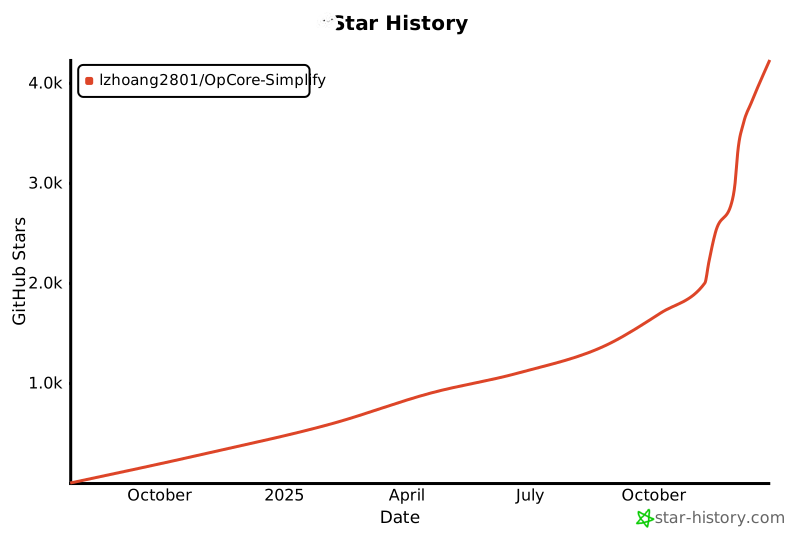](https://star-history.com/#lzhoang2801/OpCore-Simplify&Date)
|