
ghorg



ghorg allows you to quickly clone all of an orgs, or users repos into a single directory. This can be useful in many situations including
- Searching an orgs/users codebase with ack, silver searcher, grep etc..
- Bash scripting
- Creating backups
- Onboarding
- Performing Audits
When running ghorg a second time, all local changes in your *_ghorg directory will be overwritten by whats on GitHub. If you are working out of this directory, make sure you rename it before running a second time otherwise all of you changes will be lost.

Supported Providers
- GitHub
- GitLab
- Bitbucket (see bitbucket setup)
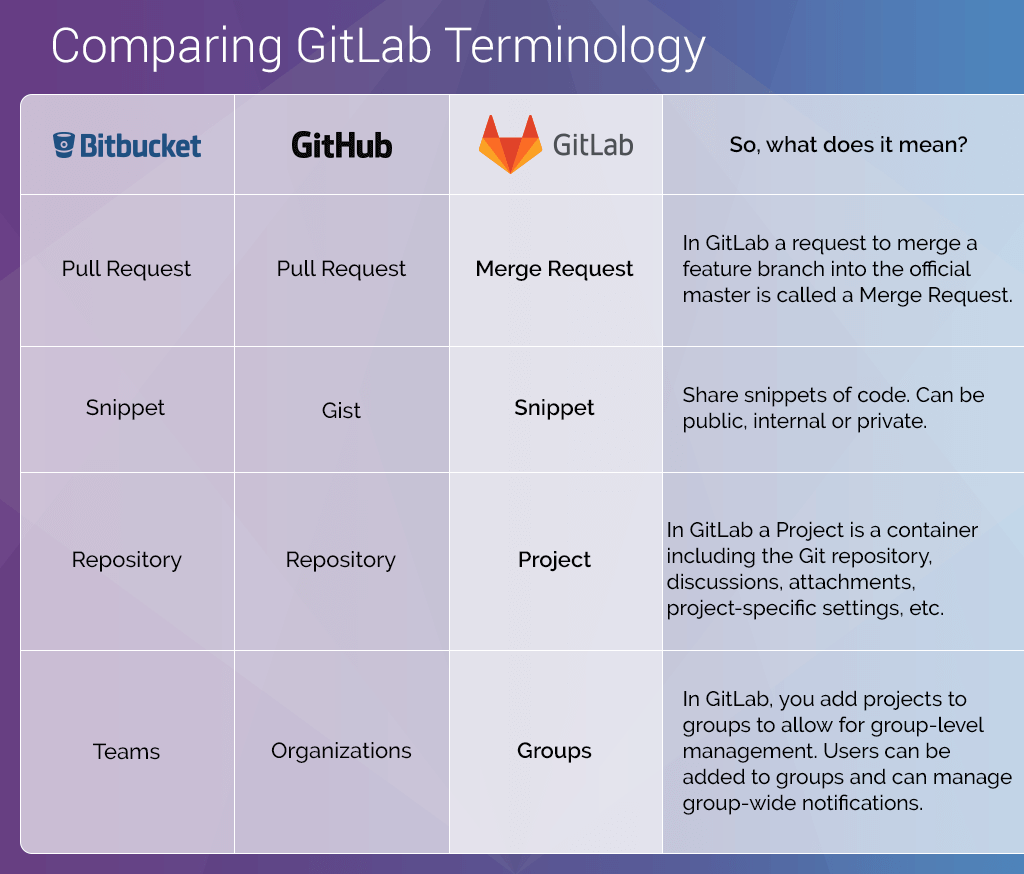
The terminology used in ghorg is that of GitHub, mainly orgs/repos. GitLab and BitBucket use different terminology. There is a handy chart thanks to GitLab that translates terminology here
Setup
Homebrew
optional
$ brew update
$ brew upgrade git
required
$ brew install gabrie30/utils/ghorg
$ mkdir -p $HOME/ghorg
$ curl https://raw.githubusercontent.com/gabrie30/ghorg/master/sample-conf.yaml > $HOME/ghorg/conf.yaml
$ vi $HOME/ghorg/conf.yaml # (optional but recommended)
Golang
$ go get -u github.com/gabrie30/ghorg
$ cd $HOME/go/src/github.com/gabrie30/ghorg
$ make install
$ vi $HOME/ghorg/conf.yaml # (optional but recommended)
$ go install
Use
$ ghorg clone someorg
$ ghorg clone someuser --clone-type=user --protocol=ssh --branch=develop --color=off
$ ghorg clone gitlab-org --scm=gitlab --namespace=gitlab-org/security-products
$ ghorg clone --help
Configuration
Configuration can be set in two ways. The first is in $HOME/ghorg/conf.yaml. This file will be created from the sample-conf.yaml and copied into $HOME/ghorg/conf.yaml. The second is setting flags via the cli, run $ ghorg clone --help for a list of flags. Any flag set on the command line will overwrite anything in the conf.yaml
Default GitHub/GitLab Token Used
$ security find-internet-password -s github.com  | grep "acct" | awk -F\" '{ print $4 }'
$ security find-internet-password -s gitlab.com  | grep "acct" | awk -F\" '{ print $4 }'
It's recommended to store github/gitlab tokens in the osxkeychain, if this command returns anything other than your token see Troubleshooting section below. However, you can always add your token to the $HOME/ghorg/conf.yaml or use the (--token, -t) flags.
Auth through SSO
- If org is behind SSO a normal token will not work. You will need to add SSO to the Github token
Bitbucket Setup
To configure with bitbucket you will need to create a new app password and update your $HOME/ghorg/conf.yaml or use the (--token, -t) and (--bitbucket-username) flags.
Known issues
- When cloning if you see something like
Username for 'https://gitlab.com':the command won't finish. I haven't been able to identify the reason for this occuring. The fix for this is to make sure your token is in the osxkeychain. See the troubleshooting section for how to set this up.
Troubleshooting
- If the
securitycommand does not return your token, follow this GitHub Documentation. For GitHub tokens you will need to set your token as your username and set nothing as the password when prompted. For GitLab you will need to set your token for both the username and password when prompted. This will correctly store your credentials in the keychain. If you are still having problems see this StackOverflow Post - If your GitHub account is behind 2fa follow this Github Documentation
- Make sure your
$ git --versionis >= 2.19.0 - You may need to increase your ulimits if cloning a large org