mirror of
https://github.com/outbackdingo/ucore.git
synced 2026-01-27 18:20:42 +00:00

626 lines
29 KiB
Markdown
626 lines
29 KiB
Markdown
# uCore <!-- omit in toc -->
|
||
|
||
[](https://github.com/ublue-os/ucore/actions/workflows/build-stable.yml)
|
||
[](https://github.com/ublue-os/ucore/actions/workflows/build-testing.yml)
|
||
|
||
uCore is an OCI image of [Fedora CoreOS](https://getfedora.org/coreos/) with "batteries included". More specifically, it's an opinionated, custom CoreOS image, built daily with some common tools added in. The idea is to make a lightweight server image including commonly used services or the building blocks to host them.
|
||
|
||
Please take a look at the included modifications, and help us improve uCore if the project interests you.
|
||
|
||
## Table of Contents <!-- omit in toc -->
|
||
|
||
- [Announcements](#announcements)
|
||
- [Features](#features)
|
||
- [Images](#images)
|
||
- [`ucore-minimal`](#ucore-minimal)
|
||
- [`ucore`](#ucore)
|
||
- [`ucore-hci`](#ucore-hci)
|
||
- [Tag Matrix](#tag-matrix)
|
||
- [Installation](#installation)
|
||
- [Image Verification](#image-verification)
|
||
- [Auto-Rebase Install](#auto-rebase-install)
|
||
- [Manual Install/Rebase](#manual-installrebase)
|
||
- [Tips and Tricks](#tips-and-tricks)
|
||
- [CoreOS and ostree Docs](#coreos-and-ostree-docs)
|
||
- [Podman](#podman)
|
||
- [Immutability and Podman](#immutability-and-podman)
|
||
- [Docker/Moby and Podman](#dockermoby-and-podman)
|
||
- [Podman and FirewallD](#podman-and-firewalld)
|
||
- [Automatically start containers on boot](#automatically-start-containers-on-boot)
|
||
- [Default Services](#default-services)
|
||
- [SELinux Troubleshooting](#selinux-troubleshooting)
|
||
- [Distrobox](#distrobox)
|
||
- [NAS - Storage](#nas---storage)
|
||
- [NFS](#nfs)
|
||
- [Samba](#samba)
|
||
- [SecureBoot](#secureboot)
|
||
- [NVIDIA](#nvidia)
|
||
- [Included Drivers](#included-drivers)
|
||
- [Other Drivers](#other-drivers)
|
||
- [ZFS](#zfs)
|
||
- [ZFS and immutable root filesystem](#zfs-and-immutable-root-filesystem)
|
||
- [Sanoid/Syncoid](#sanoidsyncoid)
|
||
- [DIY](#diy)
|
||
- [Metrics](#metrics)
|
||
|
||
## Announcements
|
||
|
||
### 2025.11.20 - uCore (Fedora 43) Available with LTS Kernel
|
||
|
||
Thank you to all for being patient as this update was a bit delayed beyond CoreOS' normal cadence.
|
||
|
||
What's new:
|
||
|
||
- Based on [Fedora CoreOS 43.20251024.3.0](https://fedoraproject.org/coreos/release-notes?stream=stable)
|
||
- uCore stable now uses an [LTS(longterm) 6.12 kernel](https://github.com/ublue-os/ucore/issues/317)
|
||
- uCore testing continues to use the upstream kernel
|
||
- mergerfs and snapraid have been updated to latest releases and are available for both aarch64/x86_64
|
||
|
||
LTS Kernel Impact:
|
||
|
||
- the primary goal is to provide more consistent behavior for servers between updates, thus it is not
|
||
the latest (6.17) which could mean some recent hardware is not well supported.
|
||
- the primary concern is for users with [SecureBoot enabled](#secureboot); the ublue-os MOK must be
|
||
imported before rebooting else the first boot will fail. See the [SecureBoot section](#secureboot)
|
||
of this README
|
||
- if the LTS kernel is a problem for your use case, we suggest using `ucore:testing`
|
||
|
||
Enjoy, and as always if any bugs or problems are found, please [file an issue](https://github.com/ublue-os/ucore/issues)!
|
||
|
||
### 2025.11.08 - uCore aarch64(ARM64) is Available
|
||
|
||
It's been [over two years](https://github.com/ublue-os/ucore/issues/15) since originally requested, but ARM64 is finally available in uCore builds!
|
||
|
||
The container image build process has been updated to publish multi-arch manifests. Simply put, whether you `podman pull` or `bootc switch` `ghcr.io/ublue-os/ucore:stable` (or any of our images starting as of `20251108`), the proper architecture will be pulled, assuming it's one of the two available: `aarch64` and `x86_64`.
|
||
|
||
Known differences between architectures will include different firmwares and a lack of Intel specific packages on `aarch64` (eg, `intel-compute-runtime` is obviously not available).
|
||
|
||
Caveats:
|
||
|
||
- minimal testing has been done with these images (they've been installed & lightly used in VMs), though upstream `aarch64` has been available for a long time, so concern is low.
|
||
- `mergerfs` is not yet available for `aarch64`; its next release will include both Fedora 43 and `aarch64` packages.
|
||
|
||
Please enjoy and report any issues or missing packages!
|
||
|
||
### 2025.06.12 - uCore Build Streamlining
|
||
|
||
In general, the Universal Blue project has been working to streamline various aspects of our builds. In several areas
|
||
this means we've cut back on images which do not have significant use, or otherwise found ways to build fewer images.
|
||
|
||
For uCore, this means we are dropping builds of `fedora-coreos` images and reducing number of `ucore*` images by
|
||
including ZFS in all `ucore*` images both nvidia and non-nvidia.
|
||
|
||
Existing tag structure for ZFS specific images will contine to work. The difference is that users running any
|
||
non-ZFS image, ZFS will be available on your system after it next updates.
|
||
|
||
The team is committed to building and maintaing uCore. For questions about about recent project direction, please
|
||
see our discourse post, [uCore: Streamlining (not retiring)](https://universal-blue.discourse.group/t/ucore-lets-streamline-not-retiring/9098).
|
||
|
||
### 2025.05.14 - uCore update to Fedora 42
|
||
|
||
As of today, Fedora CoreOS upstream has updated to kernel 6.14.3 and uCore has unpinned and is building on F42.
|
||
|
||
### 2025.04.30 - uCore delaying Fedora 42 update
|
||
|
||
As of today, Fedora CoreOS upstream has updated to Fedora 42 as a base, however it uses kernel 6.14.0 which our
|
||
team has agreed, we don't want to ship. As of April 30, this means uCore has been in an inbetween state. We have some hacks
|
||
in place to pin our builds to the last F41 kernel/release 6.13.8/41.20250331.3.0. This also means that rebase from F42 of
|
||
Fedora CoreOS to F41 of uCore will fail. So in the meantime, if you are attempting to install, use the following installer:
|
||
https://builds.coreos.fedoraproject.org/prod/streams/stable/builds/41.20250331.3.0/x86_64/fedora-coreos-41.20250331.3.0-live.x86_64.iso
|
||
|
||
### 2024.11.12 - uCore has updated to Fedora 41
|
||
|
||
As of today our upstream Fedora CoreOS stable image updated to Fedora 41 under the hood, so expect a lot of package updates.
|
||
|
||
### 2024.11.12 - uCore *stable* has pinned to kernel version *6.11.3*
|
||
|
||
Kernel version `6.11.3` was the previous *stable* update's kernel, and despite the update to Fedora 41, we've stuck with `6.11.3` rather than updating to `6.11.5` from upstream.
|
||
|
||
This is due to a kernel bug in versions `6.11.4`/`6.11.5` which [breaks tailscale status reporting](https://github.com/tailscale/tailscale/issues/13863). As many users of uCore do use tailscale, we've decided to be extra cautious and hold back the kernel, even though the rest of stable updated as usual.
|
||
|
||
We expect the next update of Fedora CoreOS to be on `6.11.6` per the current state of the testing stream. So uCore will follow when that update occurs.
|
||
|
||
## Features
|
||
|
||
The uCore project builds three images, optionally with nivida drivers.
|
||
|
||
The image names are:
|
||
|
||
- [`ucore-minimal`](#ucore-minimal)
|
||
- [`ucore`](#ucore)
|
||
- [`ucore-hci`](#ucore-hci)
|
||
|
||
The [tag matrix](#tag-matrix) includes combinations of the following:
|
||
|
||
- `stable` - images based on Fedora CoreOS stable stream including zfs driver and tools
|
||
- `testing` - images based on Fedora CoreOS testing stream including zfs driver and tools
|
||
- `nvidia` - images which include nvidia driver and container runtime
|
||
|
||
### Images
|
||
|
||
#### `ucore-minimal`
|
||
|
||
Suitable for running containerized workloads on either bare metal or virtual machines, this image tries to stay lightweight but functional.
|
||
|
||
- Starts with a [Fedora CoreOS image](https://quay.io/repository/fedora/fedora-coreos?tab=tags)
|
||
- Adds the following:
|
||
- [bootc](https://github.com/containers/bootc) (new way to update container native systems)
|
||
- [cockpit](https://cockpit-project.org) (podman container and system management)
|
||
- [firewalld](https://firewalld.org/)
|
||
- guest VM agents (`qemu-guest-agent` and `open-vm-tools`))
|
||
- [docker-buildx](https://github.com/docker/buildx) and [docker-compose](https://github.com/docker/compose) (versions matched to moby release) *docker(moby-engine) is pre-installed in CoreOS*
|
||
- [podman-compose](https://github.com/containers/podman-compose) *podman is pre-installed in CoreOS*
|
||
- [tailscale](https://tailscale.com) and [wireguard-tools](https://www.wireguard.com)
|
||
- [tmux](https://github.com/tmux/tmux/wiki/Getting-Started)
|
||
- udev rules enabling full functionality on some [Realtek 2.5Gbit USB Ethernet](https://github.com/wget/realtek-r8152-linux/) devices
|
||
- [ZFS driver](https://github.com/ublue-os/ucore-kmods) - latest driver (currently pinned to 2.2.x series) - [see below](#zfs) for details
|
||
- `pv` is installed with zfs as a complementary tool
|
||
- Optional [nvidia versions](#tag-matrix) add:
|
||
- [nvidia driver](https://github.com/ublue-os/ucore-kmods) - latest driver built from negativo17's akmod package
|
||
- [nvidia-container-toolkit](https://docs.nvidia.com/datacenter/cloud-native/container-toolkit/latest/sample-workload.html) - latest toolkit which supports both root and rootless podman containers and CDI
|
||
- [nvidia container selinux policy](https://github.com/NVIDIA/dgx-selinux/tree/master/src/nvidia-container-selinux) - allows using `--security-opt label=type:nvidia_container_t` for some jobs (some will still need `--security-opt label=disable` as suggested by nvidia)
|
||
- Disables Zincati auto upgrade/reboot service
|
||
- Enables staging of automatic system updates via rpm-ostreed
|
||
- Enables password based SSH auth (required for locally running cockpit web interface)
|
||
- Provides public key allowing [SecureBoot](#secureboot) (for ucore signed `nvidia` or `zfs` drivers)
|
||
|
||
> [!IMPORTANT]
|
||
> Per [cockpit's instructions](https://cockpit-project.org/running.html#coreos) the cockpit-ws RPM is **not** installed, rather it is provided as a pre-defined systemd service which runs a podman container.
|
||
|
||
> [!NOTE]
|
||
> When uCore was first created, zincati failed to start on systems using OCI-based deployments (such as uCore). This issue has since been addressed, but further testing is needed to verify zincati’s compatibility with custom systems like uCore.
|
||
#### `ucore`
|
||
|
||
This image builds on `ucore-minimal` but adds drivers, storage tools and utilities making it more useful on bare metal or as a storage server (NAS).
|
||
|
||
- Starts with a [`ucore-minimal`](#ucore-minimal) image providing everything above, plus:
|
||
- Adds the following:
|
||
- [cockpit-storaged](https://cockpit-project.org) (udisks2 based storage management)
|
||
- [distrobox](https://github.com/89luca89/distrobox) - a [toolbox](https://containertoolbx.org/) alternative
|
||
- [duperemove](https://github.com/markfasheh/duperemove)
|
||
- all wireless (wifi) card firmwares (CoreOS does not include them) - hardware enablement FTW
|
||
- [mergerfs](https://github.com/trapexit/mergerfs)
|
||
- nfs-utils - nfs utils including daemon for kernel NFS server
|
||
- [pcp](https://pcp.io) Performance Co-pilot monitoring
|
||
- [rclone](https://www.rclone.org/) - file synchronization and mounting of cloud storage
|
||
- [samba](https://www.samba.org/) and samba-usershares to provide SMB sevices
|
||
- [snapraid](https://www.snapraid.it/)
|
||
- usbutils(and pciutils) - technically pciutils is pulled in by open-vm-tools in ucore-minimal
|
||
- Optional [ZFS versions](#tag-matrix) add:
|
||
- [cockpit-zfs-manager](https://github.com/45Drives/cockpit-zfs-manager) (an interactive ZFS on Linux admin package for Cockpit)
|
||
- [sanoid/syncoid dependencies](https://github.com/jimsalterjrs/sanoid) - [see below](#zfs) for details
|
||
|
||
#### `ucore-hci`
|
||
|
||
Hyper-Coverged Infrastructure(HCI) refers to storage and hypervisor in one place... This image primarily adds libvirt tools for virtualization.
|
||
|
||
- Starts with a [`ucore`](#ucore) image providing everything above, plus:
|
||
- Adds the following:
|
||
- [cockpit-machines](https://github.com/cockpit-project/cockpit-machines): Cockpit GUI for managing virtual machines
|
||
- [libvirt-client](https://libvirt.org/): `virsh` command-line utility for managing virtual machines
|
||
- [libvirt-daemon-kvm](https://libvirt.org/): libvirt KVM hypervisor management
|
||
- virt-install: command-line utility for installing virtual machines
|
||
|
||
> [!NOTE]
|
||
> Fedora uses `DefaultTimeoutStop=45s` for systemd services which could cause `libvirtd` to quit before shutting down slow VMs. Consider adding `TimeoutStopSec=120s` as an override for `libvirtd.service` if needed.
|
||
|
||
### Tag Matrix
|
||
|
||
| IMAGE | TAG |
|
||
|-|-|
|
||
| [`ucore-minimal`](#ucore-minimal) - *stable* | `stable`, `stable-nvidia` |
|
||
| [`ucore-minimal`](#ucore-minimal) - *testing* | `testing`, `testing-nvidia` |
|
||
| [`ucore`](#ucore) - *stable* | `stable`, `stable-nvidia` |
|
||
| [`ucore`](#ucore) - *testing* | `testing`, `testing-nvidia` |
|
||
| [`ucore-hci`](#ucore-hci) - *stable* | `stable`, `stable-nvidia` |
|
||
| [`ucore-hci`](#ucore-hci) - *testing* | `testing`, `testing-nvidia` |
|
||
|
||
## Installation
|
||
|
||
> [!IMPORTANT]
|
||
> **Read the [CoreOS installation guide](https://docs.fedoraproject.org/en-US/fedora-coreos/bare-metal/)** before attempting installation. uCore extends Fedora CoreOS; **it does not provide its own custom or GUI installer**.
|
||
|
||
There are varying methods of installation for bare metal, cloud providers, and virtualization platforms.
|
||
|
||
**All CoreOS installation methods require the user to [produce an Ignition file](https://docs.fedoraproject.org/en-US/fedora-coreos/producing-ign/).** This Ignition file should, at mimimum, set a password and SSH key for the default user (default username is `core`).
|
||
|
||
> [!TIP]
|
||
> For bare metal installs, first test your ignition configuration by installing in a VM (or other test hardware) using the bare metal process.
|
||
|
||
### Image Verification
|
||
|
||
These images are signed with sigstore's [cosign](https://docs.sigstore.dev/cosign/overview/). You can verify the signature by running the following command:
|
||
|
||
```bash
|
||
cosign verify --key https://github.com/ublue-os/ucore/raw/main/cosign.pub ghcr.io/ublue-os/IMAGE:TAG
|
||
```
|
||
|
||
### Auto-Rebase Install
|
||
|
||
One of the fastest paths to running uCore is using [examples/ucore-autorebase.butane](examples/ucore-autorebase.butane) as a template for your CoreOS butane file.
|
||
|
||
1. As usual, you'll need to [follow the docs to setup a password](https://coreos.github.io/butane/examples/#using-password-authentication). Substitute your password hash for `YOUR_GOOD_PASSWORD_HASH_HERE` in the `ucore-autorebase.butane` file, and add your ssh pub key while you are at it.
|
||
1. Generate an ignition file from your new `ucore-autorebase.butane` [using the butane utility](https://coreos.github.io/butane/getting-started/).
|
||
1. Now install CoreOS for [hypervisor, cloud provider or bare-metal](https://docs.fedoraproject.org/en-US/fedora-coreos/bare-metal/), i.e. `sudo coreos-installer install /dev/nvme0n1 --ignition-url https://example.com/ucore-autorebase.ign` (or `--ignition-file /path/to/ucore-autorebase.ign`). Your ignition file should work for any platform, auto-rebasing to the `ucore:stable` (or other `IMAGE:TAG` combo), rebooting and leaving your install ready to use.
|
||
|
||
### Manual Install/Rebase
|
||
|
||
Once a machine is running any Fedora CoreOS version, you can easily rebase to uCore. Installing CoreOS itself can be done through [a number of provisioning methods](https://docs.fedoraproject.org/en-US/fedora-coreos/bare-metal/).
|
||
|
||
> [!WARNING]
|
||
> **Rebasing from Fedora IoT or Atomic Desktops is not supported!**
|
||
> If ignition doesn't provide a desired feature, then Fedora CoreOS doesn't support that feature. Rebasing from another system to gain a filesystem feature or GUI installation is very likely to cause problems later on.
|
||
|
||
To rebase an existing CoreOS machine to the latest uCore:
|
||
|
||
1. Execute the `rpm-ostree rebase` command (below) with desired `IMAGE` and `TAG`.
|
||
1. Reboot, as instructed.
|
||
1. After rebooting, you should [pin the working deployment](https://docs.fedoraproject.org/en-US/fedora-silverblue/faq/#_how_can_i_upgrade_my_system_to_the_next_major_version_for_instance_rawhide_or_an_upcoming_fedora_release_branch_while_keeping_my_current_deployment) which allows you to rollback if required.
|
||
|
||
```bash
|
||
sudo rpm-ostree rebase ostree-unverified-registry:ghcr.io/ublue-os/IMAGE:TAG
|
||
```
|
||
|
||
#### Verified Image Updates
|
||
|
||
The `ucore*` images include container policies to support image verification for improved trust of upgrades. Once running one of the `ucore*` images, the following command will rebase to the verified image reference:
|
||
|
||
```bash
|
||
sudo rpm-ostree rebase ostree-image-signed:docker://ghcr.io/ublue-os/IMAGE:TAG
|
||
```
|
||
|
||
## Tips and Tricks
|
||
|
||
### CoreOS and ostree Docs
|
||
|
||
It's a good idea to become familar with the [Fedora CoreOS Documentation](https://docs.fedoraproject.org/en-US/fedora-coreos/) as well as the [CoreOS rpm-ostree docs](https://coreos.github.io/rpm-ostree/). Note especially, this image is only possible due to [ostree native containers](https://coreos.github.io/rpm-ostree/container/).
|
||
|
||
### Podman
|
||
|
||
#### Immutability and Podman
|
||
|
||
A CoreOS root filesystem system is immutable at runtime, and it is not recommended to install packages like in a mutable "normal" distribution.
|
||
|
||
Fedora CoreOS expects the user to run services using [podman](https://podman.io). `moby-engine`, the free Docker implementation, is also installed for those who desire docker instead of podman.
|
||
|
||
#### Docker/Moby and Podman
|
||
|
||
> [!IMPORTANT]
|
||
> CoreOS [cautions against](https://docs.fedoraproject.org/en-US/fedora-coreos/faq/#_can_i_run_containers_via_docker_and_podman_at_the_same_time) running podman and docker containers at the same time. Thus, `docker.socket` is disabled by default to prevent accidental activation of the docker daemon, given podman is the default.
|
||
>
|
||
> Only run both simultaneously if you understand the risk.
|
||
|
||
#### Podman and FirewallD
|
||
|
||
Podman and firewalld [can sometimes conflict](https://github.com/ublue-os/ucore/issues/90) such that a `firewall-cmd --reload` removes firewall rules generated by podman.
|
||
|
||
As of [netavark v1.9.0](https://blog.podman.io/2023/11/new-netavark-firewalld-reload-service/) a service is provided to handle re-adding netavark (Podman) firewall rules after a firewalld reload occurs. If needed, enable like so: `systemctl enable netavark-firewalld-reload.service`
|
||
|
||
#### Automatically start containers on boot
|
||
|
||
By default, UCore does not automatically start `restart: always` containers on system boot, however this can be easily enabled:
|
||
|
||
##### Containers running under the `core` user
|
||
|
||
```bash
|
||
# Copy the system's podman-restart service to the user location
|
||
mkdir -p /var/home/core/.config/systemd/user
|
||
cp /lib/systemd/system/podman-restart.service /var/home/core/.config/systemd/user
|
||
|
||
# Enable the user service
|
||
systemctl --user enable podman-restart.service
|
||
|
||
# Check that it's running
|
||
systemctl --user list-unit-files | grep podman
|
||
```
|
||
|
||
When you next reboot the system, your `restart: always` containers will automatically start.
|
||
|
||
You may also need to enable “linger” mode on your user session, to prevent containers exiting which you have started interactively. To do that, run:
|
||
|
||
```bash
|
||
loginctl enable-linger $UID
|
||
```
|
||
|
||
You can find more information regarding this on the [Podman troubleshooting page](https://github.com/containers/podman/blob/main/troubleshooting.md#21-a-rootless-container-running-in-detached-mode-is-closed-at-logout).
|
||
|
||
##### Containers running under the root user (rootful containers)
|
||
|
||
You just need to enable the built-in service:
|
||
|
||
```bash
|
||
sudo systemctl enable podman-restart.service
|
||
```
|
||
|
||
### Default Services
|
||
|
||
To maintain this image's suitability as a minimal container host, most add-on services are not auto-enabled.
|
||
|
||
To activate pre-installed services (`cockpit`, `docker`, `tailscaled`, etc):
|
||
|
||
```bash
|
||
sudo systemctl enable --now SERVICENAME.service
|
||
```
|
||
|
||
> [!NOTE]
|
||
> The `libvirtd` is enabled by default, but only starts when triggerd by it's socket (eg, using `virsh` or other clients).
|
||
|
||
### SELinux Troubleshooting
|
||
|
||
SELinux is an integral part of the Fedora Atomic system design. Due to a few interelated issues, if SELinux is disabled, it's difficult to re-enable.
|
||
|
||
> [!WARNING]
|
||
> **We STRONGLY recommend: DO NOT DISABLE SELinux!**
|
||
|
||
Should you suspect that SELinux is causing a problem, it is easy to enable permissive mode at runtime, which will keep SELinux functioning, provide reporting of problems, but not enforce restrictions.
|
||
|
||
```bash
|
||
# setenforce 0
|
||
$ getenforce
|
||
Permissive
|
||
```
|
||
|
||
After the problem is resolved, don't forget to re-enable:
|
||
|
||
```bash
|
||
# setenforce 1
|
||
$ getenforce
|
||
Enforcing
|
||
```
|
||
|
||
Fedora provides useful docs on [SELinux troubleshooting](https://docs.fedoraproject.org/en-US/quick-docs/selinux-troubleshooting/).
|
||
|
||
### Distrobox
|
||
|
||
Users may use [distrobox](https://github.com/89luca89/distrobox) to run images of mutable distributions where applications can be installed with traditional package managers. This may be useful for installing interactive utilities such has `htop`, `nmap`, etc. As stated above, however, *services* should run as containers.
|
||
|
||
### NAS - Storage
|
||
|
||
`ucore` includes a few packages geared towards a storage server which will require individual research for configuration:
|
||
|
||
- [duperemove](https://github.com/markfasheh/duperemove)
|
||
- [mergerfs](https://github.com/trapexit/mergerfs)
|
||
- [snapraid](https://www.snapraid.it/)
|
||
|
||
But two others are included, which though common, warrant some explanation:
|
||
|
||
- nfs-utils - replaces a "light" version typically in CoreOS to provide kernel NFS server
|
||
- samba and samba-usershares - to provide SMB sevices
|
||
|
||
#### NFS
|
||
|
||
It's suggested to read Fedora's [NFS Server docs](https://docs.fedoraproject.org/en-US/fedora-server/services/filesharing-nfs-installation/) plus other documentation to understand how to setup this service. But here's a few quick tips...
|
||
|
||
##### Firewall - NFS
|
||
|
||
Unless you've disabled `firewalld`, you'll need to do this:
|
||
|
||
```bash
|
||
sudo firewall-cmd --permanent --zone=FedoraServer --add-service=nfs
|
||
sudo firewall-cmd --reload
|
||
```
|
||
|
||
##### SELinux - NFS
|
||
|
||
By default, nfs-server is blocked from sharing directories unless the context is set. So, generically to enable NFS sharing in SELinux run:
|
||
|
||
For read-only NFS shares:
|
||
|
||
```bash
|
||
sudo semanage fcontext --add --type "public_content_t" "/path/to/share/ro(/.*)?"
|
||
sudo restorecon -R /path/to/share/ro
|
||
```
|
||
|
||
For read-write NFS shares:
|
||
|
||
```bash
|
||
sudo semanage fcontext --add --type "public_content_rw_t" "/path/to/share/rw(/.*)?"
|
||
sudo restorecon -R /path/to/share/rw
|
||
```
|
||
|
||
Say you wanted to share all home directories:
|
||
|
||
```bash
|
||
sudo semanage fcontext --add --type "public_content_rw_t" "/var/home(/.*)?"
|
||
sudo restorecon -R /var/home
|
||
```
|
||
|
||
The least secure but simplest way to let NFS share anything configured, is...
|
||
|
||
For read-only:
|
||
|
||
```bash
|
||
sudo setsebool -P nfs_export_all_ro 1
|
||
```
|
||
|
||
For read-write:
|
||
|
||
```bash
|
||
sudo setsebool -P nfs_export_all_rw 1
|
||
```
|
||
|
||
There is [more to read](https://linux.die.net/man/8/nfs_selinux) on this topic.
|
||
|
||
##### Shares - NFS
|
||
|
||
NFS shares are configured in `/etc/exports` or `/etc/exports.d/*` (see docs).
|
||
|
||
##### Run It - NFS
|
||
|
||
Like all services, NFS needs to be enabled and started:
|
||
|
||
```bash
|
||
sudo systemctl enable --now nfs-server.service
|
||
sudo systemctl status nfs-server.service
|
||
```
|
||
|
||
#### Samba
|
||
|
||
It's suggested to read Fedora's [Samba docs](https://docs.fedoraproject.org/en-US/quick-docs/samba/) plus other documentation to understand how to setup this service. But here's a few quick tips...
|
||
|
||
##### Firewall - Samba
|
||
|
||
Unless you've disabled `firewalld`, you'll need to do this:
|
||
|
||
```bash
|
||
sudo firewall-cmd --permanent --zone=FedoraServer --add-service=samba
|
||
sudo firewall-cmd --reload
|
||
```
|
||
|
||
##### SELinux - Samba
|
||
|
||
By default, samba is blocked from sharing directories unless the context is set. So, generically to enable samba sharing in SELinux run:
|
||
|
||
```bash
|
||
sudo semanage fcontext --add --type "samba_share_t" "/path/to/share(/.*)?"
|
||
sudo restorecon -R /path/to/share
|
||
```
|
||
|
||
Say you wanted to share all home directories:
|
||
|
||
```bash
|
||
sudo semanage fcontext --add --type "samba_share_t" "/var/home(/.*)?"
|
||
sudo restorecon -R /var/home
|
||
```
|
||
|
||
The least secure but simplest way to let samba share anything configured, is this:
|
||
|
||
```bash
|
||
sudo setsebool -P samba_export_all_rw 1
|
||
```
|
||
|
||
There is [much to read](https://linux.die.net/man/8/samba_selinux) on this topic.
|
||
|
||
##### Shares - Samba
|
||
|
||
Samba shares can be manually configured in `/etc/samba/smb.conf` (see docs), but user shares are also a good option.
|
||
|
||
An example follows, but you'll probably want to read some docs on this, too:
|
||
|
||
```bash
|
||
net usershare add sharename /path/to/share [comment] [user:{R|D|F}] [guest_ok={y|n}]
|
||
```
|
||
|
||
##### Run It - Samba
|
||
|
||
Like all services, Samba needs to be enabled and started:
|
||
|
||
```bash
|
||
sudo systemctl enable --now smb.service
|
||
sudo systemctl status smb.service
|
||
```
|
||
|
||
### SecureBoot
|
||
|
||
Those wishing to run SecureBoot for a `stable` image, will need to first import the ublue-os public signing key as a MOK (Machine-Owner Key).
|
||
|
||
1. before installing, disable SecureBoot in the system UEFI firmware
|
||
2. after confirming ucore is the running image, import the key:
|
||
|
||
```bash
|
||
sudo mokutil --import /etc/pki/akmods/certs/akmods-ublue.der
|
||
```
|
||
|
||
The utility will prompt for a password. The password will be used to verify this key is the one you meant to import, after rebooting and entering the system's UEFI MOK import utility.
|
||
|
||
Note: this import process is also required for users of the `testing` image if using nvidia or zfs, though instead of failing to boot only the respective drivers will fail to load.
|
||
|
||
#### SecureBoot failure to boot recovery / troubleshooting
|
||
|
||
If your system fails to boot with an error like:
|
||
|
||
```
|
||
error: ../../grub-core/kern/efi/sb.sc:102:bad shim_signature.
|
||
error: ../../grub-core/loader/i386/efi/linux.c:250:you need to load the kernel first.
|
||
|
||
Press any key to continue...
|
||
```
|
||
|
||
You can either:
|
||
|
||
1. rollback to previous deployment of uCore to run the import command above
|
||
2. if there is no previous uCore deployment, enter UEFI firmware setup by:
|
||
- pressing `ESC`
|
||
- at the `grub>` prompt, type `fwsetup`
|
||
|
||
### NVIDIA
|
||
|
||
#### Included Drivers
|
||
|
||
If you installed an image with `-nvidia` in the tag, the nvidia kernel module, basic CUDA libraries, and the nvidia-container-toolkit are all are pre-installed.
|
||
|
||
Note, this does NOT add desktop graphics services to your images, but it DOES enable your compatible nvidia GPU to be used for nvdec, nvenc, CUDA, etc. Since this is CoreOS and it's primarily intended for container workloads the [nvidia container toolkit](https://docs.nvidia.com/datacenter/cloud-native/container-toolkit/latest/index.html) should be well understood.
|
||
|
||
The included driver is the [latest nvidia driver](https://github.com/negativo17/nvidia-driver/blob/master/nvidia-driver.spec) as bundled by [negativo17](https://negativo17.org/nvidia-driver/). This package was chosen over rpmfusion's due to it's granular packages which allow us to install just the minimal `nvidia-driver-cuda` packages.
|
||
|
||
#### Other Drivers
|
||
|
||
If you need an older (or different) driver, consider looking at the [container-toolkit-fcos driver](https://hub.docker.com/r/fifofonix/driver/). It provides pre-bundled container images with nvidia drivers for FCOS, allowing auto-build/loading of the nvidia driver IN podman, at boot, via a systemd service.
|
||
|
||
If going this path, you likely won't want to use the `ucore` `-nvidia` image, but would use the suggested systemd service. The nvidia container toolkit will still be required but can by layered easily.
|
||
|
||
### ZFS
|
||
|
||
The ZFS kernel module and tools are pre-installed, but like other services, ZFS is not pre-configured to load on default.
|
||
|
||
Load it with the command `modprobe zfs` and use `zfs` and `zpool` commands as desired.
|
||
|
||
Per the [OpenZFS Fedora documentation](https://openzfs.github.io/openzfs-docs/Getting%20Started/Fedora/index.html):
|
||
|
||
> By default ZFS kernel modules are loaded upon detecting a pool. To always load the modules at boot:
|
||
|
||
```bash
|
||
echo zfs > /etc/modules-load.d/zfs.conf
|
||
```
|
||
|
||
#### ZFS and immutable root filesystem
|
||
|
||
The default mountpoint for any newly created zpool `tank` is `/tank`. This is a problem in CoreOS as the root filesystem (`/`) is immutable, which means a directory cannot be created as a mountpoint for the zpool. An example of the problem looks like this:
|
||
|
||
```bash
|
||
# zpool create tank /dev/sdb
|
||
cannot mount '/tank': failed to create mountpoint: Operation not permitted
|
||
```
|
||
|
||
To avoid this problem, always create new zpools with a specified mountpoint:
|
||
|
||
```bash
|
||
# zpool create -m /var/tank tank /dev/sdb
|
||
```
|
||
|
||
If you do forget to specify the mountpoint, or you need to change the mountpoint on an existing zpool:
|
||
|
||
```bash
|
||
# zfs set mountpoint=/var/tank tank
|
||
```
|
||
|
||
#### ZFS scrub timers
|
||
|
||
It's good practice to run a `zpool scrub` periodically on ZFS pools to check and repair the integrity of data. This can be easily configured with ucore by enabling the timer. There are two timers available: weekly and monthly.
|
||
|
||
```bash
|
||
# Substitute <pool> with the name of the zpool
|
||
systemctl enable --now zfs-scrub-weekly@<pool>.timer
|
||
|
||
# Or to run it monthly:
|
||
systemctl enable --now zfs-scrub-monthly@<pool>.timer
|
||
```
|
||
|
||
This can be enabled for multiple storage pools by enabling and starting a timer for each.
|
||
|
||
#### Sanoid/Syncoid
|
||
|
||
sanoid/syncoid is a great tool for manual and automated snapshot/transfer of ZFS datasets. However, there is not a current stable RPM, rather they provide [instructions on installing via git](https://github.com/jimsalterjrs/sanoid/blob/master/INSTALL.md#centos).
|
||
|
||
`ucore` has pre-install all the (lightweight) required dependencies (perl-Config-IniFiles perl-Data-Dumper perl-Capture-Tiny perl-Getopt-Long lzop mbuffer mhash pv), such that a user wishing to use sanoid/syncoid only need install the "sbin" files and create configuration/systemd units for it.
|
||
|
||
## DIY
|
||
|
||
Is all this too easy, leaving you with the desire to create a custom uCore image?
|
||
|
||
Then [create an image `FROM ucore`](https://github.com/ublue-os/image-template) using our [image template](https://github.com/ublue-os/image-template)!
|
||
|
||
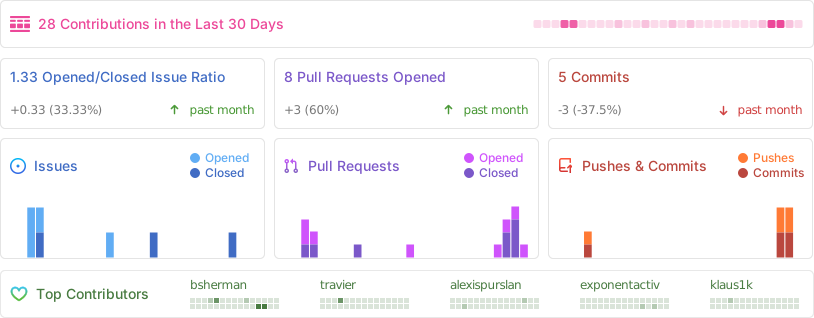
## Metrics
|
||
|
||
|